Beacon as You've Never Seen it Before
Deep dive into Beacons: what they are, how they run in memory, the evolution of loaders (including prepended/Kayn styles), and the security implications defenders need to know.

Hi — I’m DebuggerMan, a Red Teamer. This post dives into Beacons: what they are, how they run in memory, the evolution of loaders (including prepended/Kayn styles), and the security implications defenders need to know — let’s jump in.
What is Beacon?
A Beacon is a small agent used in Red Team operations to maintain communication between a compromised system and its command-and-control (C2) server. It quietly checks in, receives tasks, and sends back results — acting as the heartbeat of post-exploitation activity.
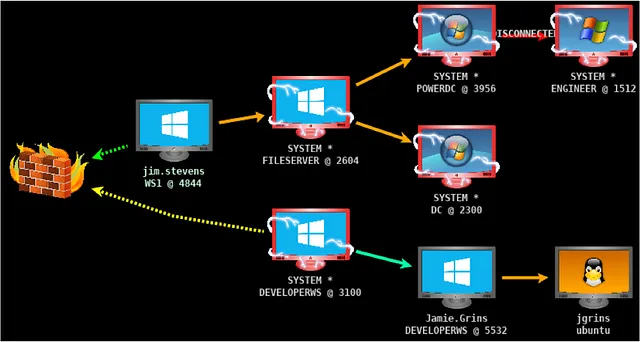 Beacon C2 infrastructure with multiple compromised systems
Beacon Types
1- Egress (Exit): Connects directly to the C2 across the network (e.g., HTTP/HTTPS, DNS)
2- Peer-to-Peer (P2P): Doesn’t connect directly to the C2; it forwards traffic through another Beacon (Examples: SMB, TCP → treated as P2P in this context.) → Ultimately, a chain of P2P Beacons must terminate at an egress Beacon for traffic to reach the server.
Payload Types
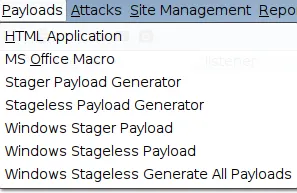 Cobalt Strike Payloads menu — Stager vs Stageless options
1- Stager Payload: Used when resources are limited, such as sending a small “beacon” before downloading the full payload.
2- Stageless Payload: Used when sufficient resources are available, with a focus on secure communication and speed.
Examples: DLL, EXE, PS1, xprocess.bin, xthread.bin, macro (VBA), HTA…
Use xthread: if you injected a beacon into an existing process on the victim (such as explorer.exe or notepad.exe), so that the process doesn’t kill itself and cause suspicion (such as abruptly closing the program).
Use xprocess: if you created a new process (such as a small .exe), so that it can be terminated completely without any traces.
Note: HTA & VBA always delivers an x86 Beacon payload.
How Beacon Operates in Memory
Beacon, a key component in tools like Cobalt Strike, is a payload that runs stealthily in a target’s memory to maintain C2 (Command and Control) communication. It avoids disk writes to evade antivirus and EDR tools. Here’s how it loads and executes:
CreateRemoteThread()
This API launches a fresh thread inside the victim’s process (e.g., notepad.exe). The thread jumps straight into running the Beacon code that’s already placed in memory, allowing immediate execution without external dependencies.
Reflective DLL Injection (RDI)
Developed by Stephen Fewer around 2010, RDI enables loading a DLL straight from memory into another process, skipping disk storage and traditional loaders like LoadLibrary. This makes it harder for security solutions to detect, as no files are created on the filesystem.
RDI Process Overview (Step-by-Step)
Before Cobalt Strike version 4.11, manual RDI was often required for custom setups. RDI injects and maps the DLL reflectively in memory. The steps below outline the flow, drawing from implementations like Stephen Fewer’s and integrations in frameworks such as Meterpreter. It works locally or remotely (using functions like LoadRemoteLibraryR).
Initial Setup Phase
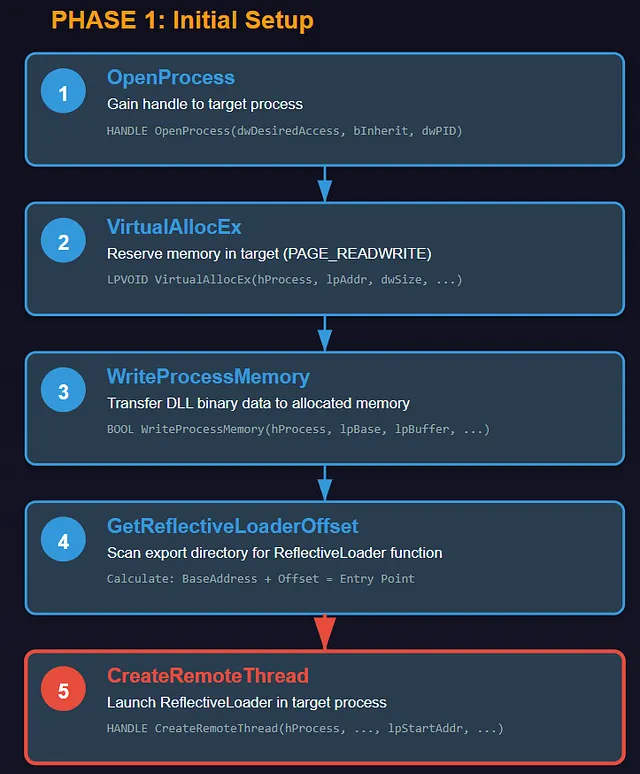 Phase 1: OpenProcess → VirtualAllocEx → WriteProcessMemory → GetReflectiveLoaderOffset → CreateRemoteThread
Gain Access to the Target Process: Use
OpenProcessto get a handle with necessary permissions (e.g., for thread creation, VM operations, writing, and reading). This grants control over the remote process’s memory space.API Signature:
HANDLE OpenProcess(DWORD dwDesiredAccess, BOOL bInheritHandle, DWORD dwProcessId);Reserve Memory in the Target: Call
VirtualAllocExto carve out room in the process’s virtual address space, sized according to the DLL’s PE header details.API Signature:
LPVOID VirtualAllocEx(HANDLE hProcess, LPVOID lpAddress, SIZE_T dwSize, DWORD flAllocationType, DWORD flProtect);Start with
PAGE_READWRITEpermissions for easy writing.Transfer DLL Data to Memory: Push the DLL’s binary data into the allocated spot via
WriteProcessMemory.API Signature:
BOOL WriteProcessMemory(HANDLE hProcess, LPVOID lpBaseAddress, LPCVOID lpBuffer, SIZE_T nSize, SIZE_T lpNumberOfBytesWritten);Identify ReflectiveLoader Position: Scan the DLL’s in-memory export directory to calculate the offset for the ReflectiveLoader export — a special function that handles self-mapping.
Rely on utilities like
GetReflectiveLoaderOffsetfor name-based searches or RVA-to-offset conversions.Initiate the Execution Thread: Kick off a remote thread via
CreateRemoteThread, directing it to the ReflectiveLoader’s location (base address plus offset).API Signature:
HANDLE CreateRemoteThread(HANDLE hProcess, LPSECURITY_ATTRIBUTES lpThreadAttributes, SIZE_T dwStackSize, LPTHREAD_START_ROUTINE lpStartAddress, LPVOID lpParameter, DWORD dwCreationFlags, LPDWORD lpThreadId);This activates the DLL’s internal reflective logic.
ReflectiveLoader Runs
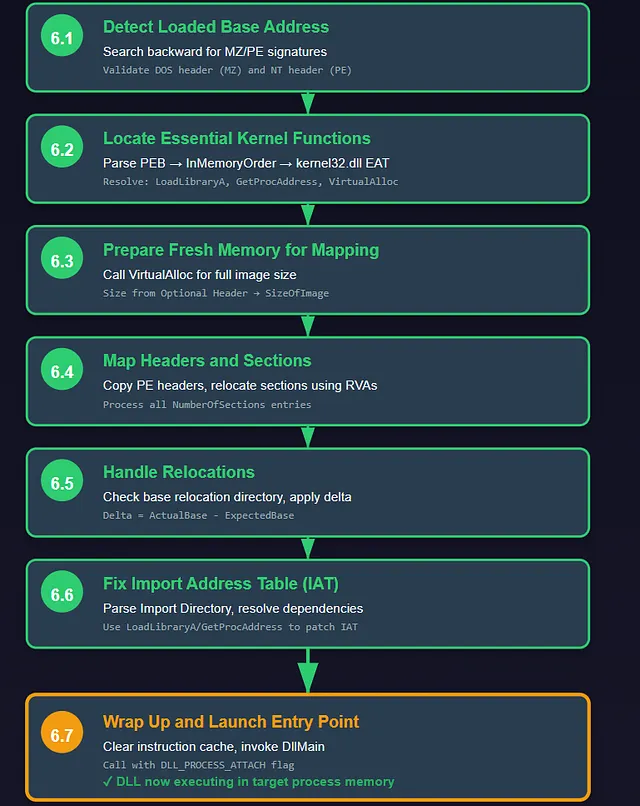 Phase 2: Detect Base → Locate Kernel Functions → Prepare Memory → Map Sections → Handle Relocations → Fix IAT → Launch Entry
6.1: Detect Loaded Base Address — Search memory backward for MZ/PE signatures to pinpoint where the DLL landed (via a caller() trick and validation loops for DOS/NT headers).
6.2: Locate Essential Kernel Functions — Grab the Process Environment Block (PEB) using CPU registers (like GS/FS). Loop through loaded modules in the InMemoryOrder chain, apply a custom hash (e.g., ROT13-style) to names, and dig into kernel32.dll’s EAT for pointers to key APIs such as LoadLibraryA, GetProcAddress, and VirtualAlloc.
6.3: Prepare Fresh Memory for Mapping — Invoke VirtualAlloc to claim space matching the DLL’s full image size (pulled from the Optional Header).
6.4: Map Headers and Sections — Duplicate PE headers initially, then process each section (based on NumberOfSections count), relocating them to the new base using RVAs (Relative Virtual Addresses).
6.5: Handle Relocations (If Applicable) — Check for a base relocation directory; if present, tweak pointers by calculating the difference (delta) between expected and actual bases.
6.6: Fix Import Table (IAT) — Examine the Import Directory, then leverage the resolved APIs (LoadLibraryA/GetProcAddress) to pull in dependencies and patch the IAT entries.
6.7: Wrap Up and Launch Entry — Clear the instruction cache if required, invoke DllMain (or equivalent) with flags like DLL_PROCESS_ATTACH, perform cleanup, and hand back execution flow.
In essence, once loaded, Beacon uses this in-memory setup to periodically “phone home” to the C2 server, execute tasks, and stay hidden. Post-4.11 Cobalt Strike versions automate much of this for easier deployment.
Note: These techniques are for educational/red teaming purposes — misuse is unethical and illegal.
The New Prepended Loader
Since Cobalt Strike 4.11, Beacon has begun to use a new style of reflective loader based on the one used by DoublePulsar. This was built by the NSA and leaked by The Shadow Brokers hacker group. The loader is famous for its association with EternalBlue and WannaCry.
This is a ‘prepended’ loader, which means the reflective loader is prepended to the front of a PE rather than being part of it.
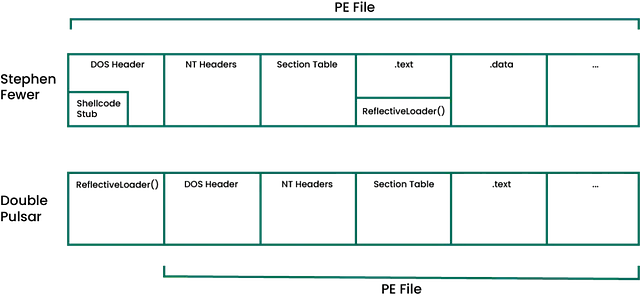 Stephen Fewer’s embedded ReflectiveLoader vs DoublePulsar’s prepended loader
System Call
This setting makes Beacon use syscalls instead of regular Win32 APIs (such as CreateRemoteThread or LoadLibrary) for its internal operations. This is more stealthy because syscalls interact directly with the kernel and are not as easily detected by EDR/AV as regular API calls.
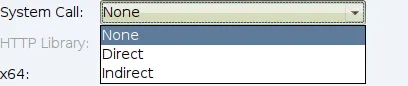 System Call options: None, Direct, and Indirect
Options
Direct: Uses the Nt version of the function directly (e.g., NtCreateThreadEx instead of CreateThread). This is faster, but can be more revealing if the EDR monitors pure syscalls.
Indirect: Jumps to the appropriate instruction within the Nt* version of the function. This is more complex and stealthy because it doesn’t call the syscall directly, but rather partially emulates it.
Benefit: Reduces traces in event logs or hooks used by AVs, especially in fortified environments like Windows Defender or CrowdStrike. Choosing Indirect is better for advanced evasion.
Payload Security
Cobalt Strike’s team server generates a unique public/private keypair on startup. Stageless payloads embed the public key, allowing Beacon to encrypt metadata and communicate only with its originating server. Each Beacon also uses a unique session key (sent in encrypted metadata) for tasking/output encryption/decryption, preventing easy MITM hijacking.
Stagers, being small, lack this security: they connect to configured hosts/ports without validation, making them vulnerable to initial hijacking when fetching the full stage.
Host Rotation Strategies
- Random: Each request can go to any host in the list randomly.
- Round-robin: It goes through the list sequentially, one after the other.
- Failover: It stays on one host; if that host fails, it moves to the next one.
- Rotate (temporal): Uses a given host for a set period of time, then switches to the next.
Behavior if All Hosts Fail
- None: The Beacon does not exit — it continues running indefinitely.
- Exit: The Beacon increases its sleep time progressively and, if failures persist, exits (an example policy for handling complete loss of communication).
Malleable C2 Profile
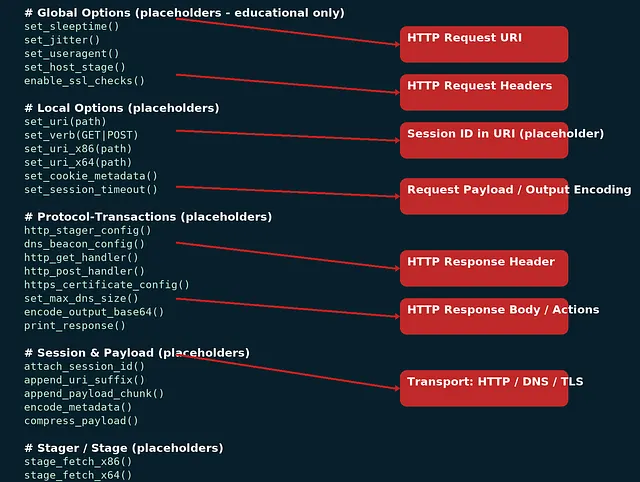 Malleable C2 Profile structure: Global Options, Local Options, Protocol-Transactions, Session & Payload
Changing the Malleable C2 profile in Cobalt Strike is essential to evade default signatures in security products, as public or unmodified profiles are often detected by EDR/IDS tools. It allows customizing Beacon’s network traffic, memory indicators, and behavior to blend with legitimate activity (e.g., mimicking jQuery requests), reducing detection risks and convincing defenders to ignore alerts during operations.
Build the Profile:
- Start from existing template
- Profile Name: For reports only
- Sleep: Interval + jitter; OPSEC-based (60s example, may detect)
- User-Agent: Capture real via web bug; avoid mismatch
- SSL: Real cert (LetsEncrypt) on redirectors; for Fronting: on Team Server
- SpawnTo: Params for blending; avoid protected/UAC; 64/32-bit; network-natural; test
- SMB: Change pipe defaults
- DNS: Change defaults; low & slow backup
- Staging: Mimic legit request (jQuery CDN); consider stageless
- Memory: peclone + Raphael’s blog
- HTTP GET: Cookie for metadata; multiple URIs
- HTTP POST: Can be GET-only; slow for large data
Avoiding EDRs
Weaknesses of traditional methods: Process injections like WriteProcessMemory and CreateRemoteThread have become easy to detect due to hooking APIs and memory analysis.
Modern Techniques:
- LoLBins: Use legitimate system tools such as PowerShell.
- In-Memory Execution: Execute code in memory without touching disk.
- Indirect Syscalls: Call system calls directly to avoid hooks.
- Hooking: EDR uses IAT/EAT hooking, inline hooking, and SSDT/IDT (in the kernel) for detection.
C2 Evasion Techniques
Server Side
- Malleable C2 Profiles — Frameworks allow customization of C2 communication patterns, including HTTP headers, URIs, and SSL certificates, to mimic legitimate traffic and evade detection.
- Encryption and Obfuscation — Encrypting C2 communications and using obfuscation techniques make it difficult for network monitoring tools to inspect and block malicious traffic.
- Domain Fronting — C2 traffic is routed through different domain names to hide behind trusted services like CDN providers, making it appear as legitimate traffic.
- Dynamic Domain Generation Algorithms (DGAs) — Generates new domain names dynamically, making it challenging for defenders to block or track C2 servers effectively.
- Redundant C2 Infrastructure — Ensuring operational continuity even if some servers are detected and taken down.
- JA3/S Fingerprint Manipulation — Manipulate SSL/TLS client and server fingerprints to avoid matching known malicious profiles, bypassing SSL/TLS fingerprint-based detection.
- Custom Protocol Obfuscation — Use protocol obfuscation techniques to mask C2 traffic, making it appear as normal network traffic and evading network-based detection systems.
Client Side
Code Injection — Inject malicious code into legitimate processes to avoid detection. Here are some injection techniques:
1. Classic Shellcode Injection
- Allocate memory in the target process using
VirtualAllocExwith appropriate permissions (e.g.,PAGE_EXECUTE_READWRITE). - Write the malicious shellcode into the allocated memory using
WriteProcessMemory. - Create a remote thread in the target process to execute the shellcode using
CreateRemoteThreador execute via callback functions likeSetWindowsHookEx.
2. Hook Injection
- Intercept API calls made by the target process using techniques like IAT/EAT hooking or inline hooking.
- Modify function pointers or overwrite instructions to redirect the intercepted API calls to the malicious code.
- Ensure that the malicious code is executed whenever the hooked API is called by the target process.
3. Thread Local Storage (TLS) Callback Injection
- Modify the target process’s Portable Executable (PE) header to include a new TLS callback function.
- Embed the malicious code as the TLS callback so it executes during process or thread initialization.
- Ensure the modified PE is loaded by the target process, triggering the execution of the malicious TLS callback.
4. Asynchronous Procedure Call (APC) Injection
- Allocate executable memory in the target process using
VirtualAllocEx. - Write the malicious code into the allocated memory using
WriteProcessMemory. - Queue an APC to a target thread in the process using
QueueUserAPC, pointing to the malicious code. - Resume or alert the thread to ensure it reaches an alertable state and executes the APC.
5. Exception Handling Hijacking Injection
- Allocate memory in the target process using
VirtualAllocExfor the malicious code and the modified exception handler. - Write the malicious code and a custom exception handler into the allocated memory using
WriteProcessMemory. - Modify the target process’s exception handling structures (e.g., the Structured Exception Handling chain) to point to the custom handler.
- Trigger an exception (e.g., divide by zero) in the target process to invoke the custom exception handler and execute the malicious code.
6. Process Hollowing
- Create a new suspended process (e.g., using
CreateProcesswith theCREATE_SUSPENDEDflag). - Unmap or hollow out the memory of the target process’s main executable section using functions like
ZwUnmapViewOfSection. - Allocate memory in the target process for the malicious executable.
- Write the malicious executable into the allocated memory using
WriteProcessMemory. - Adjust the entry point of the process to point to the malicious code.
- Resume the main thread of the process to execute the malicious code.
7. Reflective DLL Injection
- Load a DLL into memory without using the Windows loader, typically from memory rather than disk.
- Use a reflective loader within the DLL to map the DLL into the target process’s memory space.
- Execute the DLL’s entry point or exported functions within the target process.
- This technique avoids touching disk and can bypass some security controls that monitor disk-based operations.
8. Process Doppelganging
- Abuse the Windows Transactional NTFS (TxF) feature to create a malicious process.
- Create a transaction and overwrite a legitimate executable within the transaction.
- Create a process from the modified executable within the transaction.
- Commit or roll back the transaction, which doesn’t affect the in-memory image, thus running the malicious code under the guise of a legitimate process.
9. Kernel-Mode Driver Injection
- Load a malicious kernel-mode driver into the operating system.
- Utilize methods like exploiting vulnerable drivers or disabling driver signature enforcement to load unsigned drivers.
- The malicious driver can execute code with kernel-level privileges, potentially bypassing user-mode security controls.
Note: Client-side injection techniques referenced from darkentry.net
OPSEC
To minimize size, stagers omit modern “best practices” like avoiding RWX memory (which flags as anomalous in Windows processes). Stageless payloads allocate RW memory first, then switch to RX before execution via extra API calls (e.g., VirtualProtect) for evasion. Stagers skip this to save bytes, often hand-optimized in assembly.
Size comparison: Beacon stager ~890 bytes; full stageless stage ~307,200 bytes (~345x larger). This trade-off prioritizes compactness for constrained exploits but increases initial detection risk.
Note:
- Stageless payloads encrypt data (with public key + session key) and include Reflective Loader for full memory loading; stagers do not (small size, no encryption/validation, fetch stage later).
- But you can encrypt stagers after getting the full payload.
Note:
- When you send a command, Beacon temporarily launches PowerShell (or CMD) in memory to execute it, then closes the session immediately afterward to minimize traces.
- If Beacon is in sleep mode in memory, it applies obfuscation to its shellcode to hide it from detection.
References
- Developing Custom Shellcode in x64
- Effective C2 Beaconing Detection — Netskope
- How C2 Works In-Depth Part 3 — DarkEntry
Thanks for the read — keep hacking!